


SportsEngine – Team Management review
 Analysis by Appsdrops
I’d look at SportsEngine when a child’s sports season is being coordinated through a team and the usual mix of scattered messages, calendar notes, and last-minute reminders is becoming hard to manage. It is a sports app from VersantMedia, but its value is less about following professional games and more about helping families stay connected to youth sports. It works best when a team already uses SportsEngine as its shared hub; installing it alone will not make an unorganized team suddenly coordinated.
Getting oriented: the team connection matters
SportsEngine is free, rated for Everyone, and has been around since January 12, 2013. Its current version is 7.5.4, and it runs on operating systems from version 8.0 onward. The app has a 4.6 average from around 18,000 ratings, with roughly 3,000 written reviews and over a million installs. Those figures suggest that it is a familiar choice for families in organized youth sports, though they cannot tell you whether your particular team relies on it well.
The first practical question is not how to explore every part of the app; it is whether your team or organization uses SportsEngine and how it expects families to join. If a coach or administrator has invited you, start from that invitation and use the account details associated with it. If you download the app before receiving team information, you may find little that is useful for your immediate needs. That is a coordination issue, not necessarily an app problem.
I’d also check that you are signing in with the same account the team expects you to use. Families sometimes have more than one email address in play, especially when one parent handled registration and another is trying to follow schedules. Before creating another account or asking the coach to resend everything, compare the address you used with the one attached to the invitation. This simple check can prevent a confusing tangle of duplicate sign-ins.
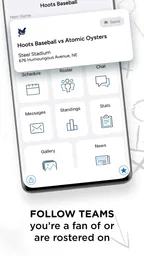
SportsEngine is aimed at the practical side of youth sports: keeping team-related information in one place rather than asking parents to reconstruct plans from a stream of texts. That makes it most useful when the coach, club, and families treat it as a shared routine. If only one or two people use it while everyone else communicates elsewhere, the app may feel like an extra stop rather than a solution.
Where families tend to get stuck
The most common friction in a team-management app often comes from the gap between having an account and being connected to the right team. A parent may be able to open the app but still not see the season information they expected. In that situation, I would first confirm the team invitation and account identity, then ask the team contact whether the roster or group connection has been completed. Reinstalling immediately is unlikely to solve a missing team association.
Another source of confusion is treating the app as an independent source of truth when the organization has not made clear how it uses it. A schedule can only help if the people responsible for it keep it current and families know where updates will appear. I recommend asking one direct question early: should parents check SportsEngine for schedule changes, or will the team continue to use another channel for urgent updates? Knowing that boundary saves time and avoids checking several places before every practice.
Notifications are worth thinking through as part of setup, rather than waiting until a missed update causes stress. Check the app’s notification settings and the phone’s own notification controls, then decide what you actually need to notice promptly. A parent who wants changes to practices surfaced quickly may prefer a different setup from someone who only checks team details once a day. I would avoid turning every alert on without a reason; a flood of low-priority notices can make important messages easier to overlook.
There is also a social adjustment. If a team has previously used a group chat, some parents may keep posting there even after the app is introduced. For the first few weeks, I’d check both the agreed team channel and the app until the group’s habits are clear. That is not an ideal long-term workflow, but it is a sensible transition plan when families are learning where information belongs.
Setup checks that prevent avoidable confusion
When joining a team, I’d work through setup in a deliberate order: confirm the account, follow the organization’s invitation or joining instructions, verify that the expected team is visible, and then review the season information the team has shared. If anything appears incomplete, record the specific issue before contacting the coach or administrator. “I can sign in, but I don’t see the team” is more useful than “the app is broken,” because it gives the person managing access a clear place to start.
For households where more than one adult needs to keep track of a player, decide who will handle the main account and how the other parent will receive updates. Avoid assuming that two adults automatically see the same information just because they are caring for the same child. Follow the team’s preferred account and access process, and ask an administrator if the family arrangement is unclear. This is especially useful for separated schedules, shared pickups, or grandparents who occasionally take a child to practice.
Before relying on the app for a time-sensitive trip, check the current plan while you still have time to resolve questions. Compare the team’s posted details with any direct message from the coach, especially during a changeable week. If the information conflicts, ask which channel is authoritative rather than guessing. This small habit matters more than repeatedly refreshing an app when the underlying schedule may not yet have been updated.
It can help to make a simple personal routine around the team’s communication pattern. For example, check the schedule at the start of the week, then look again before leaving for practice if the team often changes arrangements. This is not a special feature; it is a practical way to use a shared team app without expecting it to anticipate every family’s calendar needs. SportsEngine can organize team information, but a parent still has to decide how that information fits into the household’s plans.
Recovering a disrupted workflow
If the app stops showing information you previously relied on, take the least disruptive steps first. Confirm that you are signed into the right account, make sure the phone has a working connection, and reopen the relevant team area. If the problem remains, note what you expected to see and when you last saw it. Then contact the coach or team administrator to check whether the information is still available to the group. These checks separate a local sign-in or connection issue from a team-side change without assuming a technical cause.
When a schedule change arrives through another channel, do not assume the app has failed simply because the update has not appeared where you expected. The team may have sent a direct message, posted elsewhere, or not yet updated its shared information. Ask the person responsible for team communications which source to follow for that particular change. Once the immediate question is resolved, agree on where future updates should be posted. A clear team convention is often more effective than asking every parent to monitor multiple channels indefinitely.
For a missing invitation or a team that does not appear, contact the person who manages membership before repeatedly making new accounts. Include the email address you used and explain whether you can sign in at all or can sign in but cannot find the team. That distinction helps narrow the next step. If only one device seems affected, checking the account and connection there is reasonable; if several family members see the same missing team, the organization’s setup is a more likely place to ask about.
I would also keep a backup of the essentials for the day: the practice time, location, and a way to contact the coach or another parent. That is sensible for any youth activity, particularly when a child is being dropped off or collected by someone who does not regularly check the app. It does not undermine the app; it recognizes that no single phone-based workflow should be the only plan for a time-sensitive pickup.
When another tool may be the better fit
SportsEngine is not the right choice for every sports family. If your child’s team already coordinates reliably through a different app or a simple group message, adding another platform may create duplicate notifications and uncertainty about where to look. I would follow the team’s established system unless the organizer is actively moving everyone to SportsEngine and explaining how the transition will work.
It is also not a substitute for a general family calendar. A team-focused app can keep sports information together, while a shared household calendar may be better for combining school events, appointments, and activities across several children. If your main problem is managing the whole family’s week rather than staying informed about one team, a calendar may be the more useful primary tool. You can still use SportsEngine for team communication if that is where the organization posts its information.
Compared with a basic group chat, the advantage of a dedicated team app is the potential to keep team-related coordination from disappearing beneath unrelated conversation. The trade-off is that everyone has to adopt it and understand how the team uses it. A chat can feel quicker for informal questions; a team platform is more appealing when families need a predictable place to check organized sports information. Neither approach is automatically better if the group does not agree to use it consistently.
Families looking for sports news, live professional scores, or game-focused entertainment should also set expectations carefully. The practical appeal here is youth-team coordination, not replacing a dedicated sports news or score-following app. Likewise, a parent who only needs one occasional reminder may find the setup more effort than benefit unless the team already uses SportsEngine for everyone.
My practical verdict for a youth sports season
I’d recommend SportsEngine to parents whose club or team has chosen it and is prepared to keep team information there. Its biggest strength is not that it eliminates every message or scheduling surprise; it gives a group a place to organize the details families need to follow a season. Its usefulness rises with the team’s consistency, so I would judge the experience by the communication habits of the organization as much as by the app itself.
A realistic use case is a parent juggling work and school pickup who wants to check the team plan before leaving home, then make sure another caregiver knows where the child needs to be. SportsEngine can support that routine when the team’s information is current and the family has settled on the right account and notification approach. The useful trick is to confirm the team’s preferred communication channel early and keep a fallback contact for urgent changes, rather than assuming every update will arrive in exactly one way.
My main reservation is the dependence on other people’s setup and habits. An invitation tied to the wrong email, an unclear transition from a group chat, or an outdated team schedule can make the experience feel unreliable even when the underlying problem is coordination. I would give the team a little time to establish its process, but I would not treat the app as the sole authority until the coach or administrator has made that process clear.
Overall, I see SportsEngine as a useful, free sports app for families who want a more organized way to follow youth-team activity and whose organization already uses it. The strongest reason to install it is not its popularity alone, but the practical benefit of checking the same team space as other families. If your team is committed to that routine, it is worth trying; if it is not, a familiar chat or shared calendar may be less frustrating. My advice is simple: confirm the team connection, agree on where changes will appear, and then let the app earn its place in your weekly routine.
What we like
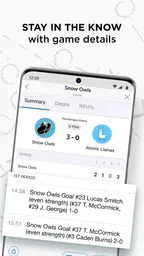
- Team schedules keep practices and games in one shared calendar.
- Parents can follow updates without contacting each coach individually.
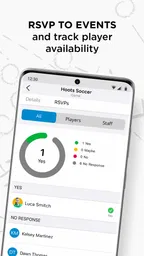
- RSVP tools make it easier to track attendance.
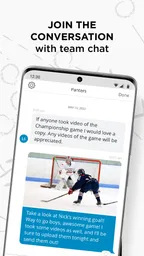
- Team messaging helps keep conversations organized.
- Event reminders can reduce the chance of missing a schedule change.
What could be better
- Some features may require a paid plan or organization subscription.
- The experience depends on teams and leagues using SportsEngine.
- Frequent notifications can become distracting.
- Managing multiple children or teams may take extra setup.
- Account creation may require personal information.





