





Spond: Sports Team Management review
 Analysis by Appsdrops
When a household has several people involved in the same team, the messages about practice can end up scattered across family chats, personal texts and somebody’s memory. I see Spond as a sports-focused way to bring that coordination into one place, especially when a parent or organizer needs to keep track of activities for more than one person. It is free, and its appeal is practical: less hunting through unrelated conversations to find out what is happening next.
One team, several people, fewer crossed messages
A realistic use is a parent helping two children manage different sports schedules. One child has a training session, the other has a match, and the adult is also the person who needs to know whether the group has been updated. A dedicated team app gives those arrangements a clearer home than a general family chat, where a note about a changed practice can quickly disappear among shopping plans and photos.
That distinction matters most when the household is not the only audience. Coaches, team organizers and other members can communicate around the group rather than relying on one parent to relay every detail. In my view, that is the useful idea behind Spond: Sports Team Management: it treats sports coordination as an ongoing group task, not just another conversation to squeeze into a messaging app.
The app is in the sports category, and Spond AS is its developer. It has a 4.7 average from around 15,000 ratings and more than a million installs. Those figures suggest it is familiar to a substantial number of users, though a high average should not be mistaken for proof that its approach fits every club or family. The real test is whether the people who need the information will actually use the same channel.
Make the account boundary clear early
Before inviting a household to rely on any team app, I would decide who is expected to use it and on which device. A parent might be the practical contact for a younger player, while an older child may want to follow team communication directly. Those are different arrangements, and they should not be blurred simply because the family shares a phone or tablet.
For a shared device, the safest everyday habit is to check which person is using the app before reading or responding to team messages. A reply sent under the wrong person’s name can confuse an organizer, while leaving a session open may expose conversations to the next person holding the device. These are ordinary account-boundary concerns, not reasons to avoid the app, but they are worth sorting out before it becomes part of a household routine.
I would also keep the distinction between team communication and family planning in mind. Spond can be the place to check what the sports group has communicated; it does not replace a household calendar or settle who is driving. A quick family check after reading a team update can turn the information into an actual plan without expecting every relative to become a team-app user.
Coordination works best when members have a routine
The strongest use case is a group that needs a reliable place to organize activities and communicate with its members. Rather than asking a coach to repeat a detail in several private chats, a team can use its shared channel as the reference point. That helps parents who join a conversation late and organizers who want members to look in the same place before asking whether plans have changed.
A small but useful workflow is to make checking the team app part of a predictable routine: look before the week begins, then check again before leaving for an activity. That is more dependable than waiting for a notification to catch someone’s attention. It also helps households avoid a common mistake—assuming that one family member saw an update and passed it on to everyone else.
The trade-off is that a central channel only works if the group keeps it current and members know to consult it. If some people continue to rely exclusively on text messages, information can still split across channels. I would encourage a team organizer to say plainly where members should look for routine updates, rather than assuming that installing the app automatically changes everyone’s habits.
Compared with a general messaging app, Spond has a narrower purpose: team and group organization rather than every kind of conversation. That focus can make sports information easier to find, but a club that already has a well-understood system may see little benefit in asking people to learn another one. For a casual group that only needs an occasional message, an existing chat may be simpler. For a team with recurring coordination needs, a dedicated space is easier to justify.
What to expect from the household setup
I would not treat one family member’s installation as a complete setup for everyone. The useful questions are practical: who will receive team communication, who is responsible for checking it, and how will the household pass along information to someone who does not use the app? Agreeing on those points first can prevent the app from becoming one more place where important details are assumed rather than confirmed.
If a child is old enough to manage their own team communication, direct use may help them take more responsibility for remembering activities. If an adult remains the main contact, the app can instead serve as a shared reference for the person arranging transport and schedules. Neither arrangement is automatically better; the right choice depends on the child, the team’s expectations and the household’s comfort with account access.
For a family juggling multiple groups, I would avoid relying on memory to distinguish which team sent an update. Check the group context before acting, and confirm any detail that affects travel or attendance with the person responsible. That is a simple safeguard against mixing up one child’s activity with another’s, particularly when several schedules are active in the same week.
Age, trust and everyday expectations
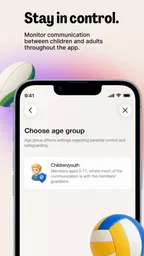
Spond is rated for Everyone, which makes its stated content age context broad. That is not the same as a recommendation that every child should manage a team account alone. Parents can decide what level of involvement is appropriate, and teams can be clear about which adult or player is expected to handle communication. I would frame that as a household decision rather than assume the age label answers every question about supervision.
Trust also depends on the group’s communication habits. An app can give members a common place to coordinate, but it cannot ensure that everyone reads an update, interprets it correctly or replies promptly. For an important change, a responsible organizer may still need to make sure affected people have seen it. Families should keep a backup way to reach one another for time-sensitive plans instead of treating any single app as infallible.
The version listed is 4.66.0, and the app was released on June 15, 2017. It requires Android 7.0 or later, so an older Android device may not be suitable. It is also free, which lowers the barrier to trying it with a team; I would still check that the intended devices and users can take part before asking an entire household to depend on it.
Where it fits—and where I would choose something else
I would recommend Spond to parents, coaches and sports groups that regularly need to organize members and keep team communication together. It is particularly sensible when a household needs to follow a club’s updates without turning a family chat into the unofficial noticeboard. Its focused role is a strength when a group uses it consistently, and a weakness when members are already committed to another channel.
I would skip it for a one-off informal game if setting up a dedicated group feels like more work than sending a message. I would also hesitate if a club cannot agree where updates belong, or if household members cannot establish who is responsible for checking them. In those cases, the problem is not necessarily the app; it is the lack of a shared communication routine. An existing, familiar group chat may be the better choice until the team has a reason to change.
Overall, I find Spond most useful as a team coordination hub that a household can consult, not as a replacement for family discussion or personal responsibility. Its broad age rating, free price and established presence make it approachable, while its value still depends on the group’s habits. If your family is repeatedly passing practice details between people, this is worth considering. If your team already communicates clearly elsewhere, I would stay with that system rather than add another inbox without a concrete benefit.
What we like
- Clear schedules help families keep track of practices and games.
- RSVPs make it easier to estimate attendance.
- Group messaging keeps team updates in one place.
- Event reminders can reduce missed activities.
- Payment tools simplify collecting team fees.
What could be better
- Some features may depend on the organizer's setup.
- Frequent notifications can become distracting.
- New members may need an invitation to join a group.
- Payment options can vary by country.
- The app is less useful if teammates do not adopt it.





