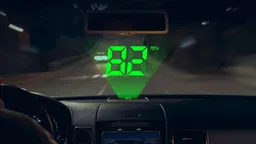
Speedometer: GPS Speedometer review
 Analysis by Appsdrops
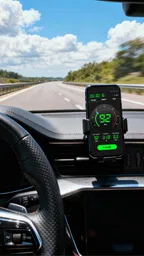
I like a speedometer app best when it answers one practical question quickly: how fast am I moving right now? Speedometer: GPS Speedometer is built around that simple job, with GPS-based speed and distance tracking plus speed-limit and time checks. I’d treat it as a useful companion for a walk, bike ride, or drive—not as a replacement for careful attention to the road or a vehicle’s built-in instruments.
What to expect from GPS-based speed
Because the app uses GPS, its speed reading depends on the phone receiving a usable location signal. In open surroundings, that can make it handy for checking your pace or comparing the number on screen with what you expected. Indoors, among tall buildings, or soon after starting a trip, the reading may be less dependable while the phone establishes its position. That is a limitation of relying on GPS, not a reason to treat every changing number as a precise measurement.
The practical distinction is between a quick reference and a certified instrument. I’d use it to get a general sense of speed and distance, but I wouldn’t rely on a phone display to settle a dispute about a speed limit or to justify driving faster. Vehicle speed displays and posted signs should remain the priority; GPS readings can lag or fluctuate as reception changes.
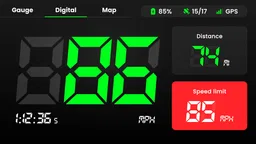
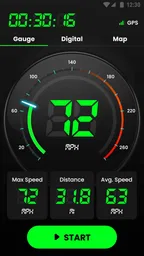
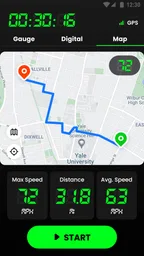
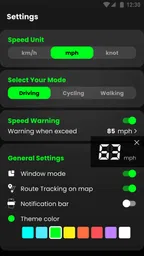
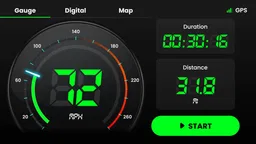
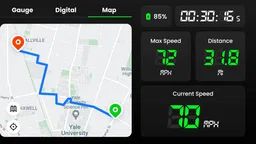
The app’s focus is deliberately narrow. Its summary points to accurate speed and distance, a speed-limit check, and time. Those basics suit someone who wants a dedicated readout rather than a full navigation experience. If I need turn-by-turn directions, route planning, traffic information, or a map-led journey, I’d open a navigation app instead. This is more useful as a quick instrument panel than as a trip planner.
Where it fits into an ordinary trip
Imagine cycling along a familiar path and wanting to know whether your pace has changed on a gentle incline. I could glance at the app when it is safe to do so, then compare the displayed speed and accumulated distance at the end of the ride. That makes the distance figure useful for a casual outing or personal check-in, while avoiding the expectation that it will provide the route analysis of a dedicated fitness tracker.
For a driver, the speed-limit check may offer a convenient reminder, but it should not encourage extra screen attention. Set up anything you intend to use before moving, keep the phone secured, and let a passenger handle checks if needed. A phone speedometer is not worth a distracted glance, and a GPS-based display is not a substitute for observing signs.
How it handles busier use
On a long journey or an extended ride, the important question is not only whether a number appears, but whether the phone can keep providing it without becoming a distraction. GPS tracking can draw on the device’s location capability, so the experience will depend on the handset, its signal conditions, and how the phone is being used alongside other apps. I wouldn’t assume that every phone will behave identically or that a particular battery impact is guaranteed.
A sensible workflow is to check the display before setting off, confirm that the reading has settled, and then leave the phone alone while moving. For a longer outing, I’d also start with a charged phone and avoid opening the app repeatedly just to watch small changes. That is a practical way to reduce interruptions and conserve attention, regardless of whether the app itself feels light on a particular device.
Using it alongside a navigation app is a reasonable option if you want directions from one tool and a speed readout from another, but switching between screens while driving is poor practice. If the route itself matters more than a standalone speed reading, navigation should take precedence. If you are walking or cycling and want distance without the extra map features, this app’s narrower purpose may feel less cluttered.
Reliability, signal, and recovery
GPS performance can change during a trip. A stretch under cover, a dense urban street, or a phone that has not yet found a stable position can affect the reading. If the number looks implausible, I’d pause somewhere safe, give the phone a moment to regain its location, and compare the result with the surroundings rather than reacting to a single jump. That small habit is more useful than treating a fluctuating display as definitive.
The same caution applies to distance. GPS estimates are practical for a rough trip total, but bends, signal interruptions, and starts or stops can influence the result. If you need a carefully measured training record, a fitness app or device designed around activity tracking may be a better fit. For a casual check—roughly how far a walk covered, for instance—the simpler reading can still be worthwhile.
I also wouldn’t make a safety decision based only on the speed-limit check. A phone can be misplaced, its display can be hard to see in bright light, and location-based readings can take time to settle. The best recovery when something seems off is to stop relying on that reading, follow road signs and the vehicle’s instruments, and check the app later when stationary.
Device limits and the trade-offs
The current release is version 1.2.8, and the app is listed for devices running Android 8.0 or later. That gives Android users a clear compatibility threshold, but the phone still needs to support location services for GPS-based readings to be useful. A compatible operating system alone does not guarantee equally strong reception or performance across different handsets.
It is free to install, with in-app purchases listed from $0.99 to $49.99 per item. I’d look at the purchase details in the app store before buying anything and decide whether the basic speed-and-distance role already meets my needs. The app is marked for everyone, which is a broad content classification rather than a promise that every feature or display will suit every user.
Compared with a car’s dashboard, a phone app is portable and can be used for activities beyond driving, but it relies on the phone’s GPS and requires a safe place to mount or view the device. Compared with a general navigation app, it keeps attention on speed and distance rather than maps and directions. Compared with a dedicated cycling computer or fitness tracker, it may be a simpler starting point, though those devices can be preferable when persistent activity recording or hands-free viewing matters more.
Who I’d recommend it to
Simple Design Ltd. makes this Maps & Navigation app for people who want a straightforward GPS speed readout and a distance reference without turning the task into full route planning. Its average rating is 4.6 from around 177,000 ratings, and it has over 10 million installs, so it has reached a large audience. Those figures are useful context, but they don’t remove the need to judge it against your own phone and use case.
I’d suggest it to someone who wants an occasional speed check while walking, cycling, or riding as a passenger, or who wants a basic distance estimate for a casual trip. I’d be more cautious recommending it to a driver who expects a phone to replace the car’s speedometer, a cyclist who needs a dedicated training record, or anyone who wants maps and directions in the same workflow. In those cases, a vehicle instrument, fitness-focused tool, or navigation app is the more appropriate choice.
My verdict on its performance
The strongest reason to try this app is its focused purpose: it turns a phone’s GPS into a convenient speed-and-distance reference. In my view, its usefulness comes from checking it at sensible moments, not from watching it continuously. Reception, device setup, and the limits of GPS all shape how dependable the readout feels, so I’d keep a little margin for uncertainty.
With an average rating of 4.6 and a free install, Speedometer: GPS Speedometer is an easy option to consider if a simple speed display is what you need. I’d install it for casual checks, test it somewhere safe, and keep expectations modest about precision and sustained use. If you want navigation, detailed exercise tracking, or a dependable substitute for vehicle instruments, choose a tool built specifically for that job instead.
What we like
- Displays speed in a clear and easy-to-read format.
- GPS tracking avoids the need for a vehicle speed sensor.
- Useful for checking speed while cycling or walking.
- Can help compare vehicle speed with the dashboard reading.
- Simple interface makes the main function quick to access.
What could be better
- GPS accuracy can drop in tunnels or between tall buildings.
- Location access is required for speed readings.
- Battery use may increase during extended GPS tracking.
- Speed readings can lag when GPS reception is weak.
- It should not replace a vehicle's certified speedometer.





