

Slice Local Pizza Delivery review
 Analysis by Appsdrops
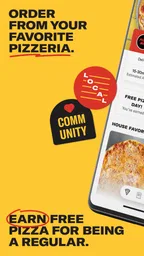
When I want pizza from a neighborhood shop rather than a national chain, I’m more interested in finding a suitable local menu than in scrolling through endless promotions. Slice Local Pizza Delivery is built around that kind of order: it helps me look for independent pizzerias and arrange delivery or pickup. The idea is practical, though the experience depends in part on which restaurants serve my location and how smoothly each one handles orders.
Finding a local pizza option without extra fuss
Slice is a free food and drink app from Slice Solutions, Inc. Its focus is narrower than that of a general restaurant-delivery app, and that is a real advantage if pizza is what I have already decided to eat. Instead of treating every cuisine as equally important, it puts local pizzerias at the center of the search. I’d use it when I want to compare nearby independent shops, not when I’m still choosing between pizza, noodles, or groceries.
The app has a 4.8 average from around 101,000 ratings, and it has been installed over 5 million times. Those figures suggest that it has found a substantial audience, but they don’t tell me whether a particular restaurant is available where I live or how fast its kitchen will be on a busy night. I’d treat them as a reassuring sign of broad use, not a guarantee about an individual order.
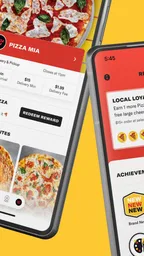
In practice, the first useful question is whether Slice lists pizzerias that I would actually consider ordering from. A focused service can make discovery easier, but a nearby favorite may not participate, and the selection can vary by area. I’d check the available restaurants before building a routine around the app. If the local list is strong, the narrower scope feels intentional; if it is thin, a restaurant’s own ordering channel or another delivery service may be more useful.
What “fast” means for a pizza order
I would separate the speed of using the app from the speed of receiving a pizza. A simple, pizza-focused search can reduce the time I spend browsing unrelated food, but the app cannot make a pizzeria prepare an order faster or make a driver arrive sooner. Rush periods, distance, and the restaurant’s own workload matter. So I’d use Slice to make the ordering step more direct, while treating any delivery estimate as something to plan around rather than a promise that every order will arrive quickly.
For pickup, the most useful time saving can be avoiding an unnecessary phone call and having the order ready to collect when it suits me. That depends on the restaurant’s available ordering options and preparation flow, so I’d still check the details shown for the specific shop. If I’m already passing a pizzeria and want to ask about a special request, calling directly may be faster and clearer than placing an app order.
A small but practical habit is to decide whether I want delivery or pickup before I compare menus. That keeps the choice tied to the actual evening: delivery when I can’t leave, pickup when I’m already out or want to avoid waiting at home. It also helps me compare the options on their own terms instead of assuming one method will always be quicker.
When the app is under heavier use
The busiest moment is often not opening the app; it is making a decision while everyone else is hungry. For example, if friends are visiting and nobody has agreed on toppings, I’d first narrow the choice to a pizzeria that can serve the group, then settle the order before checkout. That is more useful than browsing every shop repeatedly while the group changes its mind. Slice’s local-pizzeria focus can help keep the decision manageable, but it won’t resolve disagreements about what to order.
For a family order, I’d check the menu carefully before committing, especially when different people want different styles or add-ons. A focused pizza service is convenient for comparing pizza places, but it is not the same as a full meal-planning tool. If the group needs several kinds of food from different restaurants, a broader delivery app may be a better fit. If everyone wants pizza from one shop, keeping the order together is usually the simpler workflow.
Peak demand is also where expectations need adjusting. A restaurant that looks close may still be busy, and placing an order through an app does not remove the kitchen’s queue. I would avoid waiting until the last possible minute for an important meal. For a time-sensitive pickup, I’d allow room for preparation and travel rather than relying on the convenience of app ordering to solve a tight schedule.
Reliability, restaurant by restaurant
My view of reliability here has two parts: whether the app is usable when I need to place an order, and whether the restaurant can fulfill that order as expected. The second part is naturally tied to the individual pizzeria. A polished ordering flow cannot guarantee that a shop is open, has every menu item available, or is having an ordinary service night. I’d pay attention to the restaurant-specific details presented during ordering and keep a backup choice in mind for a special occasion.
If something changes after I place an order, the best next step depends on what the app and restaurant make available in that situation. I wouldn’t assume every shop handles changes or special instructions identically. When an order has an important constraint—such as a particular pickup time—I’d make sure the restaurant can accommodate it before treating the order as settled. For a complicated request, speaking with the pizzeria directly can be more dependable than hoping a short note conveys the whole situation.
Slice has been available since February 8, 2017, and its current version is 7.22.0. A mature, actively versioned app can be encouraging, but version history alone doesn’t tell me how it behaves on every device or in every service area. I’d judge reliability by whether the local restaurants and ordering process work consistently for my own routine, rather than assuming the same experience everywhere.
Device fit and everyday practicality
The app is rated for Everyone and requires operating system version 8.0 or later. That makes the stated compatibility threshold broad, although it does not guarantee identical performance across all devices that meet it. I can’t responsibly infer battery use, storage demands, or how much data it consumes from those details alone. For an older phone, the sensible test is simply whether the current app installs and remains responsive during ordinary browsing and ordering.
I’d also think about where I use it. At home, browsing menus over a reliable connection is straightforward. If I’m ordering while walking or riding in a car, I’d avoid rushing through the menu or checkout; a brief pause to confirm the restaurant, order, and delivery-versus-pickup choice is worth more than shaving a few seconds off the process. That is especially true when ordering for several people, where a small mistake can turn into an inconvenient correction.
For a repeat order, it can be tempting to move quickly because the restaurant and usual choices feel familiar. I still recommend reviewing the final order before submitting it. Menus and availability can differ between pizzerias, and a remembered preference is not a substitute for checking what is actually selected this time. That simple check is a useful safeguard in any ordering app, but it matters especially when the service connects you with many independent businesses rather than one standardized kitchen.
Where Slice fits among alternatives
Compared with a broad delivery marketplace, Slice is more appealing when I have already decided that pizza is the answer and want to explore independent pizzerias. A general-purpose app is more flexible for mixed cravings or a dinner assembled from several cuisines. Compared with ordering directly from a pizzeria, Slice can be a convenient place to discover and order from participating local shops, while contacting the shop itself may be preferable for unusual requests or questions that need a person’s answer.
That distinction matters more than any blanket claim that one option is always better. If my favorite local pizzeria is represented and the app offers the ordering method I want, Slice can make the choice feel straightforward. If the restaurant is missing, if I need a detailed conversation, or if I want food beyond pizza, I’d switch channels without hesitation. The best option is the one that matches the restaurant and the order, not necessarily the one with the most familiar interface.
I’d recommend Slice to someone who regularly orders from independent pizza shops and wants a dedicated way to find local choices for delivery or pickup. I would not make it my first choice for broad restaurant discovery, a multi-restaurant meal, or an order that hinges on complicated instructions. Its biggest practical strength is focus; its biggest limitation is that focus also makes the local restaurant selection essential.
My performance verdict
Overall, I see Slice as a useful, specific tool rather than a universal food-ordering solution. The focused format can make the search feel more direct, but perceived speed still depends on the restaurant, the order, and the conditions of the evening. I would use it when I want pizza from a participating neighborhood pizzeria, leave extra time during busy periods, and keep a direct restaurant option available for special requests.
With a 4.8 average and around 30,000 reviews, it has plenty of user feedback behind it, while its free price removes the cost of trying it. Those details make a trial reasonable, but the real test is local: whether the pizzerias near me make it worthwhile. If they do, Slice can become a handy part of a pizza night. If they don’t, a broader delivery service or ordering directly will serve me better.
What we like
- Order from nearby pizzerias in one place.
- Browse menus before choosing a restaurant.
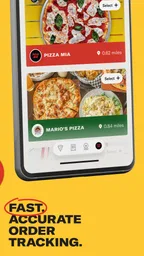
- Track delivery progress after placing an order.
- Save favorite restaurants for quicker reordering.
- Convenient for ordering pizza without calling.
What could be better
- Restaurant selection depends on your location.
- Delivery times can vary during busy periods.
- Menu prices may differ from in-store prices.
- Some restaurants may charge delivery fees.
- Order customization options vary by restaurant.





