

Site Tracker review
 Analysis by Appsdrops
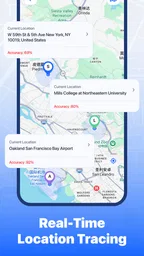
When I choose a location-sharing app, I start with a simple question: do I need turn-by-turn navigation, or do I mainly want trusted people to know where one another are and have a way to look out for each other? Site Tracker is aimed at the second need. It is a free maps and navigation app from Alpha game, built around mutual, real-time location tracking and safety alerts for a circle of trusted friends.
That focus makes it worth considering for families, friends meeting up, or people who want a lightweight way to keep tabs on a shared outing. It also sets a boundary: this is not the app I would choose as a replacement for a conventional route planner. Its value depends less on finding a destination and more on whether everyone involved is comfortable sharing location with the group.
Decide whether shared location is the real need
Before installing it, I would agree on the purpose with the people I plan to share with. A location-sharing tool works best when the group understands who can see whom and when it is useful. For example, friends heading to a concert might use it to find each other after arriving separately; a family might find it reassuring during a day of travel. If nobody wants ongoing visibility, an ordinary message or a one-time meetup plan may be a better fit.
The central decision is therefore about trust and routine, not a long list of map controls. Site Tracker describes mutual tracking, so I would approach it as a reciprocal arrangement rather than a one-way way to monitor someone. That makes it more appropriate for people who have agreed to share than for anyone seeking covert or unilateral tracking. I would also treat a safety alert as an added communication aid, not as a substitute for calling emergency services or making a direct check-in when someone may be in danger.
There is a practical question worth settling before a group relies on it: will each person keep the app available and use it consistently? A shared location view is only useful when the relevant people have joined in and are willing to participate. I would set expectations before a trip—who is included, what the group is using it for, and when it is reasonable to check—rather than letting location access become an unspoken default.
What the app is set up to do
Site Tracker’s identity is deliberately narrow. Its short description is simply “Site Tracker,” while its fuller purpose is keeping trusted friends mutually aware of one another’s whereabouts and providing safety alerts. I see that as a useful distinction from map apps whose main job is to calculate a route. Here, the map is part of a social coordination tool: the point is knowing where the group is, not necessarily deciding which road to take.
The app is rated for Everyone, and it has a 4.5 average from around one thousand ratings. That reception is encouraging, though ratings cannot tell me whether it suits a particular group’s privacy expectations or daily habits. It has passed one hundred thousand installs, which suggests there is an audience for this kind of focused utility, but I would still judge it by whether its sharing model matches the people I want to connect with.
Where it can make a group outing easier
The clearest advantage is reducing the back-and-forth that comes with coordinating several people in a busy place. Imagine meeting friends at a large outdoor event. One person is delayed, another has entered through a different gate, and messages such as “I’m near the entrance” are no longer precise enough. A shared live view can help the group orient itself without requiring every person to send a fresh description of their surroundings.
A less obvious benefit is that mutual visibility can change how a group plans its check-ins. Instead of asking everyone to send repeated updates during a walk or a long day out, people can glance at the shared view when they need context and use an alert when a situation calls for attention. That can make coordination less chatty, especially when the group is spread out. It only works, though, if the people involved understand that a location view is an aid to awareness—not proof that someone is safe or available to respond.
I would also use it as a backup layer for practical meetups. Before separating in a crowded station or shopping area, friends can agree on a fallback meeting point and use shared location to reconnect if plans change. The important tip is to decide on that fallback while everyone is together. A map is much less helpful when the group has not agreed what to do if phones are unavailable, someone loses connectivity, or a person simply does not want to be tracked at that moment.
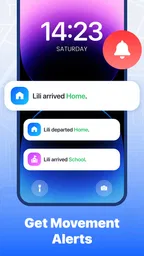
Safety alerts may be most useful when they prompt a deliberate check-in rather than create a false sense of certainty. If a friend is travelling alone or returning from a late outing, I would tell the group in advance what kind of alert should trigger a call or message. That small conversation makes the feature more actionable and avoids treating every notification as an emergency—or, at the other extreme, ignoring an alert because nobody knows what it means to the group.
How it compares with familiar alternatives
Compared with a conventional navigation app, Site Tracker serves a different job. Route planners are the natural choice when I need directions, traffic-aware routing, or help getting from one address to another. Site Tracker makes more sense when the question is “Where are the people I came with?” rather than “How do I get there?” I would happily keep a navigation app for journeys and use this only if shared awareness is an actual need.
Compared with messaging alone, location sharing can reduce the need to describe a position repeatedly, but messages remain better for explaining context. A dot on a map cannot say that someone has changed plans, needs help carrying something, or would rather meet somewhere else. My practical approach would be to use the map for orientation and ordinary conversation for decisions. Neither replaces the other.
There is also a trade-off against using a broader family-safety or location-sharing service. Those alternatives may suit people who already rely on a larger ecosystem or need a more established set of controls; I would compare their sharing model and the features that matter to my household before switching. Site Tracker’s appeal is its focused promise, not a claim that it covers every family, travel, or navigation task. If you need detailed route planning, a larger safety platform, or a tool for managing a complex group, another category may fit better.
Privacy, friction, and the cost of changing habits
Location sharing asks for more trust than an ordinary map search. Before using Site Tracker regularly, I would make sure every participant knows that sharing is mutual, understands the purpose of the group, and is comfortable with the arrangement. I would not add someone merely because it might be convenient to see where they are. A good rule is to keep the group limited to people who have a clear reason to share with one another.
The friction is social as much as technical. Some friends may not want to keep a location-sharing app in their routine, while others may prefer occasional messages over an always-available map. That difference can make a group tool less useful than it looks on paper. I would start with one specific situation—such as coordinating a trip—rather than asking everyone to adopt it for every part of daily life. If the group finds that it genuinely saves effort, it can become a regular option; if not, there is little reason to insist.
Switching from an existing tool also has a coordination cost. Everyone needs to agree on one place to check, and people may have to change a habit that already works. I would avoid maintaining multiple overlapping location-sharing arrangements indefinitely: they can make it unclear where a group should look and who is expected to respond. For a trial, choose one event, tell participants what the app is for, and decide afterward whether it was more helpful than the usual combination of texts and a meetup point.
Site Tracker is free, which makes that kind of low-commitment trial easier. The current version is 1.1.1, and it supports Android 8.0 and later. It was released on June 30, 2026. Those details are useful when checking whether it can run on a device, but compatibility alone does not settle whether the group will like the experience; the real test is whether people are willing to use mutual sharing in the situations where it helps.
Who should choose it—and who should pass
I would recommend Site Tracker to friends or families who already trust one another and want a shared view for meetups, outings, or agreed safety check-ins. It is especially appealing if your usual coordination involves several rounds of vague location messages. The app’s 4.5 average and roughly one thousand ratings offer a positive sign from users, but I would still start with a small group and a clear purpose instead of assuming it belongs on everyone’s phone.
I would pass if you mainly need navigation, prefer not to share your location, or want a tool for monitoring people who have not freely agreed to participate. I would also look elsewhere if your group needs a broad set of travel or household-management capabilities rather than a focused way to stay aware of one another. In those cases, a route-planning app, direct messaging, or a different category of safety service is a more natural starting point.
My recommendation is to treat Site Tracker as a practical coordination option, not an all-purpose map or a guarantee of safety. Use it with people who are comfortable sharing, pair location awareness with direct communication, and agree on what the group will do when an alert appears. If that matches the way you already organize outings, it is worth trying; if location sharing would create more discomfort than convenience, your usual meetup plan is probably the better choice.
What we like
- Tracks website uptime and response time.
- Provides alerts when a monitored site goes offline.
- Supports monitoring of multiple websites.
- Shows past checks to help spot recurring outages.
- Simple setup makes it accessible to beginners.
What could be better
- Monitoring frequency may be limited on the free plan.
- Alerts depend on a working internet connection.
- A brief outage can trigger a false alarm.
- Some features may require a paid subscription.
- It cannot fix website problems when they occur.





