






Shipt: Order Grocery Delivery review
 Analysis by Appsdrops
I like grocery delivery most when it takes a chore off my mind without making the order itself another project. Shipt: Order Grocery Delivery is built around that practical promise: it lets me shop for groceries and other everyday retail items from participating stores, then arrange delivery for the same day or choose an express option where available. The app is free to download, and I find its main appeal less about novelty than about making a useful routine easier to repeat.
From a grocery list to a delivery plan
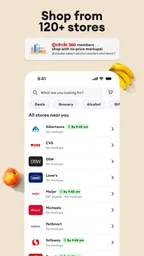
The basic workflow is familiar: choose a store, browse its available items, add what you need, and set up delivery. That makes Shipt approachable even if you have not used a delivery service before. I would start with a short, ordinary order rather than trying to plan a full household shop on the first go. A few staple ingredients are enough to learn how store selection and delivery timing fit together.
Shipt is a Food & Drink app developed by Shipt, but its scope reaches beyond groceries. It brings grocery and retail shopping together, which can be handy when a household needs pantry items alongside another everyday purchase. The important practical detail is that the stores and products available to you depend on your location. I would check the actual choices in the app before building a plan around a particular shop.
For a realistic weekday use, imagine getting home late and realizing that breakfast supplies and dinner ingredients are both running low. I would open the app, check which nearby store has the right items, and place an order around the delivery option that suits the evening. That is a more useful way to approach it than assuming every item from every store will arrive immediately. Same-day and express delivery are part of the service, but the sensible habit is to confirm the available timing while choosing the store.
Browsing can take longer than expected if I treat the app like a window-shopping trip. I get better results by making a list first, grouping it into meal ingredients and household staples, then searching with that list in hand. It reduces the temptation to add unrelated items and makes it easier to notice when a particular product is not offered by the selected store. For a bigger shop, I would also review the basket before moving on, especially if I have switched between stores while comparing availability.
The app has an average rating of 4.5 from around 42,000 ratings, and it has been installed over a million times. Those figures suggest that many shoppers have tried it, but they do not tell me whether a specific store near me has the selection or timing I want. I would treat the app as a convenient way to arrange a shop, not as a guarantee that every local shopping need will fit the same pattern.
Check the details that shape your routine
Before relying on Shipt for a time-sensitive order, I would check the store choices and delivery windows shown for my location. This is the most useful “setting” to pay attention to, even though it is really a planning decision: the store and slot determine what I can buy and when I should expect the order. If a particular ingredient is essential for tonight’s meal, I would confirm that it appears in the selected store’s catalog before building the rest of the order around it.
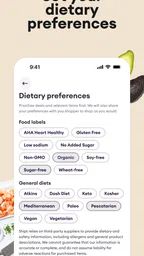
It also helps to think through substitutions before ordering. A shopper may find that an item is unavailable, so I would consider which alternatives are acceptable rather than waiting until the last moment to decide. For flexible items, such as a type of produce or a pantry staple, I can be open to a close match. For a recipe that depends on one specific ingredient, I would choose a store where that item is listed and keep a backup meal in mind. This small bit of preparation can prevent a delivery from disrupting the evening’s plan.
Shipt is free to download, but I would not confuse that with every order being cost-free. The app’s download price is one thing; the terms and costs attached to a specific order are something to inspect in the checkout flow. I would review the total before placing an order, particularly when comparing delivery services or deciding whether a small top-up shop is worth arranging. That check is useful even for experienced users, because the right choice depends on the order and the available options at the time.
For family shopping, I find it useful to separate “must have” items from “nice to have” extras before opening the app. That can be as simple as keeping a recurring household list outside the shopping session and using it to guide each order. Shipt’s value is strongest when it serves a clear need—replenishing essentials, getting ingredients for planned meals, or avoiding a trip—rather than encouraging a long, unstructured browse. A little organization makes the process feel more like a repeatable errand and less like a second grocery aisle to wander through.
Make repeat orders easier without overcomplicating them
One of the best ways to become quicker with Shipt is to repeat a dependable workflow. I would begin with the same store for familiar staples, search for the items I know I need, and then review the basket for quantities and omissions. When the store’s selection suits the household, keeping that routine can save the mental effort of re-evaluating every option each time. I would still check availability on each order rather than assuming the catalog is unchanged.
Another helpful habit is to plan around meals before browsing. If I choose two or three dinners first, I can search for ingredients with a purpose and avoid filling the cart with items that do not work together. I also like to distinguish between items needed immediately and items that can wait. That lets me decide whether a same-day or express option is genuinely useful, instead of treating speed as the default. For a planned weekend shop, I might care more about completing the list than getting it as quickly as possible.
Shipt covers more than grocery shopping, but combining errands only makes sense when the selected store and delivery plan actually serve both needs. I would not assume a single order can cover every store or category I have in mind. Instead, I would check the participating options and make a deliberate choice: one order for the essentials I need now, or a separate shopping trip if the combination becomes awkward. This is a practical trade-off, not a failure of the app; different errands often have different timing and store requirements.
Compared with shopping directly through a supermarket’s own app, Shipt’s broader mix of grocery and retail options can be useful if I want to look beyond one chain. A store-specific app may still be the better fit when I already know exactly where I shop, want to use that retailer’s own shopping routine, or need a particular product range. Compared with going to the store in person, Shipt saves the trip but gives me less direct control over selecting items from the shelves. I would choose based on whether time or hands-on selection matters more that day.
That difference matters most for fresh foods and highly specific preferences. If I want to inspect produce myself, compare package sizes in person, or make spontaneous choices while walking the aisles, a physical shop may suit me better. If I have a clear list and would rather spend that time elsewhere, delivery becomes more attractive. I see Shipt as a convenience tool for planned shopping, not a replacement for every kind of grocery run.
Where convenience has limits
The biggest limitation is that delivery depends on what is available through the stores serving your area. A broad selection in one location does not mean every neighborhood will offer the same stores, products, or timing. I would avoid building a routine around a single retailer until I have checked what the app presents locally. If the nearest suitable store does not carry the items I need, a direct store trip or another shopping option may be more reliable.
There is also a trade-off between speed and careful selection. Express delivery can be appealing when I am short on time, but a rushed order is still only useful if the items I need are available and the timing works. For a large weekly shop, I would rather plan ahead and inspect the list carefully than place a hurried order and discover I missed a key ingredient. For a last-minute need, I would keep the basket focused and confirm the delivery choice before committing.
Shipt may not be the right choice for shoppers who prefer to compare every product physically, want to browse without a list, or have a very specific store routine that another app already handles well. It may also be less useful when the local store options do not match your usual brands or shopping habits. I would try it with a small order first and judge it by the actual local experience: whether the store selection works, whether the timing is practical, and whether the total is acceptable for the convenience gained.
The app is rated for Everyone, which makes it broadly accessible as a shopping tool. It was released on April 6, 2015, and the current version is 2.309.0, with Android support beginning at version 8.0. Those details matter most if you are checking compatibility or deciding whether to install it on an older device; for everyday use, the more important question is whether your local shopping choices match your needs.
Who gets the most from Shipt
I would recommend Shipt to people who have a recurring grocery list, a busy schedule, or a reason to avoid a store trip now and then. It is particularly useful when I can plan meals in advance and order from a nearby participating store without needing to inspect every item myself. The best results come from treating it as part of a routine: know what you need, check the store and delivery timing, think about acceptable substitutes, and review the final basket.
I would be more cautious if I were shopping for a special occasion, buying produce where appearance matters a lot, or relying on a narrow selection of specific products. In those cases, I would verify the catalog carefully or use a store visit or retailer-specific alternative. That is not a reason to dismiss the app; it is simply a reminder that convenience works best when the task is a good match for delivery.
After trying to judge it as a practical shopping companion rather than a shortcut for every errand, I find Shipt: Order Grocery Delivery most convincing when it helps me turn a clear list into a manageable delivery plan. It brings grocery and retail shopping into one app and offers same-day and express delivery options, while still leaving the shopper responsible for choosing a suitable store and checking the order details. With 11,000 reviews and a 4.5 average rating, it has a substantial user base, but my recommendation is still local and personal: check the stores available to you, start with a modest order, and keep the app in your routine only if the convenience is worth the trade-offs.
For someone who values time more than browsing the aisles, that can be a genuinely useful exchange. For someone who wants full control over every selection or already prefers a particular retailer’s own system, another approach may feel more natural. I would install it when I have a repeatable shopping need, use it deliberately rather than impulsively, and let the local store options decide whether it earns a regular place on my phone.
What we like
- Schedule deliveries for a time that fits your day.
- Shop from several local retailers in one app.
- Choose preferred replacements when items are unavailable.
- Track your shopper and delivery progress in the app.
- Save frequently purchased items for quicker future orders.
What could be better
- Availability and store selection vary by location.
- Prices and fees may differ from shopping in store.
- Some retailers require a membership for certain benefits.
- Replacement choices may not match the requested item.
- Delivery time slots can be limited during busy periods.





