
Scooter's Coffee review
 Analysis by Appsdrops
When I want coffee without turning a quick stop into a whole errand, the most useful part of a coffee-shop app is a clear path from choosing a drink to paying for it. Scooter's Coffee is built around that kind of visit: I can order ahead, pay or scan, and work toward status and exclusive rewards. The result is a focused companion for customers who already have Scooter’s in their routine, rather than an app that tries to do everything.
From a coffee craving to a planned stop
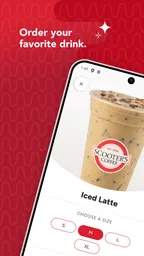
The starting point is simple. I open the app with a drink in mind, or use it to make the decision before I arrive. Its core promise is practical: handle the order in advance when that suits the visit, then use the app to pay or scan. That gives the experience a clear beginning and outcome, without making the app’s purpose hard to understand.
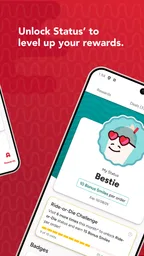
For regular customers, having ordering and rewards connected in one place can make the routine feel more organized. Instead of treating a visit as a standalone purchase, I can use the app as part of an ongoing relationship with the brand. The mention of status and exclusive rewards gives frequent visits an added reason to return, while the basic order-and-pay flow remains relevant even when I am simply trying to get coffee.
The strongest idea here is convenience that follows the customer from planning through checkout. That matters most when I know what I want and would rather arrange the visit before reaching the counter. If I am still deciding, the app can be a place to start thinking about the order, though the main appeal is less about browsing for its own sake and more about making a familiar coffee run easier to manage.
Setting up the visit
A useful coffee app should make the next action obvious. Scooter’s Coffee keeps its central tasks easy to describe: place an order ahead, pay or scan, and earn status and rewards. That directness helps the app feel approachable. I do not need to learn an elaborate system before understanding why I might open it.
The best fit is a visit with a reasonably clear plan. If I already know I want to stop for coffee, ordering ahead can move part of the process onto my phone. If I am going in person and want to use the app at checkout, the pay-or-scan option gives that visit a digital handoff as well. These two paths make the app useful at different points in the same routine, rather than limiting it to one moment.
Moving from choice to checkout
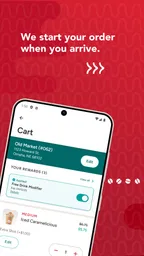
Once I have decided to order, the next step is to use the app’s ordering flow. The point of ordering ahead is to begin the purchase before the in-person part of the visit. That can make the stop feel more deliberate: I have handled the ordering step on my phone, then I can continue with the visit itself. The app’s role is clear, even if the value depends on how well this planned flow matches the way I like to buy coffee.
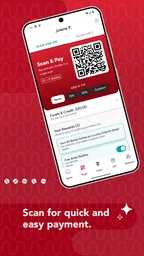
The alternate route is to pay or scan. This is a helpful distinction because not every visit starts with an advance order. Sometimes I am already at the shop or simply prefer to make the purchase in person. In those cases, the app still has a place in the transaction. I can think of it as a bridge between a regular counter visit and the account-based rewards experience.
That handoff is the heart of the product: the app begins the interaction, but the visit still concludes in the real world. A digital order or payment choice only feels useful when it connects smoothly to the customer’s next step. Scooter’s Coffee presents a straightforward workflow for that connection, with ordering ahead on one side and paying or scanning on the other.
Rewards as part of the routine
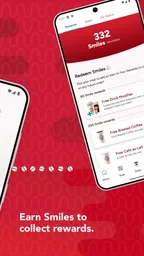
Rewards give repeat visits a longer arc. The app highlights status and exclusive rewards, so the experience is not only about completing today’s purchase. There is also a reason to keep using the same account over time. For someone who already visits Scooter’s, that can make opening the app feel worthwhile even when the immediate goal is just a drink.
I like that the rewards idea sits alongside the practical tasks instead of replacing them. A customer should be able to understand the app’s everyday purpose first, then appreciate the added incentive of building status or finding exclusive offers. That order of priorities makes sense: a rewards program has the most value when the underlying visit is already convenient enough to repeat.
The app’s public reception also suggests that plenty of people have made it part of their coffee routine. It holds a 4.2 average from around 4,200 ratings, and has passed one million installs. Those figures offer context for its reach, but the more important question for an individual customer is whether its order, checkout, and rewards flow fits their own habits.
Where the handoffs need to feel right
The workflow depends on several transitions: from deciding what to order, to placing the order or choosing an in-person purchase, to completing the visit, and then to seeing rewards as part of future visits. Each handoff should feel natural. If I have to stop and reconsider which route to use, the convenience becomes less convincing. If the path fits my plan, the app can reduce friction by keeping the digital and in-person parts connected.
There is also a difference between a planned stop and an improvised one. Ordering ahead is most appealing when I have time to make the choice before arriving. Paying or scanning suits a visit where I want to handle the transaction in person. The app’s value therefore comes partly from matching the option to the moment. It is not necessary to use every function on every visit; the useful part is having a relevant route available.
Rewards bring their own kind of handoff: today’s transaction becomes part of a longer-term account experience. That can be motivating, but it works best when the reward element remains easy to understand and does not distract from getting the order done. Scooter’s Coffee puts status and exclusive rewards among its headline reasons to use the app, so customers who care about loyalty benefits will likely see more appeal than someone who only wants a one-time coffee stop.
What the finished experience offers
At its best, the app turns a coffee run into a simple sequence: decide, order ahead or choose an in-person checkout path, complete the visit, and keep rewards in view for next time. That sequence is easy to grasp, and it gives the app a defined role before, during, and beyond a purchase. I would describe it as a practical brand companion, especially for customers who already know and enjoy Scooter’s Coffee.
The app is free, and its age rating is Everyone, which makes its basic proposition accessible to a broad audience. It has been available since December 11, 2016, and its current version is 7.3.1. Those details establish that it is an established product with an ongoing version history, while the main reason to install it remains the everyday workflow: order ahead, pay or scan, and take part in the rewards experience.
For searchers comparing coffee apps, the key distinction is that this one is centered on Scooter’s rather than being a general-purpose coffee directory. That focus is a benefit when Scooter’s is already where I want to go, because the app’s order and rewards features are tied directly to the brand. It is less compelling as a standalone discovery tool for people who are not planning a Scooter’s visit.
Where the flow can lose momentum
The most likely friction is a mismatch between what I want to do and the route I choose. If I start an advance order when I actually prefer to decide at the counter, the app becomes an unnecessary step. If I expect a rewards-focused experience but mainly need a quick transaction, the loyalty layer may feel secondary. The clearest way to get value is to treat the app as an option for the kind of visit I am already planning, not as a requirement for every coffee purchase.
Another natural limitation is its brand-specific focus. That is not a flaw for a loyal customer, but it does shape who will benefit most. Someone who visits Scooter’s often has a straightforward reason to keep the app close. Someone who only stops occasionally may use the order-ahead or pay-or-scan functions less frequently, and the status and exclusive rewards may have less influence on their routine.
As with any app that connects a phone to an in-person transaction, the handoff matters more than the feature list. The experience has to fit the timing of the visit and make it clear when I should use the app versus simply continue with the usual ordering process. The concept is easy to follow; the real benefit comes from using the option that matches the situation.
My take on Scooter’s Coffee
Scooter's Coffee makes the most sense for people who already enjoy the brand and want a smoother way to handle repeat visits. I appreciate its focused combination of advance ordering, pay-or-scan convenience, and rewards. It gives a coffee run a useful digital starting point without asking the customer to think of the app as more than it is: a companion for getting a Scooter’s order and carrying the relationship into future visits.
If I were deciding whether to install it, I would start with my own habits. If I regularly choose Scooter’s and like planning orders or keeping rewards connected to purchases, the app has a clear purpose. If I rarely visit, its brand-specific nature may make it less essential. Overall, it is a straightforward Food & Drink app whose strongest result is a connected path from a planned coffee stop to checkout and, for returning customers, another reason to come back.
What we like
- Order ahead for convenient pickup at participating locations.
- Browse the menu before choosing a drink or food item.
- Save favorite orders for quicker repeat purchases.
- Find nearby Scooter’s Coffee locations in the app.
- Earn rewards through the loyalty program.
What could be better
- Mobile ordering may not be available at every location.
- Menu options can vary by store.
- Rewards require an account and eligible purchases.
- Order customization may be limited for some items.
- App features depend on a stable internet connection.





