Scandit SDK Showcase review
 Analysis by Appsdrops
I would not install Scandit SDK Showcase as a general-purpose household scanner. I see it as a hands-on way to evaluate Scandit AG’s scanning technology, which makes it useful when someone in the home is building or assessing an app—not when everyone simply wants to scan a grocery label. That distinction matters on a shared phone: the app is a technical demonstration, not a family organizer or a replacement for an everyday barcode utility.
Where a shared device can make sense
Imagine a household member developing an inventory app and wanting to see how scanning behaves before choosing an approach. They could use Scandit SDK Showcase to explore the SDK’s barcode and ID-scanning capabilities, while another person might use the same device for ordinary calls or household tasks. In that setting, the app has a clear purpose: it helps someone judge a scanning component, rather than managing the household’s products or records itself.
The practical value is in trying a real scanning experience instead of making a decision from a description alone. A developer can look at how the SDK responds to the items and conditions relevant to a planned project, then decide whether further evaluation is worthwhile. That is a different job from keeping a shared shopping list, identifying products for a pantry, or saving scans for later. I would not assume this showcase provides those household workflows.
The app is free, and its age rating is Everyone, so the basic barrier to trying it is low. Still, “Everyone” is not the same as “useful for everyone.” A child or a relative who just needs to read a barcode will probably find a dedicated consumer scanner easier to understand. The showcase is most at home with someone who knows why they are evaluating a scanning SDK and has a use case in mind.
What to decide before installing it
On a shared phone, I would first ask who is responsible for the test and what question they want answered. Is the goal to compare how scanning works in a prototype, or simply to look up a product? The first fits the app’s purpose; the second is better served by a product-search tool. Separating those needs avoids treating a developer-focused demonstration as a household utility and then judging it for not having unrelated features.
It also helps to agree whether the test is exploratory or part of a real project. A quick try can show whether the scanning experience looks promising, but it is not the same as validating a finished app in the exact environment where that app will be used. For example, a team building a stock-taking tool should evaluate scans against its own labels, lighting, device habits, and workflow. The showcase can inform that decision, but it should not be mistaken for the team’s complete product.
One useful, non-obvious approach is to test with representative examples rather than whichever package happens to be nearby. If the intended app will scan small labels, damaged packaging, or items held at awkward angles, those are the cases worth exploring. A neat, high-contrast barcode can make almost any scanning demonstration look convincing; the difficult examples reveal more about whether the technology suits the real task.
Keep the purpose and access clear
I would keep the app’s role distinct from any personal or household records. It is a showcase for evaluating scanning, not a shared database for tracking what the family owns. That boundary is especially helpful when a device is passed between people: everyone can understand that opening the app is for testing scanning behavior, not for retrieving another person’s saved information or managing a common inventory.
I would not assume that a shared-device arrangement automatically means the app has separate profiles, household permissions, or coordination tools. Instead, make the boundary practical: tell other users what the app is for, and have the person conducting the evaluation explain what they are testing. If the project involves sensitive identification documents, treat that as a deliberate evaluation task rather than casually inviting family members to scan personal material. The app’s focus on ID scanning makes that distinction worth taking seriously.
A second useful trade-off is deciding whether a shared phone is even the right test device. It is convenient for an informal first look, but a developer may get a more meaningful result by using the same kind of device and conditions expected in the eventual product. A household phone can be a quick starting point; it should not be the only basis for a technical decision if the application will be used in a very different setting.
For coordination, I would have one person lead the evaluation and note what they observed outside the act of scanning: which examples were tested, what conditions were used, and what the next question is. That simple routine avoids two people repeating a quick demonstration and drawing conflicting conclusions from different items. It is not an in-app collaboration feature; it is a sensible way to make a shared-device test more useful.
How it differs from ordinary scanner apps
Most consumer barcode apps are designed around the result a shopper wants, such as product information or a saved list. Scandit SDK Showcase is aimed at a different decision: whether Scandit’s scanning technology is worth evaluating for an app or workflow. If I wanted to scan a product once and learn what it is, I would choose a consumer-facing scanner. If I were assessing scanning as a component of software I planned to build, this showcase would be more relevant.
That difference also shapes what I would expect from the experience. A consumer app is judged by the usefulness of its surrounding services; a technical showcase is judged by how well it lets an evaluator examine the scanning capability. The latter can be valuable without being a polished destination for daily household tasks. It is a tool for deciding what to investigate next, not necessarily the final tool the family will use.
There is a practical limitation in that distinction: anyone who installs it without a development or evaluation goal may find the purpose unclear. The short label “Scandit SDK” does little to suggest a regular household job, while the app’s actual focus is technical. I would skip it if the need is a simple camera-based barcode reader, a shopping assistant, or a place to coordinate shared lists.
Trust, age, and sensible handling
The Everyone rating makes the app broadly suitable from an age-classification perspective, but I would still guide younger users toward the task rather than hand over a technical showcase without context. They may enjoy pointing a camera at codes, yet the useful part of the app is evaluating scanning behavior, not turning scanning into a game or family activity. An adult or developer should explain what is being tested and keep the exercise focused.
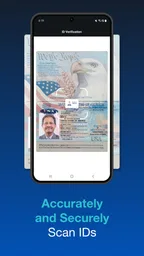
Because the showcase covers ID scanning as well as barcodes, I would avoid using it casually with someone else’s identity documents. A technology demonstration is not a reason to capture or test personal material without a clear purpose and the person’s agreement. For a safe household trial, ordinary product packaging is a more sensible starting point. This is a judgment about how to handle an ID-scanning tool responsibly, not a claim about specific storage or privacy behavior.
For a project, I would also separate “the scanner can read this example” from “our complete workflow is ready.” A successful scan alone does not settle questions about how a finished app will present results, manage records, or fit into daily work. That is why I see the showcase as an evaluation aid: it helps narrow a technical choice, while the developer remains responsible for testing the rest of the product.
Who will get the most from it
Scandit SDK Showcase is a better fit for developers, product teams, or technically curious users who need to assess barcode or ID scanning as part of a larger idea. It may also suit someone comparing scanning approaches before committing time to an implementation. The strongest use is focused evaluation: bring a relevant example, observe the scan experience, and decide what needs deeper testing.
It is less suitable for households seeking a shared catalog, a stock tracker, a shopping companion, or a scanner that explains consumer products. Those needs call for an app built around records and everyday outcomes rather than SDK assessment. If the only requirement is reading a code now and then, installing a developer showcase may add an unnecessary step instead of saving time.
The app has a 3.9 average from around 1.7 thousand ratings, and it has passed 500 thousand installs. It was released on January 24, 2014, and the current version is 8.7.1, with Android 7.0 as the minimum system requirement. Those details suggest an established app with a specific audience, but popularity alone does not make it the right choice for a family’s daily scanning needs.
My household verdict
I would keep this app on a shared device only if someone in the household has a genuine reason to evaluate Scandit’s SDK. In that case, its free access makes an initial hands-on look straightforward, and a shared phone can be enough for a first, informal test. I would set expectations clearly: it is a technical showcase, not a household account system, shared inventory, or general-purpose shopping tool.
For a better evaluation, test examples that match the intended project, keep the person responsible for the trial clear, and treat ID scanning as a deliberate task rather than casual experimentation. If the goal is merely to scan groceries or coordinate what the family has at home, choose an app designed for those jobs. My recommendation is conditional: useful for assessing Scandit’s scanning technology, but not the app I would choose to organize a household.
What we like
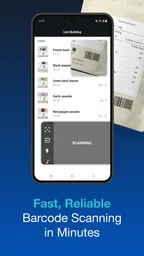
- Demonstrates barcode scanning across a range of supported formats.
- Useful for evaluating scanning performance in different lighting conditions.
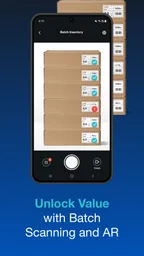
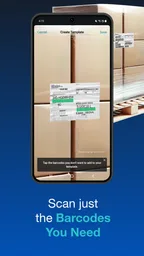
- Provides a hands-on preview of Scandit’s enterprise scanning features.
- Can help developers assess the SDK before integrating it into an app.
- Showcases scanning workflows for retail and logistics use cases.
What could be better
- Designed mainly to demonstrate Scandit technology rather than serve everyday users.
- Some showcased features may require a compatible Scandit license.
- Performance can vary depending on the device camera and hardware.
- The interface may feel technical for users unfamiliar with scanning SDKs.
- A stable internet connection may be needed for some demos or content.





