
Popeyes® review
 Analysis by Appsdrops
I think of Popeyes® as a practical companion to a craving rather than a general-purpose food app. It is built around one restaurant brand, so its appeal is straightforward: if I already know I want Popeyes, I can use the app to explore the menu and make ordering part of the same routine. If I am choosing between lots of restaurants, it is less useful. That narrow focus is also its clearest strength: I do not have to sift through unrelated places before getting to the food I came for.
What the app is like to use now
This is a free Food & Drink app from Popeyes Louisiana Kitchen, Inc., rated for everyone. Its current version is 7.51.0, and it has been available since June 18, 2018. I read those details as a sign of an established ordering tool, not a new experiment. The app has a 4.9 average across around 205,000 ratings, with roughly 41,000 written reviews, and it has been installed over 10 million times. Those figures suggest many people use it, although they do not tell me whether it will suit a particular location or ordering habit.
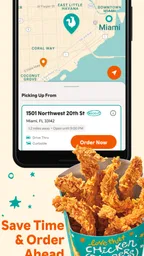
The most useful way to approach it is with a specific task in mind: decide what you want, check the choices, and place an order if the options shown fit your plans. That is a different experience from scrolling a delivery marketplace, where the main job is comparing businesses, fees, and cuisines. Here, the restaurant is already chosen. For a regular Popeyes customer, that can make the path feel more direct; for someone undecided about dinner, the app cannot replace a broad local search.
I would also treat the app as a convenience layer, not as a guarantee that every item or ordering option will be available everywhere. Restaurant menus and service can vary by location and time, so the sensible move is to check the choices in the app before building a plan around one particular item. This is especially helpful when ordering for a group: a quick look at the available menu can prevent a last-minute change after everyone has already settled on a meal.
A focused alternative to delivery marketplaces
Compared with a general delivery app, Popeyes keeps the decision space smaller. That is a benefit when I want the brand’s chicken and sides, but a limitation when I want to compare several nearby restaurants or find a completely different kind of meal. A marketplace is better for browsing across cuisines and providers. Popeyes is the more natural starting point when the restaurant itself is already the decision.
That distinction matters for cost and planning, too. I would not assume the same ordering choices or final total across every way of buying food; the checkout details are what matter for the order I am actually placing. If I am weighing pickup against delivery or comparing the app with another ordering route, I check the final choices presented before confirming rather than relying on memory or an old order. That small habit is more useful than assuming the app will always be the cheapest or quickest option.
How the version history changes the picture
The app has been around since 2018, and version 7.51.0 is the current release. That is useful context: this is an actively versioned product with a long life, rather than a one-off menu page. Still, a version number by itself does not tell me which features changed or whether a particular screen has recently been redesigned. I would not read a higher number as proof that a specific issue has been fixed.
For existing users, the practical implication is to keep expectations grounded. If the app already fits your routine, an update may be part of normal maintenance, but I would judge the current experience by whether it lets me complete my own order smoothly. If something behaves differently after an update, checking that the app is current and reopening it is a reasonable first step; for a time-sensitive meal, I would keep another ordering route in mind rather than assuming any app will be flawless.
The long-running presence and large audience make it reasonable to expect the app to remain relevant to Popeyes customers, but that is not a promise about future features. My useful benchmark is simpler: can I find the food I want, confirm the details for my location, and finish the order without confusion? Those are the things that matter more than a release number when I am hungry and short on time.
Small decisions that make ordering smoother
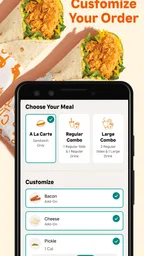
One non-obvious tip is to decide whether the app is helping you choose or simply helping you place an order. If you already have a favorite, use the menu as a confirmation step instead of browsing until you feel overwhelmed. If you are ordering for several people, check the available choices first and settle on alternatives before everyone starts customizing their wish list. That keeps the app from becoming a group chat conducted through a checkout screen.
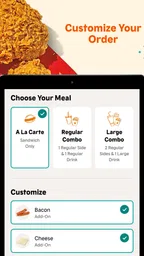
A second useful habit is to treat a saved routine as a starting point, not an automatic repeat. Before sending an order, review the location, items, and any selections shown in the current flow. Restaurant availability can change, and an old preference is not a substitute for checking what is being ordered today. I find this particularly important when picking up food for someone else, because a quick confirmation can spare an awkward handoff with the wrong meal.
Third, I would use the app early enough to leave room for a plan B. If I am ordering around a work break, a drive, or a family schedule, I check the current ordering options before I am already at the point of no return. If the choices do not suit the timing, I can switch to another route or another meal without having built my entire plan around an assumption. The app is most useful when it reduces friction, not when I expect it to solve every scheduling problem.
Where the experience may fall short
The biggest limitation is also built into the product: it serves one chain. That is ideal for a Popeyes craving, but it offers little help if the closest restaurant is inconvenient, if the menu choices do not match someone’s needs, or if the group cannot agree on the same place. In those situations, a multi-restaurant service or a broader local search is a better tool. I would not install this expecting a universal dining guide.
There is also a difference between seeing an appealing menu and knowing the full practical picture. Before relying on a particular option, I check what the app shows for the selected location and review the order before confirming. For a person with strict dietary requirements, the app should be treated as one source of menu information, not as a replacement for checking details directly with the restaurant when an ingredient or preparation question is important.
Another trade-off is that a dedicated restaurant app only earns its place on my phone if I order from that restaurant often enough. If I visit Popeyes occasionally, the convenience may not outweigh another app to maintain, especially if I already use a delivery service that handles most restaurants I want. Since the app is free, trying it does not require paying for access, but keeping it installed still depends on whether it genuinely saves time for your routine.
Who should choose it—and who should not
I would recommend it to regular Popeyes customers, people who know what they like and want a direct route to the restaurant’s menu, and anyone who occasionally coordinates a pickup for family or coworkers. It is also a sensible option for a first-time customer who wants to inspect the available choices before visiting, provided they understand that availability is tied to the selected restaurant and current ordering options.
I would skip it if I mainly want to compare restaurants, if I rarely eat Popeyes, or if my priority is finding the broadest selection in one place. It is not the right answer to “What should I eat nearby?” so much as “How do I order from Popeyes?” That difference is worth deciding before downloading, because it sets realistic expectations for what the app can do well.
For an everyday scenario, imagine I am leaving work and picking up dinner for two. I can use the app to check the choices, agree on a meal before setting off, and review the order details while I still have time to adjust. If the available choices do not work, I can change plans before making the trip. In that situation, the focused design is more valuable than a marketplace’s bigger catalog; if I am still deciding between pizza, sandwiches, and chicken, the marketplace wins.
What I would keep an eye on
As a user, I would watch for whether updates make the basic journey clearer: finding the right location, understanding the available options, and checking an order before sending it. Those are practical improvements that would matter to both new and returning customers. The current version establishes where the app stands today, but it does not by itself prove what is coming next, so I would separate hopes for future changes from what I can use now.
I would also pay attention to how well the app fits my own ordering pattern over time. If it consistently helps me reach the right menu and place the kind of order I need, it has earned a place in my routine. If I keep opening it only to compare other restaurants or discover that my preferred choices do not fit the occasion, another option is more useful. A high average rating and a large install base are encouraging signs of broad appeal, not a reason to ignore personal fit.
My verdict
My view is that Popeyes® makes the most sense as a focused ordering companion for people who already enjoy the chain. It is free, established, and popular, and its single-brand scope can make the task feel simpler than browsing a general delivery marketplace when Popeyes is exactly what I want. The trade-off is clear: it cannot help much with restaurant discovery, and I would still check availability and order details rather than assume every choice will suit every visit.
If I were recommending it to a friend, I would say to install it when Popeyes is a regular part of your meals or when you want a direct way to plan an order. I would not recommend it as a replacement for a broad food-finding app. For the right customer, it is a convenient, no-cost tool; for everyone else, its narrow focus may leave it unused. My recommendation is to judge it by one real order: if it makes that experience easier, keep it; if not, use the ordering option that better matches how you choose food.
What we like
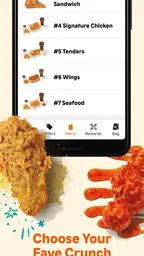
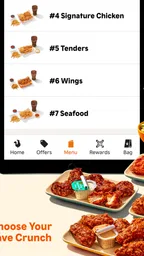
- Menu options include chicken sandwiches and tenders.
- Order pickup can save time at participating locations.
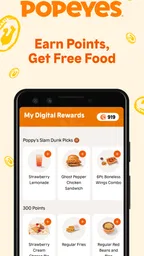
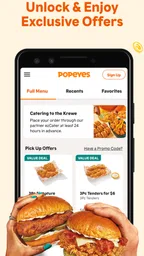
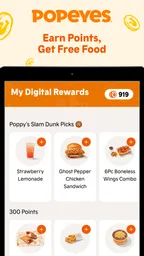
- The app may offer deals for registered users.
- Location details help find nearby restaurants.
- Ordering ahead makes meals easier to plan.
What could be better
- Menu availability varies by restaurant.
- Some locations may not support every order option.
- Deals can have restrictions or expiration dates.
- Delivery availability depends on your area.
- Order changes may be difficult after checkout.





