
PlayMetrics review
 Analysis by Appsdrops
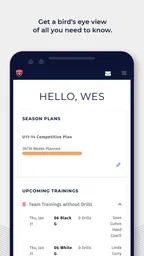
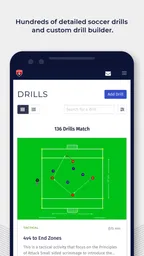
I would describe PlayMetrics as a coordination tool for youth sports rather than a scorekeeping or training app. Its purpose is to help a club keep the practical side of participation organized, which can matter just as much as what happens on the field. I find that focus useful: families and coaches often spend more time sorting out plans than they expect, and a shared club app can reduce the back-and-forth—provided everyone knows where to look and keeps their information current.
PlayMetrics is a free sports app from PlayMetrics, designed for youth club management. It has an average rating of 3.4 from around 300 ratings, and more than 100,000 installs. It is rated for Everyone, runs on Android 7.0 or later, and its current version is 3.6.4. The app has been available since February 18, 2020. Those details suggest an established product with a meaningful user base, but ratings alone do not tell me whether it will suit a particular club: the organization’s setup and day-to-day habits are what make a management app feel helpful or frustrating.
Where club coordination can get stuck
The first thing I would clarify before relying on PlayMetrics is whether a child’s club actually uses it as its main place for updates. A team-management app is only useful when coaches, administrators, and families agree to check the same channel. If one person posts an update in the app while another keeps using a text thread, parents can end up with two competing versions of the plan.
That is a common source of confusion in youth sports, where a family may be balancing practices, games, school, transport, and more than one child’s schedule. The app can help centralize club communication, but it cannot make a scattered communication routine consistent on its own. I would treat the first week as a transition: check the club’s chosen channel before each activity and ask the team whether any urgent changes are still being sent elsewhere.
There is also a difference between information being available and information being easy to notice. A parent who opens an app only when a coach sends a message may miss something if they assume every change will arrive in the same way or at the same time. I would make a small habit of checking the relevant team area before leaving home, especially on a day when plans may have shifted. That is more dependable than relying on memory or an old screenshot.
For a coach or club volunteer, the friction can be less about using the app and more about keeping it accurate. If a roster, contact detail, or team communication routine is out of date, families may not know which information to trust. I would recommend that club administrators decide who owns updates and tell families where to report a correction. Clear responsibility prevents the app from becoming another place where old details linger.
Small checks before treating a missing update as a bug
If something expected is not visible, I would first confirm that I am looking at the right team and the right part of the app. In a club with multiple squads or siblings enrolled, it is easy to assume a message belongs to the currently selected group when it was intended for another one. Rechecking the team context is a quick, low-effort step before restarting the app or asking a coach to resend information.
Next, I would check whether the club has actually published the update. A management app can display what people enter; it cannot fill in a plan that has not been shared. If other parents have the same question, a brief check with the coach or team contact can distinguish a delayed club update from an individual account issue. That saves time and avoids repeated messages to administrators.
For a new family, I would also confirm that the account is connected to the correct player or team using the club’s own instructions. I would avoid creating extra accounts or repeatedly changing details in an attempt to force a match. When a club controls enrollment or team assignments, the cleanest fix is often to ask its administrator to verify the setup rather than making guesses in the app.
These are practical checks, not evidence of a special troubleshooting tool. I would use them because they separate the usual causes—wrong team, incomplete setup, or an update not yet shared—from an app problem. That distinction matters when a family is standing in a car park trying to work out whether practice has moved.
Recovering a routine when plans change
A realistic example is a parent who has planned the afternoon around practice, then hears that the time or location may have changed. My approach would be to open PlayMetrics, check the relevant team’s current information, and compare it with the latest direct message from the coach if one exists. If the details conflict, I would not assume the newer-looking entry is correct; I would ask the coach or club contact to confirm the plan before setting off.
For coaches, the useful workflow is to make one channel the source of truth and point families back to it when changes happen. If a change is also sent through a separate group chat, I would keep the wording consistent and make clear which team it concerns. That small discipline is more valuable than adding another channel, because it reduces the chance that a parent acts on a partial message forwarded without context.
When the app seems stuck, I would try the ordinary recovery steps in order: close and reopen it, check the device’s connection, and make sure the installed app is current. The present release is 3.6.4, so I would compare the installed version with the current one in the app store before assuming an old build explains an issue. If the problem continues, I would note what I was doing and contact the club or the app’s support route with a clear description rather than repeatedly changing account information.
A useful non-obvious habit is to verify changes at the moment they matter. Before driving to a venue, I would check the current team details rather than depending on a calendar entry copied days earlier. A saved event can be convenient, but any copied plan can become stale if the club changes it later. The app works best as a live coordination point, not as a guarantee that every old reminder has updated itself.
When the app may not be the problem
Some apparent app failures are really club-process issues. If one family sees an update and another does not, the first question is whether both are connected to the same team and whether the club has communicated through the same route. If nobody can find a location change, the club may not have posted it yet. In either case, reinstalling the app is unlikely to solve the underlying problem.
Device and account basics are worth checking too. A weak connection can interrupt loading, and an outdated app can behave differently from the current release. I would also confirm that the device meets the Android minimum of 7.0 before troubleshooting further. On iOS, I would use the app store’s compatibility information for the device rather than assuming the Android requirement applies there.
Families should be realistic about what an app can replace. PlayMetrics may organize club-related communication, but it is not a substitute for asking a coach a direct question when instructions are ambiguous. Nor would I use it as the only record of a critical arrangement until I had learned how that particular club communicates urgent changes. A quick confirmation is sensible when transportation, attendance, or a last-minute venue change is involved.
This distinction also helps clubs. Before telling every parent to reinstall, an administrator can check whether the issue affects one account or the whole team, whether the information was published, and whether families are using the intended team space. A precise report—what screen or information was expected, which team it concerns, and when the issue occurred—is more actionable than “the app doesn’t work.”
Who will get the most from it
I see the strongest fit for parents and guardians whose youth club has adopted PlayMetrics consistently, especially those juggling more than one weekly activity or coordinating rides with another adult. Having a dependable place to check club information can reduce the mental load of remembering which conversation contained the latest plan. Coaches and administrators may also find a shared management app worthwhile if they are trying to keep routine communication from spreading across personal messages and informal chats.
It is less compelling for a team that already communicates reliably through a simple method and has no intention of moving its routine. In that situation, installing an additional app may create another inbox rather than solve a real problem. A casual participant who needs only an occasional time and location may prefer the club’s existing approach, while a parent who needs certainty about a specific change should still confirm directly with the team.
Compared with the usual alternatives—group texts, email threads, and separate calendar entries—PlayMetrics offers a club-oriented place to organize participation rather than leaving every family to assemble the picture themselves. The trade-off is adoption: texts are familiar and immediate, while a dedicated app asks everyone to learn and check a shared system. I would choose the app when the club genuinely maintains it; I would not assume that a dedicated platform is automatically better than a well-run, simpler routine.
The 3.4 average is a reason to approach expectations thoughtfully, not a verdict on every club’s experience. A management tool can feel smooth in one organization and confusing in another because local setup and communication habits shape much of the day-to-day result. I would judge it by whether my own club keeps information current, whether the relevant team is easy to identify, and whether families know what to do when a plan changes.
My practical verdict
My recommendation is conditional but positive: if your child’s club uses PlayMetrics as its main coordination space, it is worth trying and building a simple checking habit around it. I would confirm the correct team during setup, learn which channel the coach uses for urgent changes, and check the current plan before travelling. Those steps address the most common sources of confusion without turning routine use into a technical project.
Its real strength is giving a youth club a shared place to manage the details families need to act on. Its main weakness is that the app cannot compensate for an inconsistent club workflow, and it may feel redundant when the team already has a reliable alternative. I would give it a fair trial within the club’s routine, but I would not blame the software for missing information until I had checked the team selection, the account setup, and whether the club had actually posted the update.
What we like
- Team schedules and updates are easy for families to check.
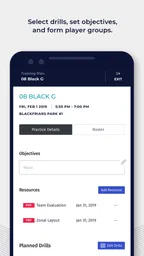
- Coaches can manage rosters and communicate with players.
- The calendar helps keep practices and games organized.
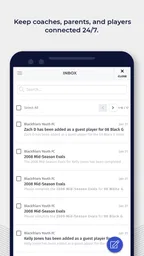
- Parents can follow team announcements in one place.
- The app supports coordination across multiple teams.
What could be better
- Some features may be unavailable unless your club uses PlayMetrics.
- Notifications can be easy to miss if app settings are restricted.
- The experience depends on teams keeping schedules up to date.
- New users may need time to learn the many team tools.
- Access to certain functions may vary by club role.





