


Pizza Hut - Delivery & Takeout review
 Analysis by Appsdrops
When I’m ordering dinner, I care less about a flashy menu than about knowing what I’m choosing and whether the order is going where I expect. Pizza Hut - Delivery & Takeout is a focused Food & Drink app from Pizza Hut Inc, built around placing an order and following it. In my view, it works best when you already want Pizza Hut and want a direct route to ordering; it is less compelling if you are still comparing lots of restaurants or want a general-purpose delivery service.
Ordering with a familiar restaurant
The app is free, rated for Everyone, and has been available since May 17, 2011. Its current version is 6.1.18, and it requires Android 7.0 or later. It has a 3.7 average from around 985,000 ratings, with over 10 million installs. Those figures suggest a widely used service, but they are not a guarantee that every local ordering experience will be equally smooth.
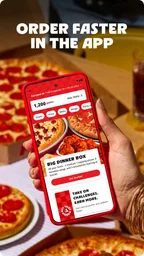
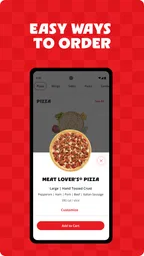
The main benefit of ordering through a restaurant’s own app is focus. Instead of browsing a marketplace full of unrelated cuisines, you can concentrate on Pizza Hut’s menu and make choices with that meal in mind. That is handy when the group has already agreed on pizza, or when you have a usual order and do not need a broad discovery tool.
I would treat it as an ordering channel rather than a dining guide. Its value depends on whether Pizza Hut serves your area and whether its available choices suit your plans. If you are deciding between several restaurants, a delivery marketplace may be a better first stop. If your decision is already made, the dedicated app removes some of that extra browsing.
A practical way to use it
For a low-stress order, I’d settle the basics before opening the menu: who is eating, whether the food is for delivery or pickup, and whether anyone has dietary needs that require careful checking. Then review the choices and the final order before submitting it. That simple routine matters because a restaurant app can make ordering convenient, but it cannot resolve a disagreement about toppings or ensure that a menu item suits someone’s needs.
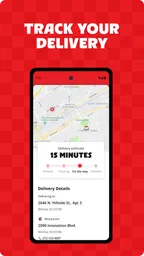
A realistic use case is a weeknight when everyone is getting home at different times. One person can make the restaurant choice, place the order, and use the app’s order-tracking purpose to follow progress instead of repeatedly calling the store. Tracking is particularly useful as a reference point, not a promise of an exact arrival time: I would still leave some flexibility if dinner needs to be ready at a precise moment.
Pickup can also be a better fit than delivery when you are already passing a nearby restaurant or want more control over when you collect dinner. The app’s ordering focus makes that option worth considering, but I’d check the selected fulfillment details carefully before confirming. The important practical distinction is not just what food is in the basket, but how you intend to receive it.
Trust begins with clear choices
For a food-ordering app, trust is built in ordinary moments: choosing the right restaurant, confirming what is in the order, and understanding what happens after tapping to place it. I find it sensible to pause on the final review rather than treating checkout as a formality. Check the items, quantities, and delivery or pickup choice before committing, especially if the order was assembled quickly or several people contributed suggestions.
The app’s stated purpose includes ordering and tracking, so those are the functions I would judge it on. I would not assume that a tracking view is a live guarantee or that an order can be changed at any point after submission. If you notice a mistake, contact the restaurant promptly through an available channel instead of relying on an unverified in-app change option.
Pizza Hut Inc is the developer, which gives the app a direct connection to the restaurant brand rather than making it an independent comparison service. That can be reassuring if you want to order from Pizza Hut specifically, but it also narrows the scope: the app is not a neutral guide to every local restaurant, and its usefulness is tied to the brand’s local availability and menu.
What I would check before sharing information
Ordering food can involve personal details, particularly when arranging delivery. I recommend reviewing the information requested at the moment you place an order and entering only what is needed to complete it. The details relevant to delivery should be accurate, since a wrong address or contact entry can create more trouble than a slightly slower checkout.
I would also pay attention to any choices shown during the ordering process rather than tapping through automatically. If the app presents account, contact, or promotional options, read the wording and decide whether each one is useful to you. I can’t responsibly make claims about particular permissions or data-handling practices without clear, confirmed details, so my practical advice is to use the device’s permission controls and the app’s visible settings where available, and to avoid granting access that does not seem necessary for the task you are doing.
There is a useful distinction between information needed to deliver an order and optional choices that may accompany an account or checkout flow. I’d make the first kind accurate and consider the second deliberately. If you are uncomfortable creating an account or sharing details beyond what your order needs, check what choices the app offers before proceeding; if those choices do not suit you, ordering another way may be preferable.
Rewards, repeat orders, and a little planning
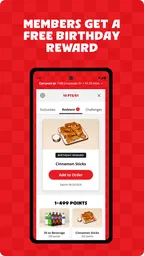
The app’s ordering-and-rewards purpose may appeal to regular customers, but I would not build a purchase decision around rewards alone. First decide whether the meal and the ordering method suit you; then consider any reward choices that are visibly presented. A benefit is only useful if its conditions fit the way you actually order, and it should not be treated as a reason to spend more than you intended.
For a repeat household order, I find it helpful to keep a simple note of what everyone likes outside the checkout flow. That makes it easier to rebuild the order carefully rather than assuming a previous basket will always reflect today’s needs. It is especially worthwhile when there are changes in who is eating or when a guest has a dietary restriction. Reviewing each item again is a small step that can prevent an avoidable mistake.
One trade-off with a brand-specific app is that convenience can encourage habit. If you order from Pizza Hut often, having the dedicated route may save browsing time. If you only order occasionally, or if you are price- and selection-shopping, compare the final choices available through the alternatives you normally use before deciding. The best channel can vary with the occasion, and a familiar interface does not automatically make an order the right one.
Where the experience may fall short
The 3.7 average across a large body of ratings indicates that experiences are mixed rather than universally smooth. I would not read that as proof of a specific defect, but it is a fair reason to keep expectations practical. Restaurant availability, menu choices, delivery conditions, and the handoff itself can all affect whether an order feels successful. An app can help organize the process; it cannot guarantee every part of the service around it.
Another limitation is scope. If you want to compare independent restaurants, browse a wide range of cuisines, or filter across many vendors in one place, a general delivery app is likely more convenient. This app is a narrower tool for Pizza Hut orders. That is a strength when you know what you want and a weakness when discovery is the point of the evening.
I would also avoid relying on the app as the sole plan for a time-sensitive meal. Use tracking to stay informed, but leave room for delays and make a backup plan if guests are waiting or the meal has to arrive by a strict deadline. For a casual dinner, that uncertainty is manageable; for an event with a fixed schedule, direct confirmation with the restaurant may be wiser.
Who should choose it
I’d recommend trying it if you already order from Pizza Hut, prefer handling the order directly with the brand, and want ordering and tracking in one place. It is also a reasonable option for households that repeat familiar meals and appreciate not having to search through unrelated restaurants. Its free price makes it easy to consider, though the real value will depend on your local ordering options and how well the available choices fit your needs.
I’d skip it if you are mainly searching for the best option across restaurants, if Pizza Hut is not a convenient choice where you live, or if you do not want to use a dedicated brand app. I’d also be cautious about using any ordering app when you are not comfortable with the information requested or the choices shown during checkout. In those cases, another ordering route—or a different restaurant—may give you more control.
My overall view is that Pizza Hut - Delivery & Takeout makes the most sense as a straightforward, brand-specific way to arrange a meal, not as an all-purpose food platform. I like the focused workflow and the ability to follow an order, while keeping expectations realistic about delivery timing, local availability, and the limits of tracking. Before placing an order, review the basket, confirm how you will receive it, and make deliberate choices about any information or optional prompts. If Pizza Hut is already what you want, this app is worth considering; if you are still deciding what to eat, start with a broader alternative.
What we like
- Order tracking helps you follow a delivery after checkout.
- The menu makes it easy to browse pizza options and sides.
- Saved addresses can speed up repeat orders.
- Pickup ordering is available for participating locations.
- Deal listings can help you find discounts on selected items.
What could be better
- Menu items and prices vary by location.
- Some orders may require an account to complete checkout.
- Delivery availability depends on your address.
- Promotions may have restrictions or minimum order amounts.
- App performance and features may differ across devices.





