
Phone Tracker review
 Analysis by Appsdrops
Finding a phone tracker is easy; deciding whether it suits the way you actually share locations takes a little more thought. Phone Tracker is a free Maps & Navigation app built around real-time location sharing, with a straightforward purpose that is easy to understand. I’d approach it as a focused tool for keeping track of shared locations rather than a complete navigation suite. That distinction matters: a simple idea can be useful, but its value depends on how smoothly it fits into your everyday routine.
What to expect from Phone Tracker
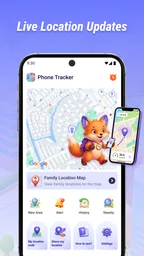
The appeal here is the core concept: real-time location sharing. When you want a location-focused app, having a clear central purpose can be more practical than wading through a crowded collection of unrelated tools. The short description, “Phone Tracker,” reinforces that direct positioning. I find that clarity helpful when evaluating an app quickly, though the name alone shouldn’t be taken as a promise about particular tracking controls or extra features.
In everyday use, speed is less about opening an app quickly and more about whether the information you need is available when you need it. Location-sharing apps are judged by how current and useful their shared location appears, so the real expectation is a responsive, understandable experience. The app’s stated focus makes that the natural standard to consider. Still, I wouldn’t assume a particular update interval, background behavior, or refresh speed without seeing it in practice on the devices and network involved.
That’s why I’d think of Phone Tracker as a practical option to try, not as a guaranteed instant solution for every situation. A phone’s connection, settings, and day-to-day conditions can affect location-based experiences. For a quick check or a routine coordination task, the concept is easy to grasp; for situations where timing is critical, it’s sensible to have a backup way to communicate rather than rely on any single app.
A focused idea, without overcomplicating the pitch
One thing I appreciate about a narrowly described app is that it sets a clear expectation. This one is presented as a phone tracker for sharing locations in real time, rather than as a full turn-by-turn navigation platform. If your main interest is location sharing, that concise focus may be appealing. If you’re looking for route planning, traffic guidance, or a broad travel toolkit, you’ll want to judge it against those separate needs instead of assuming they come with the tracking concept.
The developer is CV.Nanda Pratama Mandiri, and the app is available at no cost. It has an average rating of 3.8 from around 4,500 ratings, alongside 35 written reviews. Those figures offer a little context about its reception, but they don’t tell the whole story of how it will behave on your particular phone. I’d treat user feedback as a useful starting point and pay special attention to comments that describe experiences similar to your own.
Busy moments and heavier use
Location sharing can become more demanding when it’s part of a busy day: you may be moving between places, checking in repeatedly, or relying on a shared location while coordinating plans. In those moments, a tracker needs to feel understandable as well as responsive. Clear presentation matters because an app that leaves you unsure what you’re seeing can create more friction than it removes. The app’s central purpose is easy to identify, but individual experiences may still depend on device conditions and how the app is used.
I’d also be measured about claims concerning battery use, mobile data, or performance under sustained activity. Those can vary with phone hardware, operating-system settings, signal quality, and usage patterns. There’s no responsible way to turn the simple description of real-time sharing into a specific promise about resource demands. A sensible first test is to use the app in your ordinary routine and notice whether it feels comfortable alongside your usual phone habits.
For occasional coordination, the straightforward concept may be enough. If you expect to keep location sharing active through long or especially busy stretches, your own hands-on experience becomes more important than a general impression. Pay attention to whether the app remains easy to check and whether the information supports the way you coordinate. That’s a more useful performance test than expecting every tracker to behave identically across different phones and connections.
Reliability is about more than speed
With a location-sharing app, reliability includes consistency and clarity—not just how quickly something appears. You want to understand what the app is showing and feel confident using it for ordinary coordination. Phone Tracker’s purpose gives it a clear role, while its user rating offers a broad snapshot rather than a guarantee. I’d avoid treating a rating as proof that the app will always be accurate or continuously available; everyday network and device conditions can influence location-based tools.
Recovery matters, too. If an app becomes slow or stops updating as expected, the practical question is whether you can get back to a useful state without unnecessary hassle. I can’t assume a particular recovery process or promise how the app handles interruptions. My general advice is to keep expectations realistic: check that your phone is functioning normally, make sure the connection is usable, and communicate directly if a location view isn’t helping you coordinate.
That approach is especially important when you’re using location information to meet someone or keep plans on track. A tracker can support communication, but it shouldn’t replace it. If a shared location appears stale or confusing, a quick message or call is often the clearest next step. This isn’t a knock on Phone Tracker; it’s simply a sensible way to use any location-sharing tool when circumstances change.
Device fit and practical expectations
Phone Tracker supports Android 7.0 and later, which gives it a defined compatibility baseline for Android users. The app is marked for everyone, and its current version is 1.2.0.0. Compatibility is useful to know, but it doesn’t mean every device will feel the same in use. Phone models differ, and operating-system settings can affect how apps behave. I’d check the app’s compatibility in the app store and consider how your own device handles location-based services before making it part of a routine.
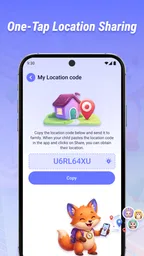
There’s also a broader device question: a phone tracker is most useful when the people involved can use it comfortably and understand what location sharing means in practice. The app’s simple description makes the basic purpose clear, but users should still make deliberate choices about when they share a location and with whom. Keeping that purpose in view helps prevent a convenient tool from becoming something people use without understanding the expectations around it.
On iOS, I would check availability and compatibility directly in the relevant app store rather than assume the Android version and iPhone experience are identical. The important point is to confirm that the version you intend to use works with your device and fits your needs. That small check can save frustration, particularly when multiple people are trying to coordinate across different phones.
Who may find it useful
Phone Tracker is most naturally suited to someone who wants a dedicated way to share location in real time and prefers a focused app description. Its category makes sense for location-oriented use, and the central idea is easy to explain to another person. If that is the task you have in mind, it may be worth trying. I’d make the decision based on how intuitive it feels on your phone and whether its real-world behavior supports your routine.
It may be less suitable if you’re specifically searching for a feature-rich navigation experience and expect route guidance or other travel functions from the name alone. A phone tracker and a navigation suite can overlap in broad subject matter without serving the same purpose. Being clear about that difference makes it easier to evaluate the app fairly and avoid expecting tools that its description doesn’t establish.
The app has passed 1 million installs, suggesting it has reached a substantial audience. It was released on April 13, 2026, and the listed version is 1.2.0.0. These details provide a snapshot of its availability, not a guarantee about future updates or performance. For a useful assessment, I’d give more weight to whether it works reliably for your particular device and the way you share locations.
My performance verdict
My overall take is that Phone Tracker has a clear, practical premise: location sharing in real time. That focus gives it an obvious role, and the free price makes trying it straightforward. On speed, stability, and resource use, I’d keep expectations grounded rather than assume specific results. The app’s basic description doesn’t establish exact refresh behavior or how it performs under every kind of use, and those experiences can vary from one phone and connection to another.
As a result, the best performance verdict is a measured one. Phone Tracker could be a useful fit if you want a focused location-sharing app and are prepared to judge it through ordinary use. I’d test it during a low-pressure outing first, see whether its presentation feels clear, and avoid relying on it as the only way to coordinate when timing really matters. That gives you a practical sense of its speed and consistency without making assumptions on its behalf.
With an average rating of 3.8, it sits in a mixed-but-usable position rather than presenting an obvious consensus of universal praise. For me, that makes a personal trial more valuable than a snap judgment. The app’s purpose is easy to understand, its cost is free, and it has a sizable install base; the deciding factor is whether it behaves comfortably on your device and matches your expectations for location sharing.
Bottom line: Phone Tracker is worth considering if your priority is a straightforward way to share locations in real time. I like the clarity of that purpose, but I’d treat speed and reliability as things to assess in your own circumstances, not automatic guarantees. Try it for routine coordination, keep communication open, and use it as a helpful aid rather than your sole source of certainty.
What we like
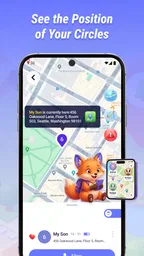
- Shows a phone’s location on a map for quick reference.
- Can help families check whether members have reached a destination.
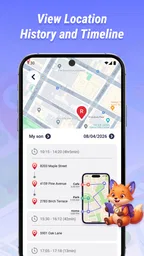
- Location history may help retrace recent movements.
- A shared location can make coordinating meetups easier.
- Useful for finding a misplaced phone when location access is enabled.
What could be better
- Location sharing requires consent from the person being tracked.
- GPS accuracy can drop indoors or in areas with weak signals.
- Frequent location updates can increase battery consumption.
- Tracking features depend on a working internet connection.
- Background location access may raise privacy concerns.





