Phone Tracker – Location Share review
 Analysis by Appsdrops
Phone Tracker – Location Share is a location-sharing app from MARO APPS, aimed at people who want a straightforward way to keep track of where family or friends are. I see the appeal: location sharing can make everyday coordination easier, but it also involves personal information, so simplicity and trust matter as much as convenience. This app sits in the maps and navigation space, and its main purpose is clear from the moment you consider using it: share a phone’s location rather than plan a route or explore a map.
A focused location-sharing tool
The app is free and rated for Everyone, which makes it accessible to a broad range of users. It has an average rating of 4.5 from around 6,900 ratings, with more than a million installs. Those figures suggest that location sharing is a familiar, useful need, though popularity alone cannot tell you whether the app suits your particular household or routine.
In my view, Phone Tracker works best when everyone involved understands why location sharing is being used and agrees to it. It can help a family coordinate arrivals, reassure a friend travelling home, or reduce the back-and-forth of asking “Where are you?” But a tracker is not a substitute for communication, and it should never be used to monitor someone without their knowledge. Consent and clear expectations should come before convenience.
The distinction between this app and a conventional navigation tool is important. A navigation app helps you get somewhere; a location-sharing app helps people see where one another are. If you mainly need turn-by-turn directions, transit details, or help finding a destination, a full mapping app is the better choice. If your everyday problem is coordinating with a small circle, Phone Tracker is more directly focused on that job.
What the current version tells me
The current release is version 1.0.46, and the app was released on November 25, 2024. That gives the product a defined starting point and a current version to check when deciding whether to install it. It does not, by itself, reveal how the app has changed between releases, so I would not assume a particular feature was added or improved just because the version number has advanced.
That distinction matters for existing users. If you already rely on the app, it is sensible to keep it updated through the app store, where the current release can be checked. Updates can matter for compatibility and reliability, but I would judge any particular change by what the app actually presents after updating rather than guessing from a version number. People considering a switch should also remember that a newer release number does not automatically mean it will fit their needs better than the location-sharing tools they already use.
The stated minimum operating system is Android 7.0. That makes the compatibility question practical: check the version of Android on the phone you plan to use before building a routine around the app. For a group, it is worth checking every participant’s device, not just the person who will be doing most of the setup. A location-sharing arrangement is only useful if the people who need to participate can run it comfortably.
How it fits into an ordinary day
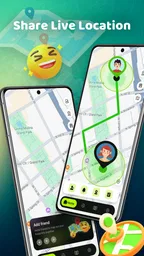
Picture a parent finishing work while a teenager is travelling home from an activity. Instead of sending repeated messages during the journey, both can use a shared location view to coordinate when to leave or meet. The useful part is not watching a moving dot every minute; it is reducing uncertainty at a specific point in the day. I would agree in advance when location sharing is useful and when it should be turned off, so the feature supports trust rather than quietly replacing conversation.
A second practical use is meeting someone in a busy area. If both people have chosen to share their locations, checking where the other person is can be simpler than trying to describe a street corner or entrance over messages. Still, location data is not a perfect substitute for a clear meeting point. Buildings, crowds, and a phone left in a bag can all make a location view less useful than a short message saying exactly where to wait.
For a household, I would set expectations before relying on it for safety or pickup plans. Decide who can see whose location, when sharing is appropriate, and what to do if a phone is unavailable. This small conversation is an important part of the workflow. It prevents people from treating an unavailable location as evidence of a problem when the more ordinary explanation may be that the person has not checked their phone or is not sharing at that moment.
Where it differs from familiar alternatives
Many people already use location sharing built into a phone’s operating system, a messaging app, or a navigation service. Those options may be more convenient if everyone in a group already uses the same platform, since there is less to install or explain. Phone Tracker is worth considering when you want a dedicated app for this specific purpose, but convenience depends on whether the people you want to share with are willing and able to use it too.
Compared with a general-purpose map, this app’s narrower focus can be a benefit: you are not choosing it for local business searches or route planning. The trade-off is that it should not be expected to replace those tools. I would keep a regular navigation app for journeys and use a tracker only for the coordination problem it is meant to solve. That separation also makes it easier to decide which app needs location access at a given time.
Compared with a messaging app, a tracker may make shared location easier to check without asking someone to send a fresh update. But a message can be more precise and less intrusive when you only need a one-time arrival estimate. For a single meetup, I would often send a quick text; for a recurring family routine, a dedicated location-sharing setup may be more convenient. The right choice depends on frequency, consent, and the habits of the group—not on which app has the longest feature list.
Privacy, reliability, and the points to check
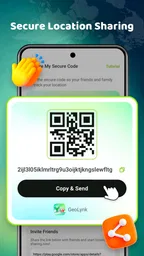
Location is sensitive, so I would treat installation as a group decision rather than a casual download. Before relying on Phone Tracker, look through its in-app controls and your phone’s location settings to understand what sharing is active and how to stop it. Be especially careful when setting up the app on a child’s device: explain what is being shared in age-appropriate language and revisit the arrangement as circumstances change.
There is also a practical reliability trade-off with any phone-based tracking. A phone must be available and able to provide a location for the view to help; a dead battery, poor signal, or settings change can disrupt the routine. I would not use a location-sharing app as the only safety plan for a long trip or an emergency. Agree on a backup, such as a check-in message or a specific meeting point, especially when timing matters.
One useful habit is to avoid checking the map compulsively. Decide what question you are trying to answer—whether someone has left, whether they are close to a pickup point, or where to meet—and use the app for that. This keeps location sharing purposeful and can make the experience feel less like surveillance. If the group finds itself monitoring constantly, that is a sign to revisit the agreement rather than simply rely on the tracker more heavily.
Another sensible step is to test the arrangement during an ordinary, low-pressure outing before depending on it for an important handoff. Each person can confirm that they understand how sharing works and what they should do if they cannot be seen. This is more valuable than assuming that installing the same app automatically creates a dependable system. It also helps identify whether the app suits the group’s devices and comfort level.
Who should choose it—and who should pass
I would consider Phone Tracker if I wanted a focused way for consenting family members or friends to coordinate location, and if the group was comfortable installing a separate app. Its free price removes a purchase decision, while its Everyone rating makes it broadly approachable. MARO APPS is the developer, and the app’s Maps & Navigation classification reflects its location-focused role rather than a broader social or route-planning purpose.
I would skip it if I only needed occasional directions, if my group already has a location-sharing option that everyone finds easy, or if any participant is uncomfortable sharing their location. It is also not the right choice for covert tracking or as an emergency-response service. In those situations, a regular map, a direct message, or an agreed check-in plan is more appropriate.
Phone Tracker – Location Share is most appealing when a clear, recurring coordination need exists and everyone involved is on board. Its current version gives prospective users a concrete release to evaluate, while the app’s popularity indicates that many people are interested in this kind of tool; neither fact removes the need to check compatibility and establish sensible boundaries. I would try it for a specific, everyday purpose, keep a backup communication plan, and continue only if it makes coordination easier without making anyone feel watched.
What we like
- Lets users share their location with selected contacts.
- Can help family members coordinate meetups.
- Useful for checking whether someone has arrived safely.
- Location sharing can make group trips easier to manage.
- A straightforward purpose makes the app easy to understand.
What could be better
- Location sharing depends on a working internet connection.
- GPS accuracy can vary indoors or in crowded areas.
- Sharing location may use extra battery power.
- Contacts may need the app to view shared locations.
- Users should review privacy settings before sharing.





