
Phone Tracker Live Locator review
 Analysis by Appsdrops
Phone Tracker Live Locator is best approached as a shared-safety tool, not a way to follow someone without their knowledge. Its purpose is to help people keep an eye on the whereabouts of children or older relatives, and that makes trust and clear agreement just as important as the map itself. I’d consider it when a family wants a straightforward location check, but I wouldn’t treat a phone tracker as a substitute for calling someone or planning for emergencies.
What matters before you choose a family locator
For this kind of Maps & Navigation app, the first question is not simply whether it can show a location. It is whether everyone involved understands who can see whom, whether the person being located is comfortable with that arrangement, and whether the family has a sensible plan for times when a phone is unavailable. A location tool is useful only when people agree on how it will be used.
The next question is how you expect to use it. A parent checking whether a child has arrived at an agreed meeting point has a different need from an adult child coordinating care for an older parent. In either case, a locator can reduce uncertainty during ordinary routines. It cannot explain why someone is delayed, confirm that they are safe, or replace direct contact when a situation feels unusual.
Phone Tracker Live Locator is a free app developed by ELIZABETH ANN BURDEN. It is rated for Everyone, and its short description identifies it as a phone tracker. That makes the intended audience broad, but I’d still make the purpose and boundaries clear before setting it up for a child or relative. An age rating describes content suitability; it does not answer family questions about consent or privacy.
The app has a 3.9 average from around 7,400 ratings, with about 87 written reviews, and has passed over a million installs. Those figures suggest that many people have tried it, but they don’t tell me whether its approach will suit a particular household. I’d weigh the app’s narrow location-focused purpose against the trust and practical habits a family needs to make any tracker worthwhile.
Where a simple location check can help
The clearest use case is a quick check during a routine that would otherwise prompt repeated calls. Imagine a child walking from school to a relative’s home. If the family has already agreed to use location sharing, a parent can check the map when the child is later than expected, then decide whether a message or call is needed. That is more useful than treating every glance at the map as a reason to intervene.
A similar arrangement can help when an older family member goes for a familiar walk or travels to an appointment. A relative may want reassurance about where the person is, while the person being located may appreciate fewer check-in calls. The important trade-off is that this works best as a mutually understood routine, not as a silent monitoring arrangement.
One practical tip is to agree on a small number of specific situations when checking the app makes sense. For example, a family might use it for travel between two known places, rather than monitoring constantly throughout the day. This keeps the tool from becoming a source of pressure and gives everyone a clearer standard for when a location check is appropriate.
Another useful habit is to decide in advance what to do if the location seems stale, unexpected, or simply unclear. Check with the person directly before drawing conclusions. A map point can prompt a sensible conversation, but it cannot tell you whether someone has stopped to talk, changed plans, or left their phone somewhere. That distinction matters especially when a family member is vulnerable or a parent is worried.
Where this app fits among alternatives
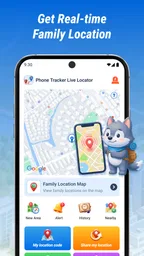
Compared with a general-purpose map app, a dedicated phone tracker is appealing when the main task is checking on family members rather than searching for places, planning a route, or exploring local businesses. If all you need is occasional navigation together, a conventional mapping app may be the more natural choice. If your priority is a shared family check-in, a locator-focused app is a more direct category to consider.
There are also alternatives built around a phone’s existing family or device-sharing tools. Those can make sense for households that already use the same mobile platform and want location sharing as part of a broader device setup. A dedicated tracker may be easier to think of as a separate family-safety tool, but the right choice depends on what everyone already uses and is willing to maintain.
For older relatives, direct calls and agreed check-ins may be preferable when they do not want location sharing or find it confusing. A tracker should not be imposed as the price of receiving help. Likewise, if the real concern is a medical emergency, a map alone is not an emergency-response system. Choose a tool that addresses the actual risk rather than expecting a location app to solve every safety problem.
The app’s description centers on viewing the whereabouts of children and older people. I would keep that scope in mind: it is a family-location proposition, not a general navigation suite. If you need turn-by-turn directions, detailed trip planning, or a broader set of map tasks, compare it with tools specifically designed for those jobs instead of assuming a phone tracker covers them.
Setup, trust, and the cost of changing tools
Before relying on any locator, make sure the people involved know which app is being used and what checking it means in practice. Discuss who will look at the location, in what circumstances, and how to raise a concern without turning the map into a constant test of obedience. With children, explain the safety reason in language they understand; with older adults, ask whether the arrangement feels acceptable to them.
Switching from another location-sharing method is not just a matter of installing a different app. The family has to agree on the new routine, get the relevant people comfortable with it, and remember which tool to check. I’d avoid running multiple trackers indefinitely: that can create confusion about which location is current and who has access. If you change tools, agree on a transition point and confirm that everyone knows where future check-ins will happen.
Phone Tracker Live Locator is currently version 1.2.0.0 and requires Android 9 or later. That makes operating-system compatibility a practical first check for an Android household. If someone’s phone cannot run the app, the family needs another shared method rather than assuming one person’s installation covers everyone.
Because the app is free, trying it does not require paying for the download. Still, “free” does not remove the time and attention involved in setting up a family routine or deciding whether the arrangement feels fair. I’d judge the real cost by whether it reduces avoidable worry without encouraging constant checking. If it makes family members feel watched or creates arguments about a dot on a map, it may not be worth keeping.
One non-obvious way to make a locator less intrusive is to pair it with a clear check-in rule: use the map to answer a practical question, then contact the person if the answer raises concern. That avoids treating location as a conversation substitute. Another is to review the arrangement when a child’s independence changes or an older relative’s preferences shift; a setup that once felt reassuring may later feel unnecessary or uncomfortable.
Who should choose it—and who should pass
I’d consider this app for a family that wants a dedicated, free phone-tracking option and can agree on transparent location sharing. It is especially relevant when a parent wants a quick way to check a child’s journey or relatives want a low-friction location check for an older family member. Its focused purpose is its strongest appeal: the decision is easier if the household wants a locator, rather than a full navigation or communication toolbox.
I’d pass if the person being tracked does not consent, if the family expects a map to provide guaranteed safety, or if the main need is route guidance and trip planning. I’d also look elsewhere if everyone already has a comfortable, established location-sharing arrangement and changing apps would add more hassle than value. The best tool is often the one the family understands and uses responsibly, not the one with the most compelling-sounding label.
Phone Tracker Live Locator was released on April 2, 2026, and is available as a free app for Android users meeting its operating-system requirement. My recommendation is cautious but positive: it is worth considering for consensual, practical family check-ins, provided everyone understands the limits of a location marker. Start with a clear agreement about when to check, use direct contact when the situation calls for it, and choose a different kind of tool if your needs go beyond knowing where a phone is.
What we like
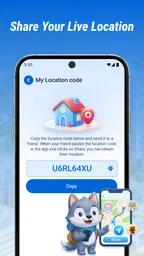
- Live location sharing helps coordinate meetups.
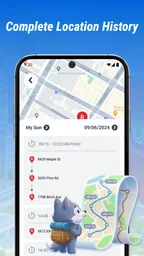
- Location history can help retrace recent journeys.
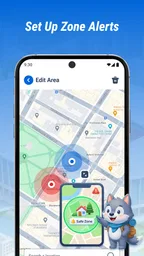
- Geofencing alerts can notify you when someone arrives or leaves.
- A simple map view makes locations easy to check.
- Useful for keeping track of consenting family members.
What could be better
- Accurate tracking depends on a reliable internet connection.
- GPS use can increase battery consumption on tracked phones.
- Location updates may be delayed in areas with weak signal.
- Everyone being tracked needs to grant location permissions.
- Continuous location sharing raises privacy concerns.





