
Phone GPS Tracker review
 Analysis by Appsdrops
I judge a family location app less by how impressive its map looks than by whether it makes a stressful moment easier. Phone GPS Tracker is aimed at people who want to share whereabouts with relatives, but that purpose comes with a human question: does it help everyone feel informed, or does it make someone feel watched? My view is that it can be useful when sharing is mutual and expectations are clear, but it is not a substitute for conversation, emergency services, or a dedicated accessibility tool.
This is a free Android Maps & Navigation app from nd5star. Its focus is location sharing rather than route planning, so I would consider it alongside family locator options, not as a replacement for a conventional turn-by-turn navigation app. The balance of user feedback is mixed: it has a 3.6 average from around 26,000 ratings, and has passed 5 million installs. That reach makes it a familiar kind of tool, but the rating is a reason to try it with modest expectations rather than assume it will suit every household.
Reading the map and finding your way around
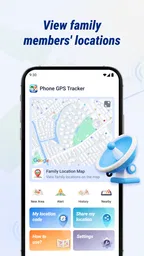
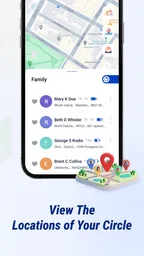
A location-sharing app has to communicate one thing clearly: where a person appears to be, and whether that information is current enough to act on. Phone GPS Tracker is presented as a phone GPS tracker and family locator, so its central value is seeing shared locations rather than searching for a destination or building a route. If your main need is “let me know when you’re on the way,” it is more relevant than a standard map app that only shows your own position.
For readability, I recommend treating the map as a quick reference rather than a definitive record. GPS positions can be imprecise, and a dot near a building or street should not be read as proof that someone is at a particular door. In a practical family routine, a useful check is to pair the map with a brief message when the exact place matters: “I’m at the north entrance” is more actionable than interpreting a pin near a large site.
I would also make a household convention before relying on location updates. For example, agree that a shared position is for coordinating pickups, not for judging why someone has stopped. This small step matters because location tools can show where a phone is without explaining what the person is doing. The app can reduce the need for repeated “where are you?” calls, but it cannot supply the context those calls often uncover.
The version listed is 1.7.1.0, and the minimum Android requirement is 7.0. Its age rating is Everyone. Those details make it worth checking the device requirements before asking a less technical relative to install it; an app that one person can use is not automatically available to every phone in a family. I would test it on the actual devices involved rather than assume compatibility from the app’s general purpose.
Motor and sensory considerations
Location sharing can be helpful when typing, reading a long message, or making a call is difficult in the moment. A relative who is travelling, carrying bags, or helping a child may be able to check a map rather than exchange several messages. That is a practical advantage of the category, though it depends on the map being legible to the person using it and on everyone understanding what the displayed location means.
For someone with limited dexterity, the most important question is not simply whether the app can show a location, but how much interaction is needed to use it reliably. I would set up the household’s sharing routine in a calm moment, then see whether the person can open the app and interpret the screen without rushing. If they need frequent help to find the right view or distinguish one person from another, the convenience may disappear. A shared location should make a task simpler, not add another fiddly step to it.
People with low vision, colour-vision differences, or difficulty processing map details should try the actual display on their own phone before depending on it. A map-based interface can be harder to interpret than a spoken update or a plain text message, especially when several streets and labels compete for attention. I would not assume that a GPS tracker is automatically accessible just because it gives a visual position. If a user relies on a screen reader, enlarged text, or high contrast, test those settings directly and keep a familiar communication method available as a backup.
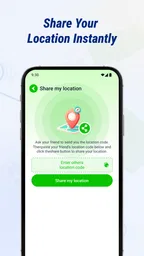
There is also a sensory and emotional side. Some people find a shared map reassuring; others find the sense of being observed uncomfortable. I would make consent a continuing conversation, not a one-time setup decision. Agree who can see whom, when sharing is useful, and when a person may prefer to send a message instead. For an adult family member, especially, the app should support autonomy rather than quietly turn into a monitoring expectation.
Useful in ordinary situations, with limits
Consider a parent coordinating a pickup after an activity. Instead of asking a child to type while walking through a busy area, the family can use location sharing to get a general sense of progress and agree on a meeting point in advance. The useful workflow is to settle the landmark before anyone sets off, check the map only when needed, and use a direct message if the pin is ambiguous. That avoids treating a GPS position as a precise rendezvous instruction.
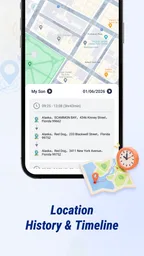
Another reasonable use is checking whether an older relative has started a familiar journey. This can spare repeated calls, but it works best when the relative has agreed to the arrangement and knows what the family expects from it. If they are delayed, the map may show a stopped or changed position without explaining why. A calm check-in is more respectful and often more useful than drawing conclusions from the screen.
For a group travelling to a crowded event, location sharing can help people regroup when plans change. I would still pick a fixed meeting point and share it verbally or in a message. Crowds, tall buildings, and indoor spaces can make a phone’s location less useful, so “follow the dot” is a weak plan when people are separated inside a venue. The app is best as a coordination aid, not the entire coordination plan.
These examples also show when a different tool is better. If you need turn-by-turn directions, transit details, or a route shared with someone who is not part of a family-sharing arrangement, a full navigation app is the more suitable choice. If the need is a one-off arrival update, a text or call may be simpler and less intrusive. Phone GPS Tracker makes most sense when a small group has an ongoing, consensual reason to see one another’s whereabouts.
Situational access and setup choices
There is a meaningful difference between being able to install an app and being able to use it at the right time. A person may have a compatible Android phone but still struggle when their battery is low, their hands are occupied, or they are somewhere with poor signal. I would not make this app the only safety plan for a trip. Keep a fallback such as a planned check-in time and a clear meeting place, particularly for children, older relatives, or anyone travelling somewhere unfamiliar.
Before relying on it, try a low-stakes test: have each person open the app from their usual starting point, check that they can identify the relevant family member, then repeat the exercise outside the home. This reveals practical friction—confusion about whose location is shown, difficulty reading the map, or uncertainty about what to do next—before a rushed pickup exposes it. It is a small test, but more useful than assuming that everyone will learn the interface under pressure.
It is also worth agreeing on a narrow purpose. “Use it to coordinate rides home” is clearer and easier to accept than an open-ended expectation to be visible all day. A specific purpose helps people decide whether the app is useful to them and reduces the chance that a convenience tool becomes a source of family tension. If someone opts out, respect that choice and use another way to coordinate.
The app is free, which lowers the barrier to trying it, but free does not mean frictionless. Anyone considering it should weigh the attention and cooperation required from every participant, not just the installation itself. With 84 written reviews alongside its larger pool of ratings, public feedback is not enough on its own to predict how it will behave on a particular device or suit a particular household. A short real-world trial is the sensible way to decide.
Remaining barriers and who should skip it
The main limitation is inherent to GPS sharing: a location is not a complete account of a person’s situation. A pin does not tell you whether they are safe, whether they want help, or why they have paused. It can also be less useful where a person cannot comfortably read a map, where connectivity is unreliable, or where location sharing would feel coercive. In those situations, a phone call, a planned check-in, or a tool designed around the person’s specific access needs may work better.
I would skip Phone GPS Tracker if you need a dependable emergency-response system, precise indoor navigation, or a way to track someone who has not freely agreed to share. I would also avoid making it mandatory for a family member who finds location monitoring distressing. The app’s purpose is narrow; using it outside that purpose can create more worry than reassurance.
For a household with different abilities, plan around the person who has the hardest time using the map, not the person who finds it easiest. That may mean choosing a visible outdoor meeting point, sending a short written update, or having one family member place a call. Such alternatives are not failures of the app. They are sensible adaptations when a live map is not the clearest channel for everyone involved.
An inclusive verdict for families
I see Phone GPS Tracker as a practical option for Android families who want a shared location view for everyday coordination and are willing to establish boundaries around it. The developer is nd5star, and the app’s straightforward focus is its strongest argument: it is about knowing where participating phones are, rather than trying to be a full navigation suite. Its 3.6 average suggests a mixed experience, so I would approach it as a tool to test rather than a guaranteed fit.
It is most likely to help when participants can comfortably interpret a map, have compatible devices, and agree on a specific reason to share. It is less suitable when someone needs spoken or highly simplified directions, when location data might be mistaken for certainty, or when the household wants an emergency service rather than a locator. Those distinctions matter more than the broad promise of knowing where everyone is.
My recommendation is to try it for one ordinary routine, such as coordinating a pickup, and judge it by whether it reduces confusion for every person involved. Keep a backup communication method, agree on privacy expectations, and do not use a map pin as a substitute for asking someone how they are. Used with those limits, Phone GPS Tracker can make family coordination easier; used without consent or a fallback, it can make the same situation more stressful.
What we like
- Shows a phone's location on a map when location sharing is enabled.
- Can help locate a misplaced device if it is online.
- Location updates can make coordinating meetups easier.
- May support family safety check-ins.
- A clear map view helps users understand shared locations.
What could be better
- Accurate tracking depends on GPS and network availability.
- The tracked phone must grant location permissions.
- Frequent location updates can drain battery life.
- Location sharing raises privacy concerns if access is misused.
- Some features may require an account or paid subscription.





