
ParkWhiz -- Parking App review
 Analysis by Appsdrops
Parking is often the part of a trip I least want to improvise. I’d rather compare a few places before setting out than circle a busy block and hope for an open space. ParkWhiz is built around that practical problem: it’s a free Maps & Navigation app from ParkWhiz Inc that helps drivers look for parking and make a plan before they arrive. Its value is less about replacing every map or parking option and more about making a parking decision feel deliberate.
Start with the parking plan, not the last-minute search
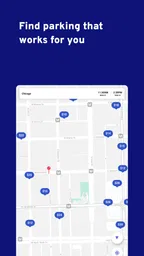
The useful way to approach the app is to begin with your destination and travel plans, then use the available parking choices to decide where to leave the car. That can be especially helpful for a concert, a game, a downtown appointment, or a visit to an unfamiliar area, where the nearest-looking garage may not be the easiest one to reach or leave.
In a straightforward outing, I’d check parking before I start driving, compare the options that suit the destination, and settle on one rather than making the choice from the driver’s seat. That small change in timing matters: it gives me a chance to think about the walk, the route into the area, and how much uncertainty I’m willing to accept. The app works best as part of trip preparation, not as a guarantee that every parking problem will disappear.
ParkWhiz is a parking-focused tool, so it fills a different role from a general navigation app. A map can help me get from A to B, but parking requires another decision: where to stop, and whether that option makes sense for this particular visit. I’d use a navigation app alongside ParkWhiz when I need turn-by-turn directions, rather than assuming the parking search itself replaces the rest of my route planning.
One practical habit is to decide what matters before comparing places. For a quick errand, convenience may outweigh a longer walk; for a full evening, the arrival and departure experience may matter more. Thinking about those trade-offs first makes the results easier to judge. It also prevents me from choosing an option simply because it appears closest to the destination.
Check the details that affect your real arrival
Before committing to a parking choice, I’d read the information shown for that option carefully and check that it fits the actual outing. The destination pin is only one part of the decision. A place that looks close on a map may still require a walk that matters in bad weather, with luggage, or when arriving with someone who has limited mobility. The best choice is the one that works for the whole trip, not just the one that looks neat on screen.
I also recommend checking the plan again before leaving, especially if the outing has a fixed start time. A parking decision made hours earlier can be easy to forget, and a quick review helps avoid heading toward the wrong area or relying on a detail you didn’t retain. Keep the destination and any relevant parking information easy to find on your phone, rather than expecting to reconstruct your choice while approaching a crowded venue.
The app’s store age rating is Everyone, and it is free to download. That makes trying it a low-commitment step for drivers who want to see whether its parking options suit their regular destinations. The listing also shows a 4.1 average from around 28,000 ratings, which is a useful broad signal of user experience, but it shouldn’t substitute for checking whether the app covers the places you personally visit.
As with any parking search, availability and suitability are tied to the specific place and moment. I would not treat a listing as a promise that a space will solve every last-minute complication. When the trip is time-sensitive, I’d make the parking decision early and keep a reasonable backup in mind. That is a more dependable workflow than waiting until the destination is in sight and assuming the first result will be ideal.
Build a repeatable routine for regular destinations
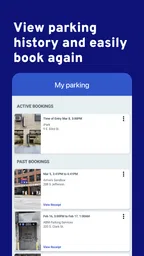
The biggest improvement for frequent use comes from making the process repeatable. If I’m going to the same venue or neighborhood again, I can use the previous trip as a reference: what kind of parking worked, how far I was comfortable walking, and whether the approach felt manageable. I would still review the current options each time, but a remembered preference helps narrow the decision without starting from scratch.
For a weekly appointment, for example, I’d check the parking choice before the day gets busy, note the destination and the option I intend to use, then leave enough time for the final walk. That routine reduces the chance of making a rushed choice on arrival. It also makes it easier to recognize when a familiar plan no longer fits, such as when the visit is at a different time or the destination changes.
For a larger event, I’d use a slightly different pattern. I’d think about both arrival and departure before choosing: walking a little farther may be worthwhile if it puts me in a more convenient position for the rest of the evening. This is a useful trade-off to consider in advance, because a parking spot that seems convenient when arriving can feel less appealing when a crowd is leaving at once.
These habits are not secret features; they are ways to get more value from a focused parking app without assuming it can make every decision for you. The app can help organize the search, but I still need to judge the context. That distinction is important: ParkWhiz can make planning easier, while local conditions and personal priorities remain part of the driver’s choice.
Where it fits among maps and other parking choices
Compared with relying only on a general-purpose map, ParkWhiz is more directly concerned with parking. That focus is useful when parking is the main uncertainty in a trip. A standard map remains the better tool for a broad route, nearby services, or exploring an area beyond the parking decision. I see the two as complementary rather than competing: use the parking app to plan where the car goes, then use navigation for the journey itself.
Compared with simply driving around and looking for a space, planning through ParkWhiz can reduce guesswork, particularly for an unfamiliar destination or a busy event. The trade-off is that checking an app takes a little preparation, and it may not be worth the extra step for a quick stop in a familiar place where parking is usually simple. I wouldn’t open it for every short errand by default; I’d reach for it when the cost of improvising is likely to be higher than the effort of planning.
The app has been available since December 14, 2012, and has over one million installs. ParkWhiz is an Arrive Mobility brand within the Arrive Network, and the long-running presence is relevant context for a service centered on a recurring everyday need. Still, the important question for me is local usefulness: whether the choices shown work for the destinations and routines I actually have.
Know when a different approach is better
ParkWhiz is not the right answer for every driver or every stop. If I’m already near a familiar destination and expect several easy alternatives, a parking app may add an unnecessary step. If my primary need is live route guidance, a dedicated navigation app is the more direct choice. And if I need certainty for a particularly complicated visit, I’d verify the practical details before relying on any parking search as my only plan.
There is also a judgment call around walking distance. Drivers traveling with children, mobility needs, heavy bags, or a tight schedule may value proximity more than a driver heading to a relaxed evening out. I’d avoid choosing based on a single headline detail and instead consider the full journey from the car to the destination. A seemingly convenient option is only convenient if it suits the people making the trip.
Another limitation is that a carefully planned parking choice cannot remove every on-the-ground variable. Traffic, event crowds, and the pace of the day can all affect how smooth the arrival feels. That’s why I prefer using the app early enough to make a decision calmly and leaving room in the plan for the walk and the approach, rather than treating the search as a last-minute fix.
Who will get the most from it
I’d recommend ParkWhiz to drivers who often visit busy destinations, travel to events, or want to make parking part of the plan instead of an arrival-time gamble. It is particularly useful for people who repeat the same trips and can develop a simple routine around comparing parking options before they leave. With 9,900 reviews shown in the app listing, it has a substantial base of user feedback, though personal experience will still depend on the places a driver needs.
I’d be less inclined to recommend it to someone who rarely drives, mostly parks in familiar areas without difficulty, or mainly wants navigation rather than parking help. It also isn’t a substitute for applying common sense to an unfamiliar location. The strongest use case is specific: you know where you’re going, parking could be a hassle, and you want to make a considered choice before reaching the area.
My overall impression is that ParkWhiz is most useful when I treat it as a planning companion rather than a magic shortcut. Check the options before a demanding trip, judge them against the walk and schedule, and keep a backup mindset when the outing matters. For drivers with recurring parking headaches, that modest routine can make the arrival feel far less improvised; for easy, familiar stops, a regular map or no app at all may be enough.
What we like
- Compare nearby parking options before choosing a spot
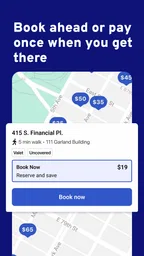
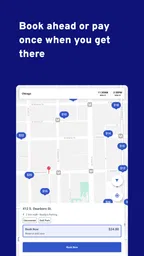
- Reserve parking in advance for busy areas
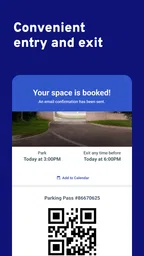
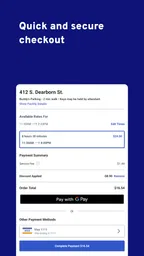
- Digital passes make entry details easy to access
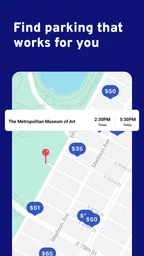
- Search results can show prices and walking distances
- Available parking filters help narrow down your choices
What could be better
- Coverage and availability vary by city
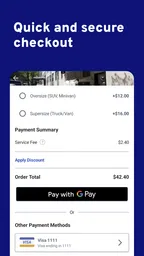
- Some listings may have restrictions on vehicle size
- A reservation may not guarantee a specific parking space
- Cancellation terms can differ between bookings
- You may need mobile data to access your parking pass





