
onX Fish: Midwest Fishing App review
 Analysis by Appsdrops
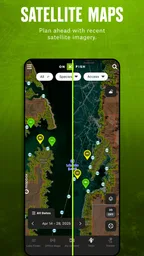
I would reach for onX Fish when I want to narrow down where to fish before heading out, rather than spend the morning scrolling through broad map results. Its focus is practical: help me find fishing spots, compare lakes using species information, and check forecasts while planning. That combination makes it more useful as a trip-planning companion than as a general-purpose outdoors map, though the value depends on whether its lake and species coverage fits the places I fish.
Start with a question, not just a map
The app is a free sports app from onXmaps, and its strongest idea is bringing location, fish species, and weather into the same planning routine. Instead of choosing a lake solely because it is nearby, I can use species data to make a more deliberate shortlist, then look at the forecast before committing. That is a meaningful improvement over searching a regular map and keeping a separate weather app open beside it.
My baseline workflow would be to decide what kind of outing I want, identify lakes that might suit it, and use the forecast to decide whether the day and location make sense. I would treat the species information as a way to guide research, not as a guarantee that a particular fish will be active or easy to catch. A lake can be a good match on paper and still be a poor choice for the conditions, access, or time I have available.
For a realistic example, imagine I have a free morning and want to target a particular species without driving blindly from one lake to another. I can use the app to compare candidate lakes, check the weather around the time I expect to be there, and settle on a destination before packing. That does not replace local knowledge, but it gives me a more reasoned starting point than choosing a spot based on a vague memory or a single search result.
The useful habit is to separate spot selection from trip expectations. First use the species information to find plausible water; then let the forecast and your own familiarity decide whether that water is right today. I would avoid reading a species filter as a live report of current catches. It is a planning aid, and the decision still benefits from checking conditions and thinking about what you know about the lake.
Use species filters to narrow the search
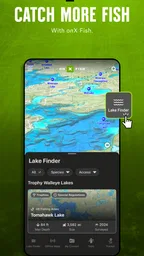
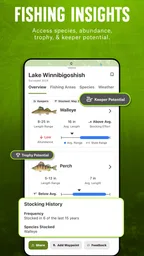
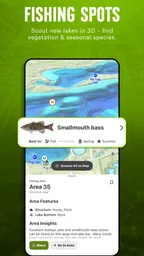
Filtering lakes by species is the feature that gives this app a distinct purpose. In a conventional map app, I can locate water, but I still have to work out which places are relevant to the fish I want. Here, the species angle can make the first pass more focused. It is particularly handy when I am visiting an unfamiliar area or choosing between several lakes that all look equally convenient on a map.
I would use that filter to create a shortlist rather than pick the first result. A practical comparison includes the target species, the forecast, travel time, and how well I know the area. If two lakes appear suitable, the better choice may be the one I can fish confidently in the available time, not the one that looks most promising in a filter. That small distinction prevents a planning tool from becoming a substitute for judgment.
There is also a useful trade-off for anglers who already have a favorite lake. If I know exactly where I am going and already understand its species and conditions, the app may add less to that particular trip. Its advantage is strongest when I am exploring options, checking a new destination, or trying to make a limited outing more purposeful. For a familiar routine that never changes, a simpler map and a reliable weather forecast may be enough.
Check the forecast as part of the same decision
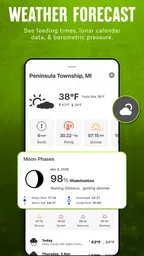
Weather is not an accessory to a fishing plan. It can affect whether I go, when I leave, and which water feels manageable. Having forecasts alongside the lake-selection workflow saves a little back-and-forth between apps and makes it easier to compare destinations with the day in mind. I would check again before leaving, especially if the outing depends on a narrow weather window.
One repeatable routine is to check the forecast while making the shortlist, then revisit it when packing. The first check helps decide which destination deserves attention; the second catches a change that could alter the plan. I would still use common sense and my usual weather sources for decisions where conditions could create a safety concern. A forecast inside a fishing app is convenient, but it should not be treated as a complete assessment of local conditions.
Settings and habits that make planning smoother
Rather than assuming the app has special shortcuts or automatic routines, I would start by checking the settings that affect everyday use: whether location access behaves as expected, whether the map is comfortable to read, and whether the forecast view is easy to interpret for the places and times I care about. A few minutes spent making the display usable can matter more than trying to build an elaborate workflow around features I may not need.
I would also make a personal habit of recording my decision outside the app when a trip depends on several factors: the lake I chose, the species I was targeting, and the forecast that influenced the choice. That simple note creates a useful comparison after the outing. If the same plan repeatedly works or disappoints, I can refine how I use the species filters and weather information instead of relying on impressions from memory.
For quicker repeat planning, I would keep the process consistent: decide the target first, narrow the lake choices, compare the forecast, and make the final call. Repeating the same sequence reduces needless browsing and helps reveal which part of the decision is actually changing from trip to trip. This is not a special in-app feature; it is a practical way to get more value from the tools the app is built around.
Another worthwhile habit is to avoid over-filtering too early. If I start with an overly specific idea of the perfect lake, I may miss a nearby alternative that still fits the outing. I would first make a broad shortlist using the species I want, then use weather and practical travel considerations to narrow it down. That approach keeps the app useful without making a single filter feel more definitive than it is.
Where it fits beside other fishing and map apps
Compared with a general map app, onX Fish is more directly oriented toward fishing decisions because species information and forecasts sit at the center of its purpose. A general map can be better when I mainly need directions, broad navigation, or a familiar view of an area. A dedicated fishing resource may be more valuable when I want to focus on lake selection and target species. The right choice depends on whether my main problem is finding my way or deciding where to fish.
Compared with a collection of separate tools, the appeal here is convenience: I can move from lake research to weather checking without changing context as often. The trade-off is that an all-in-one planning flow is only helpful if the information it presents matches the region and decisions I care about. I would not assume it replaces every local source or every mapping tool. For a complex trip, I would still use whatever navigation and local references I normally trust.
The app has an average rating of 4.8 from 543 ratings, with 117 written reviews, and it has passed 100,000 installs. Those figures suggest that anglers have found a reason to use it, but they cannot tell me whether its coverage aligns with a specific lake or fishing style. I would judge that fit by trying the places I actually consider, rather than treating popularity as proof that it will suit every outing.
Limits to keep in mind before relying on it
The main limitation is also a matter of expectations: species information helps narrow choices, but it does not tell me what I will catch on a given day. Weather forecasts can inform a decision without making it certain. Anyone looking for guaranteed hot spots, precise catch predictions, or a replacement for knowledge of local access should approach the app cautiously. The strongest use is structured planning, not certainty.
It may also be less compelling if I fish in a narrow routine and already know which water I want to visit. In that case, the app’s lake comparison may not change much, and using it could feel like an extra step. Similarly, if I need a tool primarily for navigation rather than species-led discovery, a general map may be the more direct choice. I see this as a focused companion, not a reason to abandon every other outdoor app.
There is a subscription-related detail worth weighing before building a long-term routine: the app is free to download, and in-app purchases are listed at $34.99 per item. I would check the available purchase terms in the app store before paying, and decide based on the features and coverage I expect to use. A free starting point makes it easier to assess whether the workflow suits me, but it does not mean every option inside will necessarily be free.
It is rated for Everyone, and the current version is 26.44.1, with Android 8.0 listed as the minimum operating system. The app was released on April 27, 2026. Those details are useful when checking compatibility, especially on an older device, but the most important practical test remains whether it helps with the lakes and species I actually care about.
Who will get the most from it
I would recommend trying it if you regularly weigh several lakes against a target species, fish in unfamiliar areas, or want weather checks to be part of your destination decision. It can also suit an angler who has limited time and wants to make the first planning pass more focused. The best results will come from combining its lake and forecast information with personal judgment, not treating any single screen as the final answer.
I would skip it, or keep it as a secondary tool, if I already have a reliable routine centered on one familiar lake, if I mainly need turn-by-turn navigation, or if the places I fish do not benefit from its species-led planning. It is also not the right choice for someone expecting the app to replace local expertise or tell them exactly when and where fish will bite.
Overall, onX Fish makes the most sense as a focused planning app: it helps me move from “where could I go?” to a more informed shortlist by connecting lake research, species interests, and forecasts. Its value comes from using those pieces together and repeating a sensible decision process, not from expecting a guaranteed result. If that is the part of fishing you want help with, I think it is worth exploring; if you mainly need navigation or already know your destination, a simpler tool may serve you better.
What we like
- Offline maps help you navigate when cell coverage is limited.
- Depth contours make it easier to identify promising fishing spots.
- Weather and water data support better trip planning.
- Saved waypoints let you mark productive locations for later.
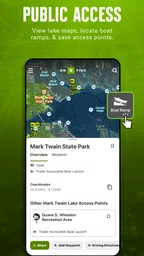
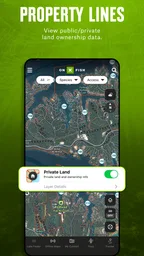
- Map layers help you explore public access and nearby facilities.
What could be better
- Many advanced mapping features require a paid subscription.
- Coverage and map detail can vary across fishing locations.
- Some data may not be current enough for changing conditions.
- The wide range of map layers can take time to learn.
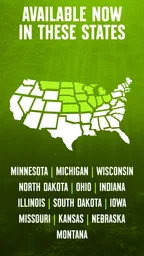
- The Midwest focus limits its usefulness for anglers elsewhere.





