
Olive Garden Italian Kitchen review
 Analysis by Appsdrops
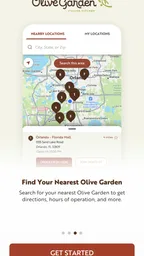
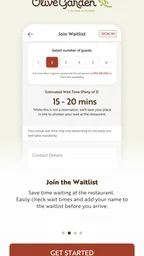
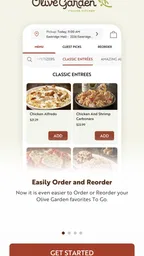
I see the Olive Garden Italian Kitchen app as a practical companion for people who already plan to eat at Olive Garden, rather than an app that needs to stay on their phone for everyday meal ideas. Its value is in handling restaurant-related tasks from a mobile device: finding a location, getting onto a wait list, placing a ToGo order, and buying gift cards. Those jobs are most useful when I have a clear plan and a working internet connection.
That focus makes it easier to judge what the app is for. It is a free Food & Drink app from Darden Restaurants, Inc., rated for Everyone, with an average rating of 3.5 from around 17,000 ratings. It has been installed over a million times, so it has a substantial audience, though the middling average suggests experiences are not uniformly smooth. I would treat it as a convenience tool for a particular restaurant, not as a replacement for general restaurant-search or delivery apps.
Where a reliable connection matters
The most consequential moments are the ones that involve current restaurant information or an action the restaurant needs to receive. Looking for a nearby Olive Garden, joining a wait list, and submitting a ToGo order all depend on the app being able to communicate. I would avoid leaving any of those steps until the last second in a place with weak reception, especially if I am coordinating a meal with other people.
A useful habit is to choose the restaurant before starting a time-sensitive task. If I am heading out for dinner, I can check the location while I still have a stable connection, then handle the wait-list step with enough time to respond if the app needs another try. This is not a guarantee of faster seating; it simply reduces the chance that I am troubleshooting on the sidewalk while everyone waits.
Ordering ToGo also benefits from a little preparation. I would review the order before submitting it, confirm that I have selected the intended restaurant, and wait for the app to finish communicating before switching away. A slow connection can make a request feel uncertain, and repeatedly tapping a submission button is a poor way to resolve that uncertainty. It can create confusion about whether the order went through.
The app’s restaurant-specific focus is both its strength and its boundary. If I already know Olive Garden is where I want to eat, it gives me a direct route to relevant tasks. If I am comparing several nearby restaurants or deciding what kind of food I want, a broader maps or dining app is more useful. Those alternatives can help with discovery; this one is better understood as a way to interact with Olive Garden once that choice has been made.
Using it while plans are changing
Phones often get used in less-than-ideal conditions: one person is driving, another is walking into a busy shopping area, and the group is trying to decide where to stop. In that kind of everyday scenario, I would have one passenger handle the app rather than asking the driver to navigate it. A restaurant search or ordering flow requires attention, and a quick meal plan is not worth unsafe phone use.
For a family arriving around a busy meal time, the wait-list option could be the most useful part. I would use it while the group is still together and able to make decisions, rather than assuming one person can manage the process without checking in. The app can help with the joining step, but it cannot remove the need to follow the restaurant’s instructions or adapt if plans change.
For a pickup meal, the app makes more sense when the order is already fairly settled. I would use it to arrange the ToGo task, then keep the restaurant and pickup plan clear among the people sharing the meal. If the group is still debating dishes or has complicated requests, taking a moment to verify everything before sending the order is more sensible than trying to fix confusion later.
Buying a gift card is another use that may suit a connected moment at home rather than a rushed trip. A stable connection gives me more room to check the details on screen before completing a purchase. I would not start that process while moving between buildings or relying on an unreliable public connection, since gift-card transactions deserve the same careful review as any other purchase.
What to do when a step stalls
Connection problems can make a restaurant app feel unreliable even when the issue is temporary. If a page takes too long to load, I would first check whether the phone has a usable connection, then give the current screen a moment before trying again. For an order or other submitted action, I would look for a clear confirmation before repeating the request. The important distinction is whether I am still browsing or whether I may already have sent something to the restaurant.
If the app does not recover promptly, I would switch to a sensible fallback instead of tapping through the same step over and over. For a time-sensitive meal, that might mean contacting the restaurant directly or using another available way to place the request. For location planning, a maps app can help me find the restaurant, but it is not a substitute for the Olive Garden app’s restaurant-specific wait-list or ordering actions.
This is where expectations matter. A mobile app can make it easier to start a task, but a weak signal, an interrupted session, or a change in the restaurant plan can still require human follow-up. I would not assume that a screen that appears unfinished means an action definitely failed, nor assume that a tap succeeded without confirmation. Taking a few seconds to establish the status is safer than creating a duplicate request.
When plans change after I have started, I would check what the app currently shows before beginning a new transaction. That small pause is especially worthwhile for ToGo orders and gift cards, where repeating an action could create an avoidable problem. The practical lesson is simple: use the app while you can pay attention, and give each important step time to resolve.
Keeping mobile use deliberate
Because the app’s main tasks are tied to restaurants, I would open it when I have a specific purpose rather than leave it running as a general dining dashboard. That makes the experience easier to manage and avoids unnecessary screen time while travelling. If I only need directions, a familiar maps app may be quicker; if I need an Olive Garden action, this app is the more relevant place to start.
People who are careful about mobile data may prefer to do their browsing and order review over a trusted Wi-Fi connection when one is conveniently available. I would not rely on an uncertain connection for a final submission, though. The useful trade-off is to save data where convenient without sacrificing confidence that a time-sensitive action has completed. I would also avoid switching networks in the middle of an order if I can help it.
For someone with limited time, the best workflow is to separate planning from execution: decide where to go, open the app when ready, complete one task, and check the result. That is more dependable than rapidly moving among location search, ordering, and messages while a group waits. The app is most helpful when it reduces small bits of friction, not when it becomes another thing to monitor constantly.
The current version is 8.10.0, and the app requires Android 11 or later. That matters if an older phone is part of the household plan: I would check compatibility in the app store before relying on it for a trip. Since access to the app’s core restaurant tasks is the point, finding out that a device cannot run it while already on the way is an avoidable inconvenience.
Who will get the most from it
I would recommend it to regular Olive Garden diners who want a direct way to handle a wait-list visit, arrange a ToGo meal, locate a restaurant, or buy a gift card. It is also a reasonable choice for someone organizing a family dinner who would rather complete restaurant-related steps on a phone than handle every detail in person. The app’s narrow purpose is an advantage for those users: the tasks are connected to one familiar restaurant.
I would skip it if I rarely visit Olive Garden, mainly want to compare restaurants, or prefer making every order by speaking with staff. In those cases, a general dining app, maps tool, or direct conversation may fit better. It is also not the right tool for solving a weak-signal problem by itself; if a request is urgent and the connection is poor, a backup method is sensible.
The rating and volume of feedback give a useful, if imperfect, signal about how people experience it. Around 5,500 written reviews accompany the ratings, and the 3.5 average is enough to make me cautious about expecting a flawless experience on every device or connection. I would install it for a concrete Olive Garden need and judge it by whether those particular tasks work well for me, rather than treating its rating as a promise.
A useful companion, not a dining essential
My overall view is that the Olive Garden Italian Kitchen app is worthwhile when it fits a real plan: finding the restaurant, joining a wait list, arranging ToGo food, or purchasing a gift card. Its biggest practical trade-off is that these conveniences rely on a phone and a functioning connection at the moment they matter. A little preparation—choosing the location first, reviewing an order before sending it, and checking for confirmation—can make the experience less stressful.
I would keep it as an occasional-use tool if Olive Garden is already part of my routine, but I would not depend on it as my only option when time or connectivity is tight. For restaurant discovery, broader tools offer more choice; for Olive Garden-specific tasks, this app has the more direct purpose. Used with realistic expectations, it can make a planned visit or pickup easier without pretending to replace good timing, careful checking, or a backup plan.
What we like
- The menu includes familiar Italian-American favorites for varied tastes.
- Online ordering makes it easy to arrange pickup or delivery.
- The rewards program offers perks for eligible purchases.
- Family-sized meal options can simplify group dining.
- The app helps users find nearby Olive Garden locations.
What could be better
- Menu prices and available dishes may vary by location.
- Delivery availability depends on the restaurant and service area.
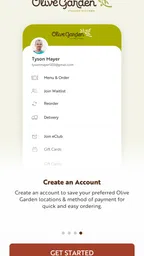
- Some app features may require an account to use.
- Rewards terms can limit how and when perks are redeemed.
- The app may not reflect real-time wait times at every location.





