




Offline Maps & AI Trip Planner review
 Analysis by Appsdrops
I look at a navigation app differently when a trip leaves familiar streets. A route can be clear at home and much less useful in a basement garage, on a rural road, or when a mobile connection drops just as I need the next turn. Offline Maps & AI Trip Planner brings offline map downloads together with trip planning, place discovery, and car tracking, so it aims to cover several parts of getting around rather than only drawing a route. My main advice is to treat its offline maps as a planning tool you should prepare in advance, not assume that every connected feature will work without a signal.
Where a connection changes the experience
Offline Maps & AI Trip Planner is a free Maps & Navigation app from Aykonu. Its average rating is 4.0 from around 1.7 thousand ratings, and it has passed 500 thousand installs. Those figures suggest that it has attracted a sizable audience, but they do not tell me whether a particular route, place search, or phone will suit it. The practical question is how much of your journey you can prepare before you lose reception.
When a connection is available, the app’s combination of trip planning and place finding can help with the early stages of a journey: deciding where to go, considering stops, and getting oriented before setting off. The AI planning element may be useful when I have a destination but want help shaping the trip, rather than manually assembling every idea from scratch. I would still review any proposed route and stop choices myself. An automated suggestion is a starting point, not a substitute for checking opening hours, road restrictions, or whether a stop fits the day.
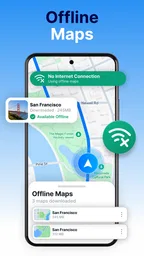
The distinction between a downloaded map and a fully independent navigation experience matters. The app promotes offline map downloads, but that alone does not establish that every search, route calculation, AI feature, or live update remains available without internet. I would download the area I expect to visit while connected, then check what the app can still do before relying on it. That small test is especially worthwhile before a long drive or a trip through patchy coverage.
Place discovery is another moment where connectivity can affect expectations. Looking for a café or landmark while online is different from searching for one after the signal has gone. If I know I will want particular stops, I would find and note them ahead of time rather than assume a downloaded map includes every detail I might need. That is not a reason to avoid the app; it is a sensible way to separate what I have prepared from what still depends on a live connection.
Prepare the journey before leaving
A useful workflow is to plan the broad journey while connected, download the map for the places I expect to cross, and then open the relevant area once more before departure. If the day includes an unexpected detour, I would try it while I still have reception rather than waiting until I am already off the main road. This is one of the strongest practical advantages of an offline-map option: it encourages me to think ahead instead of treating mobile data as guaranteed everywhere.
Map downloads also need a little housekeeping. I would choose only the regions that matter for the trip, particularly if storage space is tight, and remove old areas when they are no longer useful. A map can take up space even when I am not using it, while downloading too late can be inconvenient if the connection is slow. The app is more appealing to a careful planner than to someone who expects every part of navigation to configure itself at the last second.
How it fits different mobile situations
For a daily city commute, a familiar navigation app that already handles live traffic and quick rerouting may remain the easier choice. Offline Maps & AI Trip Planner becomes more interesting when I expect to travel beyond my usual area, want to prepare maps before leaving, or prefer having trip planning and car tracking in one place. It can be a useful companion for a weekend drive, a holiday road trip, or exploring an unfamiliar town where I do not want to depend entirely on mobile coverage.
Consider a realistic travel day: I drive from home to a trailhead, stop in a small town for lunch, and then continue through an area where reception is inconsistent. I would use the connected part of the day to plan the route and investigate the lunch stop, download the map covering the drive, and check the downloaded area before setting out. If I later change plans, I would not count on every new place search or AI suggestion being available offline. I would have a fallback destination or a note of the key stop instead.
The car-tracking feature may also appeal to people who want a simple way to keep track of where they parked or locate their vehicle as part of a journey. I would treat it as an extra convenience, not as a replacement for remembering where I left the car or for any dedicated vehicle-security system. Its usefulness depends on the situation and on how the feature behaves on your device, so it is worth trying in an ordinary parking situation before depending on it in a crowded event or unfamiliar garage.
For people who travel with a group, an offline map can be useful even when only one person is navigating: the driver can prepare the route, while others can help check the plan and likely stops before departure. I would avoid handling the phone while driving; the best time to download, inspect, or revise a route is while parked. That is a small but important distinction between an app that supports a trip and a safe way to use it.
When things go wrong, and how I would recover
If the connection disappears, my first move would be to stay with the map area already prepared and avoid repeatedly refreshing online-dependent screens. I would check whether the route remains visible and whether the app can recalculate locally before making a new turn based on an assumption. If it cannot provide what I need, I would use a backup navigation option or stop somewhere safe to regain a connection. No navigation app should encourage a driver to troubleshoot while moving.
Before a trip, I would also make sure the phone has enough battery and that the downloaded region actually covers the route, including the intended destination and likely detours. An offline map does not help if the journey runs beyond its saved area. A quick check at home or in the parking lot is far less stressful than discovering a gap after entering a low-signal stretch.
There is a trade-off here compared with relying on a conventional online-first map service. Live conditions and immediate searches can be valuable when they are available, while prepared maps help reduce the risk of being left with nothing when service fades. I would not expect one approach to replace the other in every situation. For a commuter who constantly changes destinations and needs current traffic, an online-first alternative may be better. For a traveler who knows the general region in advance, offline preparation can be more reassuring.
Keep data use and purchases in perspective
Downloading maps while on a stable connection is the most straightforward way to avoid using mobile data for that preparation on the road. It also gives me a chance to choose the areas deliberately rather than downloading broadly without thinking about storage. I would still expect online activities such as looking up new places or using connected planning tools to need a connection unless I have tested otherwise. That distinction helps avoid confusing “maps are downloaded” with “the entire app is offline.”
The app is free to install, with in-app purchases listed from $4.99 to $29.99 per item. I would begin with the free experience and only consider a purchase if I understand what it unlocks and know that I will use it. For an occasional traveler, paying for an extra may not be worthwhile; for someone who plans trips regularly, a relevant upgrade could make more sense. I would check the purchase details in the app before deciding rather than assume that a paid item is necessary for basic map preparation.
Its current version is 1.0.5, and it requires Android 7.0 or later. The content rating is Everyone, which makes the stated age classification broad, though parents should still decide whether any app is suitable for a particular child. These details make it easier to check compatibility before installing, especially on an older Android phone that may be used as a travel backup.
Who should choose it—and who should not
I would recommend Offline Maps & AI Trip Planner to someone who likes to prepare before travelling and wants map downloads alongside trip-planning tools, place discovery, and car tracking. It is particularly worth considering for road trips where coverage may vary, provided the user tests the offline workflow beforehand. The AI element can add convenience when turning a broad idea into a plan, but I would keep final judgement over route choices and stops in my own hands.
I would skip it as my primary navigation choice if I depend on live traffic, frequent last-minute searches, or seamless rerouting and have not confirmed how those tasks behave with my connection. It may also be unnecessary if I already have a trusted app that handles my everyday routes well and I rarely travel outside strong coverage. A dedicated offline navigation tool could suit someone whose only priority is dependable routing without the extra planning functions; this app’s appeal is its broader mix, not a promise that every feature works in every network condition.
Overall, I see this as a useful option for travelers willing to prepare their maps and verify their route before leaving. Its best case is not “never worry about internet again,” but “reduce how much a weak signal can disrupt a trip.” That is a meaningful benefit when used with realistic expectations. Download the areas you need while connected, test the route before departure, and keep a backup plan for searches or changes that need the internet. With that routine, the app’s offline focus can make unfamiliar journeys feel more manageable without asking me to trust connectivity that may not be there.
What we like
- Downloadable maps remain available without mobile data.
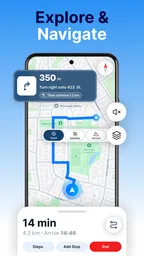
- Turn-by-turn navigation helps guide drivers on unfamiliar roads.
- The AI planner can organize a trip around selected interests.
- Saved places make it easier to keep track of planned stops.
- Route planning can help travelers prepare before leaving.
What could be better
- Offline maps need to be downloaded before losing internet access.
- Map downloads can use substantial storage space.
- Offline searches may show fewer places than online searches.
- AI-generated itineraries may need manual adjustments.
- Navigation accuracy depends on up-to-date map data.





