



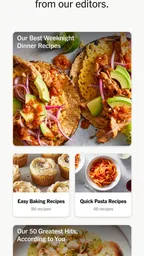
NYT Cooking: Quick Tasty Meals review
 Analysis by Appsdrops
I turn to a recipe app when I need dinner to feel manageable, not when I want another complicated project. NYT Cooking: Quick Tasty Meals is aimed at that everyday gap: finding something appealing, checking how it comes together, and deciding whether it fits the time and ingredients I have. My impression is that it works best as a trusted cooking companion rather than a magic shortcut. The recipes can make planning easier, but choosing, shopping, and cooking still take real effort.
Finding a useful recipe without turning dinner into a research session
Made by The New York Times Company, this Food & Drink app has a clear editorial identity: it is a recipe library meant to help people cook at home, supported by practical kitchen guidance. That focus matters. Compared with a general recipe search, where results can vary widely in quality and style, NYT Cooking gives the experience a more curated feel. I would reach for it when I want a dependable starting point, especially if browsing a flood of unrelated results usually leaves me less certain than before.
Its appeal is not simply that recipes are available in one place. The more useful promise is a path from an idea to a workable meal: choose a dish, understand the method, and use the app as a reference while cooking. For a weekday cook, that can reduce the mental load of deciding what to make. It does not remove the need to check ingredients or judge whether a recipe suits your schedule, though. A meal described as simple can still involve preparation, cleanup, or a cooking time that does not fit a rushed evening.
Speed, in this context, is mostly about how quickly I can narrow down a decision—not a guarantee that every recipe is fast. If I have only a short window, I would look for a recipe whose ingredient list and steps are immediately practical, rather than assume the app’s general emphasis on accessible cooking means every option is a quick one. That small distinction helps avoid the familiar mistake of starting a promising recipe and only then discovering that its preparation is more involved than expected.
How I would use it on an ordinary evening
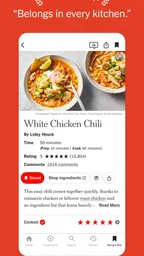
Picture getting home with a few ingredients and no plan. I would open the app, look for a dish that suits what I already have, then read the method and ingredient list before committing. The key step is that last check: it is easy to be drawn in by a recipe’s name or photo, but the ingredient list tells me whether I can actually make it tonight. If there is a specialist item I would need to buy, I can save the idea for another day instead of improvising halfway through.
Once cooking begins, a digital cookbook is most useful when I treat it as a reference point rather than something to skim once and forget. I would read the full method before starting, note any steps that need to happen early, and keep the recipe available for the moments when timing matters. That habit is particularly helpful with unfamiliar dishes: it prevents a recipe from feeling slow simply because I have to stop repeatedly to work out what comes next.
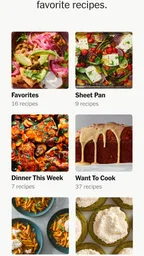
A less obvious advantage of a curated collection is that it can help with repeat decisions. Instead of searching from scratch every time, I can use the app to revisit dishes that suited my household and build a more realistic personal rotation. That is a better use of a large recipe library than endlessly browsing it. The trade-off is that a digital collection only becomes genuinely convenient when I put in the small effort to remember which recipes were practical for me.
When browsing becomes the slow part
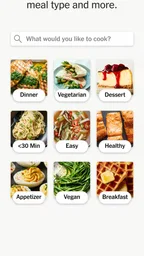
The app is likely to feel most useful when I have a clear boundary: a meal for tonight, a particular ingredient, or a style of cooking I am in the mood for. With no such boundary, exploring recipes can become its own activity. That is not a flaw unique to this app, but a large library can make indecision worse if I keep opening new possibilities instead of choosing one. I would set a simple rule for myself: shortlist a couple of realistic options, compare their ingredients and steps, and stop browsing once one fits.
Heavy use also changes what matters. If I am cooking several times a week, the question is less whether I can find an appealing dish and more whether the recipes suit my routine. Do I have time for the preparation? Can I find the ingredients locally? Is the method comfortable for my skill level? The app can help me consult recipes and kitchen advice, but it cannot make those personal constraints disappear. I would not assume that a well-written recipe automatically suits a particular budget, dietary need, or cooking setup.
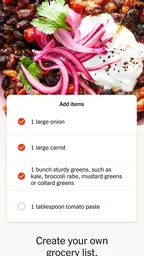
For meal planning, I find the most practical approach is to plan around ingredients that can be used more than once. A recipe app can supply ideas, but I still need to check whether the plan makes sense across several meals and whether anything will be left unused. This is where a little restraint helps: choose dishes that match the week ahead, rather than collecting ambitious recipes that look good but compete for time and pantry space.
Reliability is about having a clear cooking reference
When I am in the middle of cooking, reliability means being able to return to the instructions and understand them without second-guessing what I read earlier. A dedicated recipe app is better suited to that task than a general web search that mixes recipes, commentary, and unrelated pages. NYT Cooking’s cookbook-style focus makes it a natural place to keep the cooking process centered on the dish at hand. I would still read the method before beginning, particularly for a recipe I have not made before; that is a useful safeguard in any digital cookbook.
I would avoid making strong claims about how quickly the app loads or how consistently it behaves across every phone. Those experiences can depend on the device and connection. In normal use, my practical expectation would be straightforward: open the recipe before I start, make sure the instructions are available on screen, and avoid leaving an unfamiliar step until the last moment. That preparation matters more to a smooth cooking session than assuming every app will behave identically in every kitchen.
The app’s version is 2.142.0, but a version number by itself does not tell me how it performs on a particular device. The sensible approach is to keep the app current through the app store and try it during a low-pressure moment before depending on it for an important meal. If something interrupts a session, having already reviewed the recipe makes it easier to recover: I know the next step and can continue without needing to reconstruct the whole method from memory.
Subscriptions, access, and who should choose another tool
The app is free to install, and it offers in-app purchases ranging from $4.99 to $299.99 per item. I would check the purchase and access details in the app before building my routine around particular recipes or services. That is especially important if I only want occasional cooking inspiration and do not want to pay for ongoing access. The headline cost of installation is not the same question as what a regular user may choose to buy.
Its audience rating is Everyone, so the app is presented for a broad audience. That does not mean every recipe will be suitable for every household; I would still check ingredients and adapt only where I know the change will work. The app has a 4.9 average from around 20,000 ratings, and more than a million installs. Those figures suggest it has found a substantial audience, but they should be a starting point for deciding whether its style suits you, not a promise that each recipe will match your taste.
I would skip it if my main need is a bare-bones shopping list, a highly specialized diet planner, or an offline-first cooking tool. It is also not the best fit for someone who prefers to search the open web for one specific recipe and has no interest in a dedicated cookbook. A free-form search can be faster for a very narrow question, while a personal notes app may be better for someone who already has a settled collection of family recipes. NYT Cooking makes more sense when curated cooking ideas and kitchen guidance are part of the appeal.
Device limits and realistic expectations
The app requires iOS 11 or later. Before installing, I would check the operating system on an older phone or tablet rather than assume it will run on every device. On a compatible device, I would expect the recipe-reading task to be the main demand, not treat the app as a reason to upgrade hardware. I cannot infer battery use, storage needs, or performance from the version requirement alone, so I would judge those in everyday use rather than rely on guesswork.
Screen size can affect how pleasant a recipe is to follow, even when an app technically runs. A larger display may be easier to glance at from a counter, while a phone is convenient to keep nearby. Either way, I would set the device somewhere it can be checked without interrupting a cooking task, and read the method first if I expect wet hands or a crowded workspace. These are small habits, but they make a phone-based cookbook less distracting and reduce the chance of losing my place.
For someone who plans meals around a family or cooks frequently, the value is in making recipe discovery and reference part of a repeatable routine. For an occasional cook, it can still be useful, but the paid options and the time needed to browse are worth weighing against simpler alternatives. If I already know what I want to make, a quick targeted search may get me there sooner. If I want a reliable source of ideas and guidance, a dedicated cookbook experience is more appealing.
My performance verdict: useful when the meal is the priority
NYT Cooking is strongest when I use it with a specific need in mind: choose a recipe that fits the evening, check the ingredients and steps, then keep the instructions close while I cook. Its focused identity distinguishes it from general search, and its recipe-and-guidance approach makes it more than a place to collect attractive meal ideas. The main friction is not a complicated interface I can prove, but the ordinary challenge of browsing too long, discovering a recipe needs more effort than expected, or deciding whether paid access fits my habits.
I would recommend NYT Cooking: Quick Tasty Meals to someone who enjoys cooking but wants a more organized source of ideas than scattered search results. I would be more cautious if you need guaranteed fast dinners, strict dietary planning, or a complete shopping and meal-management system. The best way to judge it is to try a recipe on an ordinary night, read the full method before starting, and notice whether its style makes your decisions easier. For me, that is the right measure of performance: not an unsupported claim about speed or stability, but whether the app helps dinner move from indecision to the table with fewer avoidable surprises.
What we like
- Search recipes by ingredient to make use of food already on hand.
- Save favorites for quick access when planning meals.
- Clear step-by-step instructions make recipes easier to follow.
- Recipe ratings and reviews help guide your choices.
- Meal planning tools can help organize what to cook next.
What could be better
- A subscription may be required to access many recipes.
- Some recipes call for specialty ingredients that are hard to find.
- The large recipe catalog can take time to browse.
- Ads or subscription prompts may interrupt browsing.
- Some recipes require long preparation or cooking times.





