

NFL Collect by Topps® review
 Analysis by Appsdrops
I tend to judge a sports collecting app by more than the names on its cards. I also want to know what kind of routine it encourages, where spending enters the experience, and whether I can enjoy it without treating every notification or offer as something I need to act on. NFL Collect by Topps® is a digital football card app from The Topps Company, Inc., built around collecting and trading rather than watching games or managing a fantasy roster. That distinction matters: it is aimed at fans who like the hobby side of football, not people looking for scores, analysis, or a complete substitute for physical cards.
What kind of collecting experience it offers
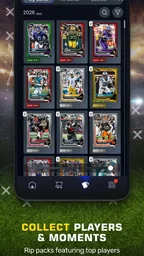
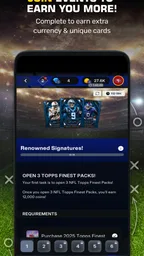
The app’s appeal is the familiar collector loop: look for cards, build a collection, and connect that collection to other fans through trades. The football focus gives the activity a clear center, while the chance to redeem tickets for hobby boxes adds a physical-collecting thread to what is otherwise a digital pastime. I like that this makes the app feel more tied to the broader card hobby than a simple gallery of images.
It is free to download and is rated for Everyone, which makes it easy to try without an upfront purchase. Its average rating is 4.6 from around 7,800 ratings, and it has passed 500,000 installs. Those figures suggest a sizable audience, but they do not tell me whether a particular player’s cards are easy to find or whether a trade will suit my collection. I would treat them as context, not as a promise about the experience.
A practical point for new users: decide what “a good collection” means to you before chasing every new card. You might focus on a favorite team, a handful of players, or cards you simply like visually. That boundary helps keep collecting enjoyable and makes trades easier to evaluate. Without one, the steady appeal of adding something new can turn into a vague feeling that the collection is never finished.
Trust starts with knowing what you are choosing
For a collection app, trust is not just about whether the cards look polished. It is also about being clear-eyed when deciding whether to create an account, make a trade, or spend money. I can say that the app is free to start and that in-app purchases range from $0.99 to $249.99 per item. That is a broad enough range to make deliberate spending habits important, especially for anyone who tends to buy digital packs impulsively.
I would not treat the free entry point as evidence that every part of collecting can be completed without spending. Instead, I would first explore what is available at no cost and decide whether the collecting loop itself is satisfying. If a purchase becomes tempting, pause and ask whether it supports a specific goal—such as filling a gap in a collection—or is just a reaction to wanting the next new item. That small check is useful in any collectible app, but especially one where purchasing is built into the experience.
The app has been available since September 3, 2014, and its current version is 40.5.0. For me, that history makes it a more established option than a newly launched collectible experiment, but age alone does not establish how any particular account or data choice works. I prefer to make privacy decisions based on the prompts and controls I can actually see, rather than assuming that a long-running app must handle every concern in a certain way.
Check the choices that appear on your device
One useful first step is to read each permission prompt before accepting it. A sports card app may be enjoyable without every possible device permission, but the right choice depends on what the app asks for and which features you want to use. I would avoid granting access automatically just to get through setup. If a prompt is unclear, take a moment to consider whether the requested access makes sense for the action you are trying to complete.
The same caution applies to account setup and data choices. Look for the account, privacy, and notification controls that are actually presented in the app or in your device settings. Review them when you first settle in, then revisit them if your use changes. I cannot responsibly promise a particular deletion option, sign-in method, or data policy without seeing it, so I would not make an account decision on assumptions. The practical habit is simple: read the available choices and keep only the access and alerts you want.
Notifications deserve a little thought because a collecting routine can become more demanding when it keeps calling you back. If alerts are available, I would start with the least intrusive settings and enable only those that help me follow an activity I genuinely care about. A collector who checks in on weekends may not need the same reminders as someone who actively trades. This is a small way to keep the hobby on your schedule rather than letting the app set it.
Trading works best when you bring a plan
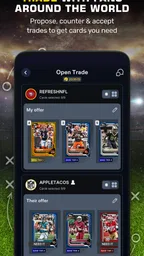
Trading with other fans is one of the more distinctive parts of the experience, but it also asks for judgment. A card’s value to you can be personal: it might complete a team grouping or feature a player you follow. That does not automatically make it an equal trade from another collector’s point of view. Before accepting an offer, I would compare what I am giving away with what I actually want, rather than treating a trade as good merely because it adds a card.
A simple workflow helps: choose a collection goal, identify which cards you are willing to trade, and keep a short mental list of the players or teams you want next. Then consider each offer against that list. This avoids one common trap of digital collecting—making a string of casual trades and later realizing that the collection has become larger but less personal. If you enjoy negotiation and community interaction, that process can be part of the fun; if you want a solitary cataloging app, the social layer may feel like extra work.
It is also worth keeping trade conversations and account decisions separate from pressure. I would not share personal details just to make a deal feel more trustworthy, and I would step away from any interaction that makes me uncomfortable. The useful principle is to trade cards, not private information, and to rely on the controls the app actually exposes for managing your account or interactions.
Tickets, hobby boxes, and spending boundaries
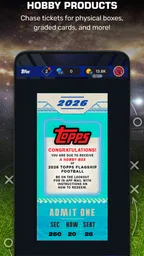
The possibility of redeeming tickets for hobby boxes gives the app a bridge to physical cards, which may be a strong draw for collectors who enjoy both formats. I would treat tickets as a reason to understand the redemption process before investing time or money around them. Read the conditions shown when a redemption is offered, check what is required, and make sure the reward is something you genuinely want. A ticket or redemption opportunity is not automatically worthwhile just because it sounds closer to a traditional hobby box.
Purchases are another point where a little planning can protect the experience. Since individual in-app items can cost as much as $249.99, I would set a personal limit before browsing offers, and make sure any purchase is intentional. That is particularly useful if you are collecting for a child: the Everyone age rating describes the content suitability, but it does not remove the need for an adult to review purchase settings and supervise spending. Free-to-play access is a reasonable way to test whether the app holds your interest before deciding whether to spend at all.
I would also separate the satisfaction of collecting from the hope of obtaining a specific outcome. If you are happy to browse, trade, and gradually shape a collection, the app’s format may suit you. If you only enjoy it when you get a particular card or reward, purchases and chance can make the experience frustrating. Keeping that distinction in mind is more useful than trying to predict what any single pack or offer will deliver.
How it compares with physical cards and other football apps
Compared with physical collecting, a digital collection is easier to browse in small spare moments and does not require sorting a stack of cards at home. Trading through the app can also connect you with fans beyond your immediate circle. The trade-off is that the experience depends on the app and its available digital activities; it does not replace the tactile pleasure of handling a physical card or independently organizing one’s own collection.
Compared with score, news, or fantasy football apps, this is a different kind of tool. Those apps answer questions about games, players, or lineups. This one is for collecting and trading. I would not install it as my main football companion if what I need is live updates or analysis. Likewise, people who already prefer a physical-only hobby may find that a digital collection does not scratch the same itch.
For a realistic everyday use, imagine having a few minutes during a commute or while waiting for an appointment. You can check the collection, decide whether a card fits your chosen theme, and consider whether a trade advances it. That is a natural use case because it turns short idle periods into light hobby time. It is less suited to someone who wants a quick, definitive answer about which player is performing best right now.
Who I would recommend it to
I would recommend giving it a try if you follow the NFL and enjoy collecting more than simply viewing highlights. It should be especially appealing if you like comparing cards, building a themed collection, and trading with other fans. The free download makes it possible to see whether that loop clicks before spending, and the hobby-box redemption angle may interest people who already enjoy physical cards as well as digital ones.
I would be more cautious if you dislike in-app purchases, feel compelled to complete every collection, or prefer football apps that deliver news and game information. The range of purchase prices makes a budget worthwhile, and trading requires patience and clear preferences. If social exchanges are not your thing, the app’s collecting focus may still be appealing, but you should not expect it to feel like a purely offline album.
Overall, I see NFL Collect as a focused digital hobby rather than an essential football utility. Its strongest case is for fans who enjoy the small decisions behind collecting—what to keep, what to trade, and which players deserve space in a personal collection. My cautious recommendation is to start free, review the choices and permissions shown on your device, set spending boundaries before browsing paid items, and build toward a collection you actually care about. If that measured approach sounds enjoyable, it is worth exploring; if you want scores, analysis, or physical cards only, another kind of football experience will serve you better.
What we like
- Official NFL and team branding adds authenticity to the collecting experience.
- Digital cards are easy to organize and browse in one place.
- A free-to-play option lets users try collecting without an upfront purchase.
- Limited-time releases can make the collection feel fresh.
- The familiar card format is appealing to football fans and collectors.
What could be better
- Some cards or features may require in-app purchases.
- Building a valuable collection can take considerable time.
- Limited releases may be difficult to obtain after their events end.
- The experience may feel less engaging to players who do not follow the NFL.
- Card values and availability can change over time.





