

NFHS Network review
 Analysis by Appsdrops
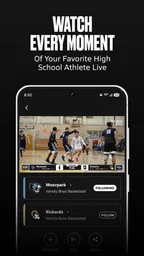
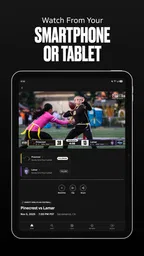
When I want to follow a high school game but can’t be there in person, I look for a way to watch that doesn’t turn the event into a complicated project. NFHS Network is built for that specific purpose: it brings high school sports broadcasts together in one app. My view is that its usefulness depends less on flashy extras and more on whether it helps you get from “there’s a game on” to watching the right team without unnecessary fuss.
It’s a free sports app from NFHS Network, with in-app purchases priced from $9.99 to $79.99 per item. The audience is broad: the age rating is Everyone, and the app has reached over 500,000 installs. Its average rating is 3.9 from around 9,700 ratings, which suggests a substantial audience but also a mixed experience. That feels reasonable for a service where performance can depend on the broadcast and the viewer’s connection as much as the app itself.
Getting to a game without wasting the first quarter
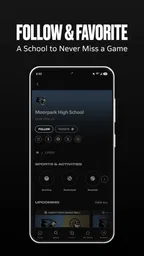
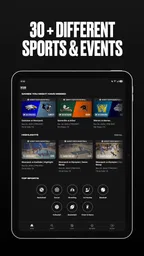
The app’s appeal is straightforward: it focuses on high school sporting events from across the country rather than trying to be a general-purpose sports hub. That focus is useful if you’re a parent, relative, student, coach, or fan trying to keep up with a school team. If you mainly follow professional leagues, scores, or broad sports headlines, a conventional sports news app will probably suit you better.
Speed matters here in a practical way. A broadcast app can feel slow even when its screens open promptly if finding the right event takes too many steps. I’d approach it with the school and matchup in mind before opening the app, then check the event details before settling in. That small habit can save frustration when several games are taking place around the same time.
I wouldn’t treat “fast” as a guarantee that every stream starts instantly. Live video has more moving parts than a score page: the phone needs a usable connection, the event needs to be available, and the broadcast itself must be running. If you’re opening the app from the car park just as a game begins, give yourself a little time to locate the event and get playback going rather than waiting until the opening whistle.
One useful way to plan is to open the app before leaving home and confirm that you can reach the event you care about. That doesn’t promise the connection will remain strong at the venue, but it separates a navigation problem from a network problem. For a family member watching from another town, checking ahead also gives time to sort out purchase decisions rather than making them while the game is already underway.
What the app is best suited to
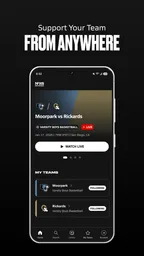
The strongest use case is following a particular high school event, especially when travel, work, or distance rules out attending. Imagine a parent finishing a shift while a child’s away game is already underway. The phone offers a way to check for the broadcast and watch from home or another suitable place, instead of relying on second-hand updates. That is a meaningful convenience, even if it cannot reproduce the atmosphere of being in the stands.
It can also help relatives who live far from a school keep a closer connection to a student’s season. Rather than asking someone at the game to send updates, they can look for the event themselves. I’d still keep expectations specific: this is about watching school sports when a broadcast is available, not a promise that every team or every event will be covered.
That distinction is important when deciding whether to pay. The app is free to install, but individual in-app purchases range from $9.99 to $79.99. Before committing, I’d check that the event or viewing option I want is actually the one being offered and consider how often I expect to use it. A one-off game may not justify the same expense as following a season, and the purchase range makes it worth thinking that through rather than assuming all access is included.
When a live broadcast gets demanding
The heaviest-use moment is obvious: a busy evening when you want to start a live game, keep watching through a long stretch, and perhaps move between events. Video puts more pressure on a phone than checking a schedule or reading a score. A weak mobile signal, crowded Wi-Fi, or a low battery can matter more than the app’s menus, so I’d choose a stable connection and plug in for an extended viewing session when possible.
If playback stutters, I’d first check the connection rather than repeatedly closing and reopening the app. If other video or pages are also struggling, the network is a likely contributor. If everything else works but this event does not, backing out once and returning to the event is a reasonable next step. I wouldn’t keep repeating that cycle indefinitely; after a couple of sensible checks, it may be better to wait briefly or follow the game another way.
For people watching while moving between locations, the trade-off is sharper. A stream that works well on a reliable home connection may be less dependable on a changing mobile signal. If the game matters enough that missing action would be upsetting, I’d avoid treating a commute as the main viewing plan. Use the app when you can stay in a place with a steadier connection, and use another source for quick updates if uninterrupted video is not realistic.
Long sessions also make the phone’s own limits more noticeable. Screen brightness, video playback, and an active connection can drain a battery faster than occasional score checks. I can’t infer a particular battery impact for every device, but it’s sensible to start with a good charge and have power nearby for a full game. If storage or background apps are already straining an older phone, closing unneeded apps before a stream is a practical precaution, not a special requirement of this service.
Reliability is more than whether the app opens
For a live sports app, I judge reliability by whether I can find the intended event, begin watching, and stay connected through the part I care about. The app is designed around high school broadcasts, but a viewer’s experience can still vary with event availability, the stream, device condition, and connection quality. I’d avoid assuming that a problem in one of those areas means the whole service is unusable.
A useful troubleshooting order is to check that you selected the right event, confirm the phone has a working connection, and then try returning to the stream once. If the issue appears limited to one broadcast, that points toward a different problem than an app that will not open at all. Keeping this order in mind prevents the familiar but unhelpful routine of tapping the same controls repeatedly without learning anything.
Recovery is especially relevant when a game is already in progress. If playback stops, returning to the event may be worth trying, but I would not count on every interruption being recoverable without losing a moment. For a close game, consider having a backup way to follow the score, such as updates from someone at the venue. That doesn’t replace the broadcast; it simply reduces the chance that a temporary video issue leaves you completely out of the loop.
The rating picture also encourages a measured expectation rather than blind confidence. With a 3.9 average and around 1,900 written reviews, feedback is mixed enough that I would treat the app as a useful option to test, not a guaranteed flawless viewing experience. The current version is 3.6.14, and the app first appeared on July 1, 2019. Those details help identify the product, but they don’t tell me how it will behave on a particular phone or network.
Device fit and practical limits
The minimum operating-system requirement is 7.0, so older software may be a compatibility barrier. Before relying on the app for an important event, I’d check that the device can install and run the current release. An older phone can also feel less comfortable for live viewing if it struggles with video generally, even when it meets the minimum requirement.
Screen size changes the experience too. A phone is convenient for a quick check or watching away from home, but a larger screen is easier for several people to share. If your plan is to gather the family around a television, don’t assume the phone app alone will provide the setup you want; decide in advance which device you’ll use and test the arrangement before game time.
There’s also a cost-versus-convenience trade-off. A free install makes it easy to explore, but paid items mean that “free app” should not be read as “every broadcast is free.” I’d inspect the purchase choice carefully and match it to the event and viewing period that matter to me. If I only want a team’s final score, a free score source may be more sensible. If seeing the actual game matters, paying for the relevant access could be worthwhile, depending on the option presented.
Compared with general sports apps, NFHS Network has a narrower purpose and that is both its advantage and its limitation. A standard scores app is usually the better tool for quick results across many leagues. A social post or a message from a friend may be enough for a single update. This app makes more sense when the goal is a high school game broadcast, not when the user wants broad sports coverage or instant text-only information.
My performance verdict
I’d recommend NFHS Network to someone who regularly follows high school sports and is willing to check event access, connection quality, and any purchase before settling down to watch. Its value is clearest when distance keeps you away from a game that matters to you. It is less compelling if you only need scores, rarely follow school teams, or expect every event to be available without extra cost.
For the smoothest experience, I’d locate the event ahead of time, use a stable connection, keep the phone charged, and avoid waiting until the last second to make a purchase decision. Those steps won’t solve every broadcast hiccup, but they address the most controllable sources of friction. If a stream fails, check the connection and event once before retrying, then switch to a backup update rather than burning the whole game troubleshooting.
Overall, I see it as a focused viewing option rather than an all-purpose sports companion. NFHS Network can make a school game accessible to people who cannot attend, and that is a real benefit. Its live-video nature brings the usual demands on signal, battery, and planning, while paid access means the cost deserves a moment of thought. If those trade-offs fit your situation, it’s worth trying; if they don’t, a score-focused alternative is likely the more practical choice.
What we like
- Watch live streams of high school sports events.
- Find coverage from participating schools across the country.
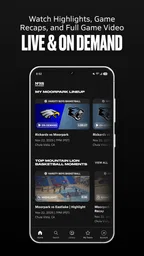
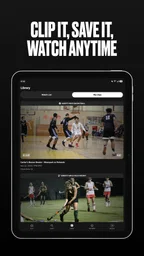
- Replay archived games and event footage.
- Follow multiple sports from one app.
- Access coverage on supported Android and iOS devices.
What could be better
- A subscription may be required for full access.
- Coverage depends on whether a school participates.
- Stream quality can vary with your internet connection.
- Some events may not have live commentary.
- The available schedule can differ by location.





