


NFHS Network TV review
 Analysis by Appsdrops
I would treat NFHS Network TV as a focused way to follow high school sports, not as an all-purpose sports streaming service. Its appeal is straightforward: when a school event is available through the NFHS Network, the app gives families and supporters a place to watch it on a phone. The trade-off is that this narrow purpose makes the experience depend on finding the right event and getting a reliable stream at the right time. I would choose it for a specific game I care about, rather than install it expecting broad sports coverage.
Finding the right event can be the first hurdle
The app is a sports app from NFHS Network, built around high school competitions from across the country. That scope is useful if you are following a student, school, or local team, but it also changes how I would approach the app: I would start with the event I want to watch, rather than browse casually and assume every school or matchup will be there.
If you open the app shortly before a game, take a moment to check that you have the correct school and event. Similar school names, multiple teams, and a busy schedule can make a quick search feel less obvious than opening a mainstream professional league app and tapping a prominent live game. This is a practical distinction, not a flaw unique to this service: high school sports are organized locally, so the viewer often needs to arrive knowing what they are looking for.
My best advice is to confirm the event before settling in to watch. If you are arranging a family viewing session, do that earlier in the day, then reopen the app near game time. That small habit separates a search problem from a streaming problem and avoids discovering at kickoff that you selected the wrong school or event.
The app has an average rating of 1.8 from around 70 ratings, so I would go in with realistic expectations about user satisfaction. That score does not tell me what any individual viewer will experience, but it is a reason to test the basic path—finding an event and starting playback—before relying on it for an important game. NFHS Network TV has over 100,000 installs, which indicates that it serves a meaningful audience, though popularity alone does not guarantee a smooth match-day experience.
Check the viewing plan before game day
The app is free to install, but it includes in-app purchases ranging from about $14 to $80 per item. I would check the purchase options shown in the app before committing to a plan or assuming a particular event is included. The important decision is not simply whether the download costs anything; it is whether the viewing arrangement makes sense for how often you expect to watch.
For someone following one relative’s season, a paid option may be worth considering if it covers the events they care about. For a casual viewer who wants to watch a single occasional matchup, I would compare the available choices carefully and avoid buying in a hurry. The range is wide enough that I would read the terms displayed at the point of purchase rather than guess what an item includes or how long access lasts.
That also answers a common practical question: can I install the app without paying? Yes, it is free to download, but access to viewing may involve purchases. Keep the distinction clear, especially if a parent or grandparent is setting up a device for someone else. Confirm the selected purchase and its scope before using the app as the only plan for watching a game.
Set up the device before people are waiting
NFHS Network TV is rated for Everyone and requires Android 9 or later. I would check the operating system on the intended device before troubleshooting anything else. If the app will not install or behaves poorly on an older phone, compatibility is a sensible first thing to verify; repeatedly retrying an installation will not solve an operating-system mismatch.
The current version is 2.0.1, and the app was released on June 14, 2021. I would keep the app current through the app store and restart it after an update if playback or navigation seems stuck. That is ordinary maintenance rather than a promise that an update will fix every issue, but it is a low-effort check before a live event.
For a planned watch, I would also test the whole route once: open the app, locate the intended event, and confirm that the viewing screen loads. Do this on the same device and network you expect to use later. It is a more useful test than merely seeing that the app icon opens, because it checks the part that matters to viewers: reaching the actual event.
If you are using a phone, decide ahead of time where it will sit and how everyone will watch. A small screen may be fine for checking in from the sidelines or following a game while traveling, but it is less comfortable for a group gathered in a living room. I would use a larger screen or another available viewing option when shared viewing matters, while keeping the phone as a backup for checking whether the event itself is accessible.
Recover methodically when playback stalls
When a stream does not start, I would avoid changing several things at once. First, return to the event and make sure it is the one you meant to open. Next, close and reopen the app, then try again. If it still fails, check whether other apps can use the same internet connection. These steps help distinguish a navigation hiccup from a broader connection problem without assuming that the app is necessarily at fault.
A useful recovery habit is to remember exactly where the failure occurs. If the app opens but the event is hard to locate, focus on the school and event details. If the event page appears but playback will not begin, check the connection and retry. If the video starts and then stops, a brief interruption in connectivity may be more relevant than the original search. Naming the stage of the failure makes support conversations and your own troubleshooting more efficient.
For a high-stakes game, I would not wait until the first whistle to try again and again. Open the event early enough to deal with a sign-in, purchase, or connection issue at a calmer moment. If restarting the app and checking the network do not help, try again after a short pause, and use the app store’s support route or the developer’s official support channel for persistent account or playback trouble. Avoid repeatedly buying an item just because one attempt to play has failed; first make sure the purchase state and selected event are correct.
Another small but useful tactic is to keep the event details at hand. A school name, sport, and game time make it easier to return to the same destination after an interruption. If another family member is helping, share those details rather than asking them to search from scratch. This is especially helpful when the app is being used by someone who is less comfortable navigating a phone.
When the problem may be outside the app
Live video is sensitive to the conditions around the viewer. A weak or crowded connection can interrupt playback even when the app itself has opened normally. If the stream struggles, I would move to a stronger connection when possible, pause other heavy internet use in the household, and try again. These are general checks; they cannot guarantee a better stream, but they help rule out common local causes before concluding that the app has failed.
It is also worth separating an event-availability question from a playback issue. If the event is not visible, verify the school and matchup details before assuming the app is broken. High school schedules can be easy to misread, and a viewer may be looking under the wrong team or time. If you cannot find a particular game after checking carefully, the practical next step is to confirm its availability through NFHS Network’s official channels rather than repeatedly reinstalling the app.
Likewise, a purchase question and a technical problem need different solutions. If playback is blocked by an account or payment choice, checking the purchase information is more useful than switching networks. If the app does not load at all, a connection or device check is more relevant. I would keep those possibilities separate and make one change at a time; that gives you a clearer idea of what actually fixed the issue.
Who will get the most from this kind of coverage?
I think the strongest fit is a parent, relative, former student, or community supporter who has a clear reason to follow high school sports. It can make sense when attending in person is not possible and a particular school event is available to watch. The focused scope is a benefit for that audience: you are using a service with a specific connection to school competitions, not trying to find a high school game buried among professional highlights and unrelated sports content.
Compared with general sports apps, NFHS Network TV is less suited to someone who wants scores, commentary, and broad coverage across many leagues in one place. A regular sports news app is a better choice for quick updates and results; a familiar streaming service may be more convenient for a living-room audience if it carries the event. I would use this app when the high school event itself is the priority, and another option when the goal is general sports browsing or a polished shared-screen setup.
It is not the right choice for every viewer. If you only watch occasionally and do not know which school or event you need, the search-and-purchase decisions may feel like more work than the benefit. If reliable live viewing is essential for a family gathering, test the event and device beforehand and have a backup plan. And if you expect every local game to be available, adjust that expectation: the app’s purpose is high school sports coverage, but a particular event still needs to be located and accessible.
My practical verdict
NFHS Network TV has a clear reason to exist: it gives people a mobile route to follow high school sporting events that matter to them. I would recommend trying it when you already have a school or matchup in mind, especially if you cannot be there in person. The app is free to install, rated for Everyone, and developed by NFHS Network, but the in-app purchase range means I would check the viewing choice before treating it as a no-cost way to watch.
My approach would be simple: confirm the event, test playback before game time, and keep the device and connection checks straightforward if something goes wrong. That preparation matters more here than casual browsing because the app’s value is tied to a particular event at a particular time. If you want broad sports coverage or a friction-free option for every viewer, I would look elsewhere. If your goal is to keep up with a high school team from afar, it is a focused option worth testing—with realistic expectations and a backup plan for an important game.
What we like
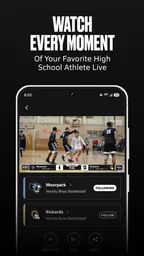
- Watch live high school sports from schools across the United States.
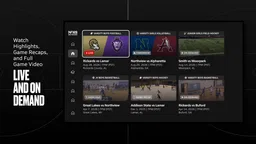
- Replay many events with on-demand video access.
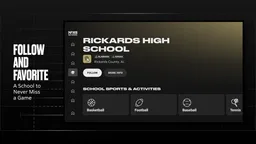
- Follow a favorite school to find its broadcasts more easily.
- Stream events on supported phones and connected devices.
- Event schedules help viewers plan around upcoming games.
What could be better
- Coverage varies by school and depends on local participation.
- A subscription may be required to watch many events.
- Video quality can suffer when the internet connection is weak.
- Some broadcasts may have limited commentary or production quality.
- The app offers little value if your local schools are not covered.





