
NBC Sports review
 Analysis by Appsdrops
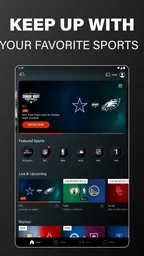
I see NBC Sports as a focused companion for people who already follow sports carried by NBC, rather than a complete home for every league and event. Its appeal is straightforward: it brings live sports and related NBC viewing into one app. The catch is that a live stream depends on more than installing an app; the event, your access, your connection, and your device all have to line up. Knowing where those pieces can go wrong makes the experience much less frustrating.
Where a live stream can get stuck
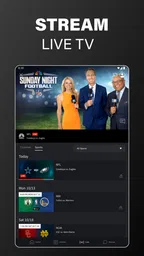
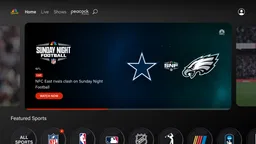
The first thing I would check is whether the event I want is actually available through NBC Sports. The app is useful for NBC’s sports coverage, including Sunday Night Football, but that does not make it a universal sports subscription. If a game is carried elsewhere, repeatedly reopening this app is unlikely to solve the problem. I’d check the event’s broadcaster before settling in to watch.
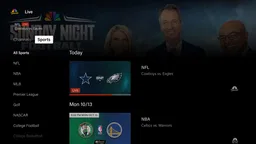
Another common point of confusion is the difference between seeing an event and being able to play it. A schedule or event page can help orient you, but it doesn’t guarantee that a stream will start for every viewer. Access may depend on the viewing arrangement available to you. If the app asks you to sign in or verify access, follow the prompt rather than assuming the stream is broken.
Playback trouble can also look like an app problem when the network is really at fault. A stream that keeps pausing, drops in quality, or stops loading may be struggling with an unstable connection. I’d try another video service on the same device, then switch between Wi-Fi and mobile data if that is practical. That quick comparison can tell you whether the issue is specific to NBC Sports or affects streaming more broadly.
There is also a timing trap with live sports: arriving just before a major event can mean several things are happening at once, including a busy connection or a last-minute app update. I recommend opening the app earlier, finding the event, and checking that playback works before kickoff or the start of coverage. It is a small habit, but it is much better than troubleshooting while everyone else is waiting for the game.
Start with the simple checks
If a stream will not begin, I would first confirm that the app is current, the device has a working internet connection, and I am signed into the right account if sign-in is requested. Then I’d close and reopen the app. These are ordinary checks, not guaranteed fixes, but they separate a temporary loading hiccup from a more persistent access or device issue.
It helps to be precise about the symptom. A sign-in prompt points toward an account or access step; a blank or endlessly loading player suggests trying a connection check and restarting the app; a message tied to a particular event makes me look at event availability first. Keeping track of what the screen actually says is more useful than repeatedly tapping the play button.
Device compatibility matters too. The listed minimum operating-system requirement is version 7.0, so I’d check the device’s software version before spending time reinstalling. That requirement is a baseline, not a promise that every older device will handle modern streaming smoothly. If the device is struggling with other video apps as well, its age or available resources may be part of the problem.
I would also avoid changing several things at once. If I update the app, change networks, sign out, and reinstall in one go, I won’t know what helped—and signing out may add an unnecessary step if I cannot easily access the account again. A better order is to test the connection, restart the app, check for an update, and only then consider signing back in or reinstalling.
A calmer recovery workflow
For a normal evening watch, my routine would be simple: open NBC Sports ahead of the event, locate the match or broadcast, and test the stream while there is still time to fix a basic issue. If playback fails, I’d note whether the app shows an access prompt or a loading problem, then try one change at a time. This makes it easier to recover without losing track of the event.
On a phone, I’d think about where I plan to watch before relying on a live stream. A stable home connection is often a safer choice than assuming mobile reception will remain consistent throughout a commute or crowded venue. If I do need to use mobile data, I’d test the stream before the event and keep the phone’s battery in mind. Live video is a poor fit for a situation where the connection or power supply is uncertain.
If the app stops responding, closing it fully and launching it again is a reasonable first move. If that fails, restarting the device can clear a temporary problem. I would save reinstalling for later, since it may require signing in again. And if only one event fails while other content works, I would not immediately erase app data or blame the phone; the problem may be tied to that particular stream or the access route for it.
For someone who watches with family or plans a get-together around a game, I’d test the setup on the screen and device that will actually be used. A successful stream on a phone does not prove that another device is ready. I’d also leave a little time for sign-in and connection checks, rather than treating the app as a last-second substitute for a television broadcast.
When the app may not be the cause
Not every interruption is something a viewer can fix. If a stream stops for many people at once, or a particular event does not play despite the rest of the app working, repeated restarts may not help. I’d give it a short pause, try again, and check whether the problem is limited to that event. That is a more sensible response than repeatedly reinstalling the app during a live broadcast.
Account access can be another separate issue. If a prompt asks me to verify eligibility or sign in, I would use the account or provider details requested on screen and make sure I have the correct credentials. If the verification itself fails, changing the network may not resolve an account mismatch. In that case, I’d follow the app’s support route rather than sharing passwords or payment information through an unrelated message or page.
It is also worth separating app performance from the broadcaster’s schedule. The app cannot make an event available if it is not part of NBC’s coverage for that occasion. When the event is the priority, I’d check which broadcaster has it and use that service if needed. This is the key trade-off: NBC Sports can be convenient for its own coverage, but it is not a substitute for checking where each sport or game is being shown.
When seeking help, I’d describe the device, the operating-system version, the event, and the exact stage where playback fails. I would not include passwords or other sensitive account details. A clear report—whether the issue happens before sign-in, after an access prompt, or in the player—makes it easier to distinguish a device problem from a stream or account issue.
Who will get the most from it
I’d recommend NBC Sports to viewers who regularly follow events carried by NBC and want a direct way to watch on a mobile device. It is especially practical when I’m away from the television but still have a reliable connection and a way to complete any required sign-in. The app is free to install, and the content rating is Everyone, making it suitable for a broad audience; that rating does not mean every broadcast is designed specifically for children.
For a realistic everyday example, imagine I’m finishing errands on a Sunday and want to catch Sunday Night Football at home. I’d open the app before the game, check that I can reach the event, and sort out any sign-in prompt while I still have time. If the stream works, I can continue watching on the phone; if it does not, I can switch to the appropriate television option instead of discovering the problem after the game begins.
The app comes from NBCUniversal Media, LLC and has been available since February 25, 2019. Its current version is 9.33.0, and it has more than a million installs. Those figures suggest it has an established audience, but they do not guarantee that it will work equally well on every device or connection. I’d treat the average rating of 2.9 from around 500 ratings as a reason to keep expectations realistic, not as proof that the app will fail for me.
Compared with a general sports-news app, NBC Sports is better suited to watching its own live coverage than to acting as a neutral hub for every competition. A broadcaster’s app can be the more direct choice when I know the event is on that network; a broader sports service is more useful when I want results and coverage across multiple outlets. If I mainly want scores, schedules, or news rather than video, a lightweight sports-information app may be the less troublesome option.
I would skip it if the events I care about are usually carried by other broadcasters, if I need a single service that covers every league, or if I mainly want scores without live video. I’d also hesitate to depend on it as my only way to watch when I have an unreliable connection or cannot resolve an account prompt ahead of time. In those situations, checking the broadcaster or choosing a service that fits the specific event is the better move.
My practical verdict
My advice is to treat NBC Sports as a useful, event-specific viewing option—not as a guaranteed all-sports solution. When its coverage matches what I want to watch, it can save me from being tied to a television. Its weak point is that access and playback depend on conditions outside the app itself, and a last-minute setup can turn a simple plan into a frustrating one.
I’d install it if NBC’s sports coverage is part of my regular viewing, check the device and sign-in before an important game, and keep another viewing option in mind for events outside its coverage. That approach makes the app’s strengths clear while avoiding the assumption that one sports app can handle every broadcast. For the right viewer, it is worth trying; for everyone else, confirming the event’s broadcaster first is the most useful step.
What we like
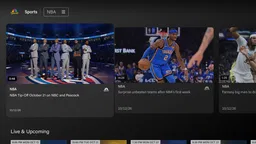
- Live streams cover major NBC Sports events.
- Replays help you catch up after a live broadcast.
- Event schedules make upcoming coverage easy to find.
- Personalized alerts can notify you about selected events.
- The app supports casting to compatible TVs.
What could be better
- Some live streams require a participating TV provider.
- Access to events varies by location and broadcast rights.
- Video quality may drop on a weak internet connection.
- Ads can interrupt some videos and streams.
- The app may use substantial data during live video.





