






MyRecipes review
 Analysis by Appsdrops
I like recipe apps most when they shorten the distance between “What should I cook?” and a meal I can actually make. MyRecipes is aimed at that everyday problem: it brings a large recipe collection together with a way to save food ideas spotted on TikTok and Instagram. That combination could be especially handy if your inspiration comes from social feeds but you would rather keep promising dishes in one place than hunt for them again later.
My impression is that the app’s value depends less on how many recipes it can point you toward and more on whether its collection and saving workflow fit the way you cook. It is a free Food & Drink app from PEOPLE INC. GROUP, with optional in-app purchases. I would consider it a practical discovery tool, not an automatic replacement for a carefully organized meal plan or a trusted cookbook.
What you get before spending anything
The app is free to install, so you can try its basic experience without paying upfront. In-app purchases are listed at $6.99 to $39.99 per item. Those are the confirmed cost details worth keeping in mind: the range shows that paid items can vary considerably, but it does not tell me which specific features or content are included at each price. I would check the purchase screen carefully before buying rather than assuming a higher-priced option is necessary.
That distinction matters because a free starting point can be useful even if you never make a purchase. You can decide whether browsing recipes and collecting social discoveries actually improves your routine before assigning the app a place in your cooking habits. If the parts you use most are available without spending, its value is straightforward; if a feature you care about is behind a purchase, weigh that specific benefit against your existing alternatives.
There is no need to treat the listed purchase range as a recommendation to spend. I would first try a few different kinds of recipe search and save the dishes I genuinely want to revisit. A collection that becomes useful through regular use is a better reason to consider paying than the appeal of a large headline number alone.
A collection is useful when it reduces search friction
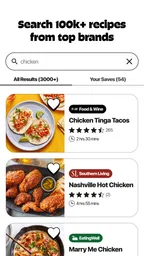
The app is associated with more than 100,000 recipes, which gives it a broad starting point for exploring meals. A deep catalog can help when you have a main ingredient but no clear plan, or when you want to break away from the handful of dishes you cook by habit. The practical benefit is choice: you can look for inspiration without starting from a blank page.
But size by itself does not make a recipe library easy to use. A result still has to match your appetite, available ingredients, time, and confidence in the kitchen. I would judge the collection by how quickly I can find something suitable, not by the total count. When browsing starts producing too many near-matches, narrowing your search around one concrete need—such as a particular ingredient or a meal occasion—is more useful than scrolling without a decision in mind.
One useful workflow is to treat discovery and cooking as separate steps. When a dish catches your eye, save it first; later, decide whether it is realistic for the week. That small pause helps keep an attractive photo from becoming an impractical dinner plan. It is particularly relevant for recipes discovered in short videos, where the presentation may make a dish look simpler than it feels to prepare.
Saving social inspiration has a specific advantage
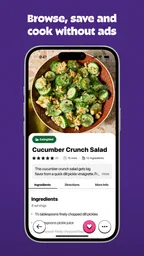
The ability to save recipes from TikTok and Instagram addresses a familiar annoyance: a dish appears in a feed, you mean to try it, and then it disappears under newer posts. Bringing those ideas into a recipe-focused place can make them easier to revisit when you are planning what to cook. For people who collect food inspiration while browsing social media, that is a more meaningful distinction than simply adding another general recipe catalog.
I would still use a little judgment when saving. A quick video may not give you the full ingredient list, timings, or context you need to reproduce a dish. Before relying on a saved idea for dinner, check that you have enough practical detail to cook it. If a clip is more of a visual prompt than a complete recipe, treat it as inspiration and use the app’s broader collection to find a more workable approach.
Another small but helpful habit is to save selectively. If every tempting post goes into one undifferentiated pile, the collection can become a second feed to scroll through. Saving only dishes you would plausibly cook—and revisiting those choices when planning—turns the feature into a lightweight shortlist rather than an archive you never open.
Where it fits beside familiar alternatives
Compared with searching the open web, a dedicated recipe app can give you one place to browse and keep ideas. Compared with a social feed, it can make saved food inspiration easier to return to without relying on a post resurfacing in your timeline. Those are practical advantages, especially if your current routine involves switching between videos, browser tabs, and notes.
On the other hand, people who already have a reliable cookbook collection, a well-maintained personal recipe file, or a meal-planning system may not need another library. A notebook can be better for recipes you have adapted repeatedly, because your own notes and substitutions are right where you expect them. A focused meal planner may also suit someone whose main concern is coordinating several days of meals rather than finding new dishes.
I would not choose MyRecipes solely because it has a large catalog. I would choose it if the combination of browsing and saving social discoveries solves a real organizational problem for me. If you mostly cook a small set of familiar meals, or prefer to search directly for a precise technique from a specialist source, a broader collection may add options without changing what you actually make.
Everyday use: turning a feed discovery into dinner
Imagine that you see a pasta idea while taking a break, but you are not shopping or cooking at that moment. Saving it gives you a way to return to it when you have time to check ingredients and decide whether it suits the evening. If it does not, you can move on to another recipe rather than trying to reconstruct the video from memory. This is a modest workflow, but it addresses a real gap between casual inspiration and a meal you can prepare.
For a busy week, I would use the app in two short sessions instead of browsing every time I felt hungry. First, collect a few promising ideas when they appear. Later, review them with the week’s ingredients and schedule in mind. That approach limits impulse choices and helps separate “looks good” from “I can make this tonight.” It also gives a large catalog a clearer purpose: supporting a decision, not demanding endless browsing.
For a beginner, the same method can help identify dishes worth trying, but the app cannot make an incomplete recipe complete. Read the cooking instructions before you commit, check whether the ingredients are accessible to you, and avoid leaving a new technique until the last minute. Experienced cooks may use the collection differently—as a source of variations or a prompt to cook with an ingredient they already have.
Tradeoffs and the people most likely to benefit
MyRecipes has a published average rating of 3.3 from 177 ratings, with 113 reviews. I read that as a reason to approach it with measured expectations, not as proof that it will or will not suit an individual cook. Ratings summarize varied experiences; what matters for you is whether the app’s core routine—finding recipes and collecting social inspiration—works smoothly enough to become useful.
The main tradeoff is that more places to find recipes can mean more choices to sort through. A broad collection is helpful when you need inspiration, but less compelling when you already know exactly what you want. Social saves have a similar limitation: collecting ideas is easy to understand, while turning them into a dependable cooking plan still takes your own review and judgment.
I think the best fit is someone who often discovers dishes online, forgets where they saw them, and wants a free way to start gathering recipe ideas. It may also suit a curious home cook who likes exploring a wide range of possibilities before choosing what to make. The app has reached over 100,000 installs, and its Everyone content rating makes it broadly suitable from an age-rating standpoint, though that does not guarantee that every recipe will fit a particular household’s needs.
I would be more cautious if you want a highly controlled meal plan, a personal cookbook with detailed notes, or a very focused collection tailored to a specific cooking style. In those cases, compare the app with the tool you already use and identify the exact gap you want to fill. If the answer is simply “I need to stop losing recipes I see on social media,” its saving angle is the clearest reason to give it a try.
My verdict on whether it earns a place in your kitchen
The current version is 1.5.0 and requires iOS 11 or later. That is useful compatibility information if you are deciding whether to install it on an older Apple device. MyRecipes is free to start, while optional purchases range from $6.99 to $39.99 per item, so I would explore the free experience before deciding whether any paid item offers enough value for your own routine.
Overall, I see it as a potentially useful bridge between a large recipe library and the food ideas people encounter on social platforms. Its strongest case is not that it can replace every cooking resource, but that it may make scattered inspiration easier to collect and revisit. Its weaker case is for cooks who do not need discovery or already have a system that keeps recipes organized.
My recommendation is to try it if you regularly lose track of dishes you want to make. Save a few recipes, revisit them when planning an actual meal, and see whether that small workflow saves you time. If you find yourself browsing without cooking more varied or more confidently, stick with your existing method. If the saved ideas become a practical shortlist, the free entry point makes MyRecipes worth keeping in your kitchen toolkit.
What we like
- The recipe collection makes it easy to save dishes for later.
- Ingredient lists help organize grocery shopping.
- Step-by-step instructions are approachable for home cooks.
- Search filters help narrow down recipes by preference.
- The app offers inspiration for planning everyday meals.
What could be better
- Some recipes may require ingredients that are hard to find.
- Recipe quality and instructions can vary between dishes.
- Ads may interrupt browsing or distract from recipes.
- A reliable internet connection may be needed for some content.
- The recipe selection may not suit every dietary restriction.





