Murphy Drive Rewards review
 Analysis by Appsdrops
I judge a rewards app less by how many offers it displays than by whether I can understand and use them during an ordinary errand. Murphy Drive Rewards is built around visits to Murphy USA: it connects savings on fuel with deals on items bought inside. That focus gives it a clear purpose, but it also means its usefulness depends heavily on where you shop and how comfortable you are managing a phone while paying.
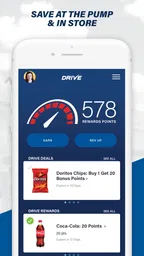
Developed by Murphy USA: REV UP, AMERICA!, this free Food & Drink app is intended for everyone. Its store description presents it as a way to save at the pump and in the shop; in practice, I would think of it as a companion for people who already stop at Murphy USA, not as a general-purpose grocery or fuel-budgeting tool. The app has a 4.8 average from around 182,000 ratings, and it has passed 5 million installs. Those figures suggest broad interest, though they do not tell you whether a particular station has an offer you want today.
Finding your way through the app
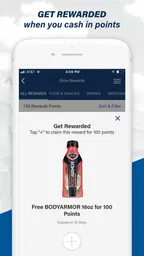
The main appeal of Murphy Drive Rewards is that its subject is narrow. You are not opening a sprawling supermarket platform with recipes, shopping lists, delivery choices, and unrelated promotions. The emphasis is on saving during a Murphy USA visit, which can make the app easier to approach if your goal is simply to check for a relevant deal before you stop.
That simplicity is useful for occasional users, but rewards apps still ask you to make small decisions: Is an offer relevant? Does it apply to the purchase I am about to make? Is it worth the extra step at checkout? I recommend looking at the available deal before you are standing at the pump or in a queue. That gives you time to read the terms and decide whether the offer fits your plans rather than trying to interpret it while people are waiting behind you.
The app’s name can also create a small expectation gap. “Rewards” may sound like a broad points account that pays off automatically, while the practical value here is tied to Murphy USA promotions on fuel, snacks, and drinks. I would treat each offer as something to check and use deliberately, not assume that every purchase will produce the same kind of saving. If you prefer an app that automatically tracks spending across many retailers, this focused setup may feel limited.
There is a helpful mental workflow: check the app before leaving, choose only an offer you would use anyway, then follow the app’s instructions at the station. This avoids buying an extra drink merely because a promotion makes it look like a bargain. For a quick stop, the best reward is often the one that fits a purchase you had already planned.
Readable in a calm moment, less convenient in a rush
For readability, the key question is not just whether text appears on screen, but whether you can review an offer without having to hurry. I find this kind of app most comfortable to use while planning a stop or waiting somewhere safe. A pump area can involve glare, movement, noise, and the distraction of watching a vehicle or handling payment. Even clear wording is harder to absorb in those conditions.
If small text or dense terms are difficult for you, take a moment to read the offer before driving to the station. You can then remember the important condition, such as what purchase it concerns, instead of needing to inspect the screen at the counter. I would not rely on a quick glance to settle an unclear promotion. When the wording is confusing, skipping the deal is better than holding up a line or making a purchase you did not intend.
The app is currently version 1.31 and requires Android 7.0 or later. That establishes compatibility for a range of Android devices, but it does not guarantee that every phone will display text or controls equally well. People who use enlarged system text, screen readers, high-contrast settings, or other assistive tools should check how the current app behaves on their own device before depending on it for a time-sensitive transaction.
Using a phone comfortably and safely
Rewards apps can add friction for people with limited dexterity, tremors, pain, or difficulty making precise taps. A fuel stop is already a sequence of tasks, and switching between a phone, payment method, and pump can be awkward. My practical advice is to complete the app-related part before you begin fueling whenever possible. Avoid trying to navigate screens while holding a nozzle or moving around the forecourt.
Sensory conditions matter too. A busy station may be loud, brightly lit, and full of visual distractions. If those surroundings make it hard to concentrate, decide on the offer at home or in the passenger seat before arriving. A companion can also help read the details or manage the phone, if that suits your situation. These are ordinary workarounds rather than special app features, but they can make a short stop less stressful.
I would not assume that a rewards app is automatically accessible simply because it is intended for everyone. The experience depends on how its screens work with your phone’s settings and any assistive technology you rely on. If an offer requires more attention or manual interaction than you can comfortably manage, the savings may not justify the effort. That is a real trade-off, especially when the purchase itself is optional.
When the app fits into an everyday stop
Imagine you are heading home and realize the car needs fuel. You already plan to stop at Murphy USA, and you also need a drink for the drive. Before leaving, you check the app, see whether a relevant offer is available, and decide whether it is worth using. At the station, you can focus on the purchase rather than searching through promotions with one hand while managing the pump with the other. This is where the app makes the most sense: it attaches a possible saving to an errand you were already making.
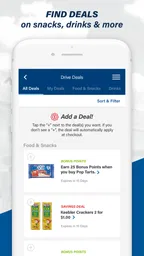
For someone who visits Murphy USA regularly, that quick pre-check can become part of the routine. It may help you notice a snack or drink deal that suits a planned purchase, or a fuel-related saving worth considering. The non-obvious benefit is not that every stop becomes cheaper; it is that checking first helps you separate a genuine fit from an impulse buy. If you only visit occasionally, the habit may be harder to justify, particularly when you have to remember to open a separate app.
It is also worth thinking about who is driving. If you are responsible for the vehicle, do not browse promotions while moving or while handling a fueling task. A passenger can review the offer, or you can do it before setting off. The app is most useful when it supports the trip without competing for attention.
Where it falls short compared with alternatives
Compared with a general fuel-price comparison app, Murphy Drive Rewards has a different job. A comparison tool is useful when you want to choose among stations based on price or location; this app is more relevant after you have decided to shop at Murphy USA and want to look for its offers. If your priority is finding the cheapest available fuel across several brands, a broader alternative may be a better first stop.
It also differs from a supermarket loyalty app. Those often center on a larger basket of groceries and repeated household shopping, while Murphy Drive Rewards is geared toward a fuel-and-convenience-store visit. That narrower scope can be a strength if it matches your routine, but it is not a replacement for a store program where you earn value across weekly food shopping.
The main limitation is therefore practical rather than complicated: the app’s value is tied to using Murphy USA and to finding an offer that suits what you actually need. Someone who chooses stations solely by proximity, who rarely buys anything inside, or who prefers not to use a phone during a transaction may see little benefit. Likewise, if you are comparing several brands on a long drive, this app alone will not answer the wider question of where to stop.
A useful check before you depend on it
Before making the app part of your routine, install it and explore at a relaxed time. Confirm that your device runs the required Android version, then see whether the text and navigation are comfortable for you. Check an offer’s conditions before counting on a saving, and avoid changing your purchase just to qualify. These small steps are especially valuable if you have low vision, limited hand mobility, attention-related needs, or simply dislike handling a phone in a crowded setting.
The app is free, which makes trying it low-risk, but free does not mean effort-free. You still need to decide whether opening it, understanding an offer, and using it during a stop are worthwhile for your habits. I would judge it over several planned visits rather than by one promotion: does it fit the way you already buy fuel, and can you use it without adding stress?
Who I would recommend it to
I would recommend Murphy Drive Rewards to someone who already stops at Murphy USA and is willing to check promotions before buying. It is particularly sensible for drivers who also pick up a snack or drink and want to see whether an offer applies. Murphy USA has built a focused rewards app rather than a broad shopping service, and the 4.8 average from around 60,000 reviews gives prospective users a strong sign of customer interest, without guaranteeing that every person will find the experience comfortable.
I would suggest skipping it if you do not shop at Murphy USA, want to compare fuel prices across competing stations, or find app-based checkout steps tiring or difficult. I would also avoid treating a discount as a reason to buy something unnecessary. The strongest use is modest: check in advance, use a deal only when it matches your plan, and let the app remain optional rather than making it another task at the pump.
Overall, I see this as a practical, location-specific tool with a clear audience. Its focused approach can help regular Murphy USA customers notice relevant savings, while its dependence on station choice and phone interaction limits its reach. For me, the inclusive verdict is cautiously positive: it can support a range of routines when used at a comfortable pace, but the real test is whether its screens and transaction steps work for your abilities and surroundings. Check it before a planned stop, keep safety ahead of savings, and use another option when comparison shopping or hands-free convenience matters more.
What we like
- Earn points on eligible fuel purchases and in-store items.
- Redeem points for savings on future fuel purchases.
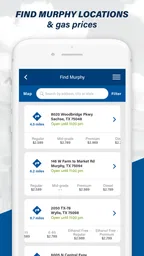
- The app can help locate participating Murphy USA stations.
- Offers provide another way to earn rewards beyond fuel purchases.
- A digital rewards account makes it easier to track points.
What could be better
- Rewards are limited to participating Murphy USA locations.
- Eligible purchases and reward rates may vary by offer.
- Points may expire under the program's terms.
- Some offers require activation before purchase.
- Savings can take time to build if you refuel infrequently.





