

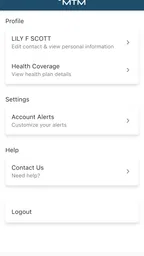
MTM Link Member review
 Analysis by Appsdrops
The first week with MTM Link Member is less about exploring a new map and more about figuring out whether it makes your existing rides easier to manage. I’d approach it as a practical companion for people who already use MTM’s ride services, not as a replacement for the navigation app they use to find a restaurant or plan a road trip. That distinction matters: its value depends on whether ride management is a recurring part of your life.
Useful from the start, if your rides fit its purpose
MTM Link Member is a free maps and navigation app from MTM, Inc. Its focus is member ride management, which gives it a narrower job than a general-purpose map. The appeal is straightforward: keep the ride-related task in a dedicated app rather than trying to make a broad navigation tool serve a purpose it was not designed around.
That narrower focus can be helpful when you have a ride to coordinate and want to deal with it in the context of the service you use. It is also why I would not install it just because I need directions. Google Maps, Apple Maps, or another familiar navigation app is the more natural choice for finding places, comparing routes, or getting around somewhere new. MTM Link Member makes sense when your need is specifically tied to managing rides as an MTM member.
The app has a 4.4 average from around 9,500 ratings, with about 2,200 written reviews and over 100,000 installs. That suggests a meaningful group of people uses it, but those figures alone do not tell me whether it suits every member’s routine. A ride-management tool is judged by whether it helps with the particular journeys a person needs, not by how many people have downloaded it.
For a new user, I’d start by checking whether the app’s role matches the way you currently arrange rides. If your rides are already handled through an organization or service process, the useful question is whether this app fits into that process—not whether it can replace all your travel tools. Keeping that expectation clear can prevent a common disappointment: expecting a specialist member app to behave like a full navigation suite.
Where it may fit into an ordinary day
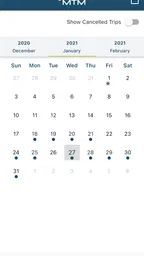
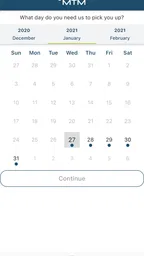
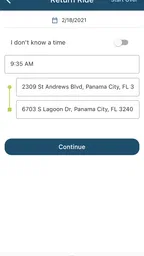
Imagine you have an appointment coming up and a ride is part of getting there. Instead of treating the trip as just a destination to search for on a map, you can turn to the member-focused app for the ride-management side of the task. That is a more relevant use case than asking it to guide you through a spontaneous drive across town.
A useful habit is to open the app when you are ready to handle the ride itself, then use your preferred map separately if you need to inspect the area around your destination. This split can feel slightly less seamless than doing everything in one general app, but it also keeps the ride task distinct from ordinary directions. For someone managing recurring appointments, that separation may be easier to remember than scattering ride details across different tools.
I would not assume the app covers every stage of every journey simply because its name and category suggest navigation. The reliable way to judge it is to try it with a real ride you need to manage and see whether it supports your normal routine. If the ride process depends on other people or established arrangements, the app should be considered one part of that process rather than a guarantee that every detail is handled automatically.
Does the value last beyond the first few uses?
For this kind of app, lasting value comes from repetition. If you regularly arrange rides through MTM, a dedicated place to handle that task can earn a spot on your phone without needing to be entertaining or constantly updated in your attention. A tool that saves you from re-learning where to go each time can be worthwhile precisely because its routine becomes ordinary.
If you only need a ride occasionally, the case is less compelling. An app can still be useful for those moments, but it may not become part of your daily habits. I’d keep it installed if it helps with a continuing ride need; I would not keep it merely because I tried it once and assume it will be useful for unrelated travel later.
The app is free, which lowers the cost of trying it, but free does not mean there is no maintenance burden. You still have to keep it available, recognize when to use it, and make sure the information and arrangements you rely on are current. The most practical test is whether it reduces friction often enough to justify those small responsibilities.
One non-obvious benefit of a dedicated member app is that it can make a routine easier to hand off mentally. Rather than remembering that ride management lives in a general map, a message thread, or a note, you can make MTM Link Member the place you check for the MTM-related part of the trip. That only works if you consistently use it for that purpose; otherwise, it becomes one more icon to search for.
Another useful trade-off is keeping navigation and ride administration separate. General map apps are strong at route discovery and location context, while a member app is intended for a service-specific task. Switching between them may be a minor inconvenience, but using the right tool for each job can be less confusing than expecting one app to manage both equally well.
What upkeep and friction should I expect?
MTM Link Member runs on Android from version 7.0, and its current version is 4000.22.0. The app is rated for Everyone. Those details make it easier to assess basic compatibility, but they do not tell me how well it will fit an individual device or personal workflow. Before relying on it for an important ride, I’d install it and become familiar with its basic role while there is time to resolve any setup confusion.
The maintenance is likely to be mostly behavioral: remember that the app is for MTM ride management, not every trip you take. That sounds simple, but apps with a narrow purpose can be forgotten between uses. If your rides happen irregularly, a reminder tied to the appointment or a consistent pre-trip routine may help you remember to check the app rather than assuming you will recall it at the last minute.
I would also avoid building an essential plan around an assumption you have not tested. Try the app with a normal, non-urgent ride first. Pay attention to whether the steps make sense to you and whether the app fits the way you already coordinate transportation. This is a practical way to discover friction early without relying on guesses about what the app can do.
The main source of fatigue is likely to be mismatch: opening a specialist tool when you wanted general directions, or keeping it installed when you no longer have a recurring MTM ride need. A second source can be duplicating effort if you manage the same ride in multiple places without a clear reason. I’d decide which tool handles the ride-related task and which handles route finding, then stick with that division.
Some people may prefer a single app for all travel, and that preference is reasonable. If your day-to-day needs are mostly route search, live navigation, and discovering nearby places, a conventional maps app will probably feel more useful. If your rides are connected to MTM membership, a general map does not necessarily address the member-specific part that brought you here in the first place.
Who should keep it, and who can skip it?
I’d recommend trying MTM Link Member if you are an MTM member who regularly needs to manage rides and wants a dedicated app for that purpose. It is also worth considering if ride arrangements are a repeated part of appointments or other planned outings, because recurring use gives a focused tool a fair chance to prove its value.
I’d skip it if you are looking only for a standard GPS, driving directions, walking routes, or a way to explore unfamiliar places. Those needs are better served by mainstream map apps. I’d also think twice about keeping it if your rides are rare and you already have a dependable way to manage them; adding another app is not automatically an improvement.
The app was released on February 24, 2021, and its current version is 4000.22.0. For me, the important question is not how long it has existed, but whether it remains useful in the particular member routine it was made for. A continuing ride need is a stronger reason to keep it than curiosity about a new app.
A sensible long-term choice for the right routine
My overall view is that MTM Link Member can earn lasting space when it supports a recurring, MTM-related ride task. Its best quality is its focused purpose; that same focus is its limit. It is not the app I’d reach for to plan a holiday drive or find a café, and judging it by those jobs would miss the point.
To decide whether it deserves a permanent place on your phone, use it for a real ride, see whether its process fits your routine, and check whether you naturally return to it the next time. If it makes a repeated task easier to remember and manage, keep it. If it adds another step without improving your current arrangement, rely on the tools that already work for you.
MTM Link Member is worth trying when ride management is a regular need, not simply because you want another navigation app. That is the standard I’d use after the first-week novelty fades: does it continue to serve a specific purpose in your month-to-month routine? For the people who can answer yes, its focused role may be enough. For everyone else, a general map—or no additional app at all—may be the better fit.
What we like
- Members can check selected account details from their phone.
- The app offers a convenient way to access membership information.
- Mobile access can reduce the need to contact support for basic details.
- A dedicated member portal keeps account tools in one place.
- It can be useful for managing membership while away from a computer.
What could be better
- Available features may depend on your membership type.
- You may need valid member credentials to use the app.
- Some account tasks may still require contacting MTM directly.
- Access can be affected by connectivity or service outages.
- The app is less useful for people who rarely manage membership online.





