
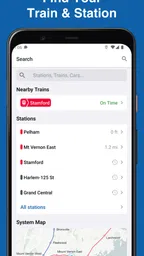
MTA TrainTime review
 Analysis by Appsdrops
I think MTA TrainTime makes the most sense when your trip is already centered on the Long Island Rail Road or Metro-North. It brings ticketing and train-trip planning into one focused place, which can be easier than switching between a general map, a transit search tool, and a separate way to handle your fare. The trade-off is equally clear: this is not an all-purpose New York City transit guide, so its usefulness falls off when your journey depends on buses, subways, or rail services outside those two networks.
A focused companion for two rail networks
MTA TrainTime is a free Maps & Navigation app from the Metropolitan Transportation Authority, built around LIRR and Metro-North travel. I’d consider it first if I regularly commute on either railroad, make occasional trips from the city to a suburban station, or want a rail-specific tool instead of asking a broad map app to handle every part of the journey. Its Everyone age rating also makes it suitable for a wide range of riders.
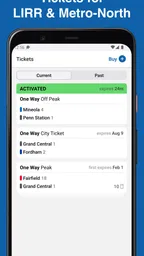
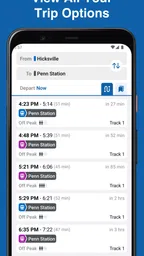
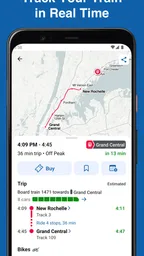
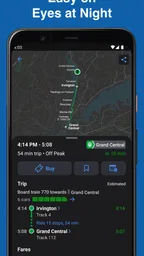
The app’s basic appeal is practical rather than flashy: plan a rail trip and deal with tickets in the same app. That pairing matters because a journey is not finished when you find a departure. You still need to be ready to travel, and keeping the trip and its ticketing in one place can reduce last-minute shuffling between apps. I wouldn’t treat that convenience as a reason to stop checking the details of a particular journey, but it gives TrainTime a clear job to do.
It has a 4.6 average from around 28,000 ratings, with roughly 2,400 written reviews, and has passed a million installs. Those figures suggest it has reached a substantial audience of rail riders, though popularity by itself doesn’t tell me whether it fits your route. The more useful question is whether your trips actually use LIRR or Metro-North often enough to justify a dedicated companion.
Where the focused approach helps
General navigation apps are good at putting many kinds of travel on one map. Their breadth is useful when a trip mixes walking, driving, buses, and trains, but it can make rail-specific tasks feel like only one part of a larger interface. TrainTime’s narrower scope is a strength when the railroad is the main event: you can approach it with a specific station-to-station trip in mind rather than starting from a map full of unrelated options.
For a regular commuter, that focus can make the app a natural part of a routine. For a less frequent rider, it can still help organize the rail portion of a day out. I’d be less inclined to use it as my sole travel app when I need detailed directions across the whole city, because a dedicated railroad tool is not a substitute for an all-network journey planner.
A realistic trip workflow
Imagine leaving work and taking Metro-North to meet friends, with a walk or subway ride needed at the other end. I’d use TrainTime to handle the railroad leg and ticket, then use a broader navigation app for the connection after arriving. Before heading to the station, I’d check the intended trip again rather than relying on a plan I made much earlier. This split approach plays to each app’s strengths and avoids expecting one tool to cover every mode equally well.
For a LIRR rider making an occasional weekend trip, the same idea applies in reverse: settle the rail portion in TrainTime, and keep a separate option handy for the last mile. If the station is unfamiliar, it is sensible to plan the walk or onward transfer before setting out. That small bit of preparation is especially useful when the train is only one part of a longer itinerary.
A less obvious benefit of keeping ticketing and trip planning together is that it can simplify a rushed departure. Instead of trying to remember which app you used for the fare while checking a separate tool for the train, you have one rail-focused place to return to. The practical tip is to complete the ticket-related steps before you are in a hurry at the station, and to make sure you understand what your chosen ticket covers. I wouldn’t assume that every fare or travel situation works identically without checking the option shown for the trip.
What the current version tells me
The current version is 10.21.0, and the app was released on June 6, 2016. That history gives TrainTime a long-running place in the MTA’s mobile offering, while the version number shows the product has continued to move beyond its initial release. I can use those facts to describe its established presence, but not to claim that a particular update introduced a specific feature or fixed a particular problem.
For someone who has used it for a while, the most useful way to judge its evolution is to focus on the current experience that matters to their own trips: whether the rail journey is easy to locate, whether ticket handling fits their routine, and whether they still need another app for connections. A version number alone cannot answer those questions. I’d update the app through the app store and then judge it on the tasks I actually need, rather than expecting an update label to promise a particular improvement.
The minimum operating-system requirement is version 8.0, which means the stated compatibility floor is relatively broad. That is useful if you keep an older device in service, although compatibility on paper does not guarantee that every device will feel equally responsive. If you rely on an older phone for travel, I’d test the app before a time-sensitive journey rather than discovering an installation or performance issue at the station.
How it fits alongside alternatives
Compared with a general-purpose map app, TrainTime is the more purposeful choice when you need to arrange the LIRR or Metro-North part of a trip and manage its ticket in the same setting. A map app is usually the better companion for finding a place, comparing walking or driving routes, or combining several transport modes. I would not force a choice between them: for many riders, the sensible setup is TrainTime for the railroad and a broader tool for the rest.
Compared with relying only on station signs or a paper plan, an app can make it easier to keep trip planning and ticket preparation together. But a phone should not be your only travel plan if you cannot access it when needed. I recommend checking your intended journey before leaving, keeping your phone usable, and knowing the station and destination you are aiming for. That is ordinary travel preparation, not a special feature claim.
TrainTime is also not the best answer for every MTA journey. If your trip is entirely by subway or bus, or if you need one tool to compare a complicated mix of transit modes, a broader planner is likely a better starting point. Likewise, a visitor who does not yet know which railroad serves their destination may benefit from first using a citywide map or transit guide to understand the options, then turning to TrainTime once the LIRR or Metro-North leg is clear.
Friction to keep in mind
The biggest limitation is the boundary of its purpose. Having two major railroads in view is valuable, but the rest of a journey may involve separate tools and a little more planning. That split can feel inconvenient if you expect a single app to guide you from your door to your final destination across every transport mode. I’d see the focused design as a sensible trade-off, not a flaw that makes the app unusable.
Another point is that ticketing can involve choices a rider should understand rather than tap through automatically. Before buying or relying on a ticket, check that it suits the trip you intend to take. For a new rider, that extra attention is worthwhile; for someone who travels often, it can become part of a predictable routine. I wouldn’t recommend treating any transit app as a replacement for reading the relevant fare information when your circumstances are unusual.
There is also a difference between planning a trip and being prepared for every disruption or transfer. TrainTime’s stated purpose covers rail tickets and trips, but I would still keep an eye on travel information and use another source if I need a broader, multi-agency picture. For a journey involving a tight connection, I’d avoid building the whole day around a single assumption: leave room for the onward leg and check that connection separately.
Who I’d recommend it to
I’d recommend TrainTime to regular LIRR and Metro-North riders who want a dedicated place for rail trips and ticket handling. It is also a reasonable choice for occasional passengers who already know which railroad they need and want to prepare that part of the journey without making a general map app do everything. The free price makes it easy to try for those use cases, and the app’s focused role is straightforward to understand.
I’d skip it as a primary planner if most of your travel is by subway or bus, if you need door-to-door directions across many modes, or if you are still figuring out which regional service reaches your destination. In those cases, start with a citywide navigation or transit-planning tool and use TrainTime only if the route includes one of its two railroads. This is a better fit for a defined rail task than for every kind of trip in the region.
Looking ahead, I would watch how well the app continues to support the everyday handoff between choosing a rail journey and being ready to board. I would also judge future changes by whether they make common rider tasks clearer, not by a version number alone. Those are expectations for what matters in a rail companion, not claims about features that are already present.
My take after weighing the trade-offs
MTA TrainTime earns its place when LIRR or Metro-North is central to your plans. Its strongest quality is its specific purpose: planning rail trips and handling tickets together, without pretending to replace every map and transit tool you might need. The key trade-off is that broader journeys still call for a broader companion, and riders should pay attention to ticket suitability and onward connections.
If I were recommending it to a friend, I’d say to install it when you ride either railroad, try it with a familiar trip first, and keep a general navigation app available for the pieces beyond the train. That gives you a fair sense of whether its focused workflow suits your routine. For rail commuters and occasional regional passengers alike, it is a useful tool when the route fits; outside that scope, another planner will serve you better.
What we like
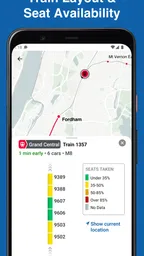
- Live train status helps you check for delays before leaving.
- Digital tickets are easy to buy and show from your phone.
- Saved trips make regular commuting quicker to plan.
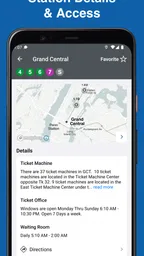
- Station information helps you navigate the MTA network.
- The app supports trip planning across Metro-North and LIRR.
What could be better
- Some features may require an MTA account.
- Live updates can lag behind sudden service changes.
- Ticket purchases require a reliable internet connection.
- The interface can feel crowded for first-time users.
- Digital tickets may not suit travelers who prefer paper tickets.





