

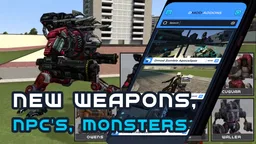

Mods for Dmod review
 Analysis by Appsdrops
Browsing a collection of community-made maps and mods is most useful when it helps me find something worth trying without turning the search into a project. Mods for Dmod is a focused companion for people who want to explore additions for Dmod on a phone. Its appeal is straightforward: it brings maps and mods into one place, while the value of using it depends on how easily I can discover, choose, and get back to the content I want.
In my view, this is best approached as a discovery app rather than a replacement for Dmod itself. If you already enjoy experimenting with user-created content, it gives you a dedicated place to look around. If you are expecting a full game, a general mod manager, or a guarantee that every item will work smoothly on your particular setup, you may find the scope narrower than you hoped.
Finding content when the connection matters
The collection is the central reason to install it. Maps and mods are different kinds of additions, so having both under one Dmod-focused roof is more convenient than searching broadly through unrelated gaming pages. That focus matters most when I have a specific mood in mind: a new place to explore, or a change to the familiar experience. I can start with the kind of content I want rather than sorting through material for other games.
Discovery apps are only as useful as the information they make available while browsing. For this kind of collection, I would check the details attached to an item before committing to it, especially if I am deciding between several options. A title or thumbnail can make something look appealing, but a sensible choice also depends on understanding what the item is meant to add and whether it suits the way I play. I would treat browsing as a selection step, not assume that every result is automatically the right fit.
Connectivity shapes that process. When I have a stable connection, I can browse at leisure and make a more considered choice. If I am on a weak mobile signal, waiting for content or trying to revisit something can make a quick search feel less convenient. I would therefore do the exploratory part at home or on reliable Wi-Fi, then open Dmod when I am ready to try what I chose. That is a practical workflow, not a claim that the app supports offline access.
It also helps to separate discovery from play. Mods for Dmod is a Libraries & Demo app, not the game itself, and its role is to help users find content related to Dmod. I would not install it expecting it to replace the game, explain every mod’s behavior, or solve compatibility issues. Keeping those expectations clear makes the app easier to judge fairly.
A useful routine for choosing a map or mod
My preferred approach is to browse with a small goal rather than download or try everything that catches my eye. For example, if I have only a short session available, I would look for one item that sounds suited to that session, check its description, and then move to Dmod to test it. This avoids spending the whole break browsing and gives me a clearer sense of whether the content was worth the effort.
A second useful habit is to remember what I have already tried. When a collection offers multiple choices, it is easy to lose track of which one produced a good session and which one I merely opened. A short note on my phone with the item name and a one-line reaction can make future browsing much more efficient. This is especially handy if I explore several maps over multiple evenings and want to return to a favorite without repeating the search.
For people who enjoy trying community content but do not want to follow scattered recommendations, this focused collection can be a convenient starting point. It is less compelling for someone who already has a trusted, well-organized source and prefers to manage every addition manually. The trade-off is simple: convenience in discovery versus the control and context that can come from a more deliberate, hands-on search.
Using it in everyday mobile situations
On a commute, I would use the app mainly to browse when the connection is steady, not to assume I can complete every step while moving between coverage areas. A train journey with patchy reception can interrupt a search at an awkward moment. If I spot something interesting, it is better to note it and come back when the connection is reliable than to keep retrying while travelling.
At home, the app makes more sense as part of a relaxed setup: look through the collection, choose a map or mod, then switch over to Dmod and see whether it suits the evening’s play. That separation is a small but important point. The collection helps with finding content; the actual enjoyment still depends on the content and the game experience. I would not judge the app solely by whether a single choice turns out to be my favorite.
It can also suit a quick decision before a longer session. If friends are waiting or I have only a few minutes before starting, I would avoid browsing without a plan. Instead, I would search for one kind of addition, make a choice, and stop. That limit prevents a common frustration with content libraries: spending more time choosing than using what you found.
For younger users, the app has an Everyone age rating, but I would still make sure the person using it understands that community-created content can vary in style and quality. The rating is a helpful starting point, not a substitute for a parent or guardian’s judgment about what is appropriate for a particular child. I would especially encourage younger players to ask before installing or trying unfamiliar additions.
What to do when browsing or trying content stalls
When something does not load or an attempt to use a selected item goes nowhere, I would avoid immediately repeating the same action several times. First, I would check whether the phone has a stable connection and whether other online activity is working. Then I would close and reopen the app, revisit the item, and try again once. This basic sequence can distinguish a temporary connection problem from an issue tied to a particular choice without wasting much time.
If the app opens but the selected content does not behave as expected in Dmod, I would treat that as a separate troubleshooting step. Confirm that I am working with the right game and the intended item, then retry from a clean starting point. I would not assume that a failed attempt means the entire collection is broken, but I also would not keep repeating an approach that has already failed. Moving on to another option is often the most practical way to protect a short play session.
There is a real limitation here: a focused collection can make content easier to find, but it cannot remove every uncertainty involved in trying community-made additions. Some choices may be more interesting or suitable than others, and a network interruption can make discovery feel stop-start. If you need dependable access at a specific moment, browse ahead rather than leaving the search until the last minute.
The app is also not the right choice if your priority is a broad library spanning many games. Its appeal comes from its connection to Dmod, so that specialization is a strength for the intended audience and a limitation for everyone else. A general mod directory or a game-specific source you already trust may be a better fit if you want more editorial context or a wider range of titles.
Keeping mobile data and purchases in perspective
I would browse over Wi-Fi when possible, particularly if I plan to explore many items or revisit the collection repeatedly. This is a cautious mobile habit rather than a statement about how much data any particular action uses. If I am on a limited plan, I would pay attention to my phone’s data settings and avoid leaving an app active in the background when I am finished.
Mods for Dmod is free to install, while in-app purchases are listed at $19.99 per item. That is worth keeping in mind before tapping through any purchase flow. I would first use the free parts of the experience to decide whether the collection suits my needs, then read the price shown for any optional item carefully. A free download does not mean every possible addition is free, and a per-item price can matter more if you intend to try several things.
Because this is a content-discovery tool, I would be selective rather than treating a larger collection as automatically better. Choosing one item at a time helps me judge whether it is worth pursuing and keeps spending decisions deliberate. It also reduces the chance of accumulating content I never actually use. That measured approach is particularly sensible for younger players or anyone sharing a device with family.
The app is developed by Dumitru Boico. It has reached over 100,000 installs, with a 3.2 average from 679 ratings. I read that reception as a reason to approach it with realistic expectations: it has attracted a substantial audience, but the average rating suggests that the experience may not satisfy everyone equally. Ratings are a useful signal, not a substitute for deciding whether a Dmod-focused collection matches your own habits.
Who will get the most from it
I would recommend giving it a try if you already play Dmod, enjoy sampling maps or mods, and want a focused place to start your search. It is particularly useful for a curious player who likes to explore a few options before settling into a session. The collection format can also help someone who has heard about community content but needs a manageable first step rather than a broad search across unrelated sources.
I would skip it if you do not use Dmod, rarely try user-created additions, or expect the app to function as a standalone game. I would also look elsewhere if your main concern is extensive guidance about compatibility, a broad cross-game catalogue, or a carefully curated recommendation system. Those are different needs from simply having a Dmod-oriented collection to browse.
Compared with searching through general app or web results, a focused library has an obvious convenience advantage: it keeps the subject matter relevant. Compared with manually tracking recommendations and selecting content one item at a time, it may save some discovery effort, but it still calls for judgment. I would not confuse a convenient starting point with a guarantee that every option is polished or right for my setup.
The app is free to install, rated for Everyone, and currently at version 2.6; it requires Android 6.0 or later. Those details make it accessible to many Android users, though the actual experience still depends on having a compatible device and being able to use Dmod. I would check those basics before spending time browsing, especially if I am setting it up for someone else.
My verdict on its connected, focused approach
Mods for Dmod makes the most sense as a practical discovery companion for players who already know they want Dmod-related maps or mods. I like the narrow focus because it gives browsing a clear purpose, and I appreciate that it can fit into a simple routine: explore when the connection is good, choose deliberately, and try the content in the game afterward.
Its limitations are equally clear. A network-dependent browsing moment can be inconvenient on the move, and finding a promising item does not guarantee that it will be the best choice for a particular player. The app also cannot replace Dmod or meet the needs of someone looking for a general mod library. I would keep the app for occasional discovery rather than rely on it as an all-purpose gaming tool.
Overall, I would recommend it to a Dmod player who enjoys experimentation and is comfortable making their own choices about community content. Use Wi-Fi when convenient, check purchase details before committing, and keep a note of the items you want to revisit. If you want a broader catalogue or expect every discovery step to work regardless of connection, a different option is likely to suit you better.
What we like
- Adds fresh community-made content to the base game.
- Offers more ways to customize gameplay.
- Can make repeat sessions feel less predictable.
- Lets players explore ideas created by other fans.
- May extend the game's replay value.
What could be better
- Some mods may not work with every game version.
- User-made content can vary in quality.
- Installing mods may require extra steps.
- A mod could cause crashes or other technical issues.
- Some downloads may need careful checks for safety.





