



MochiCloner Premium & Add‑ons review
 Analysis by Appsdrops
I approach subscription tools with a simple question: do they make it easier to understand and manage recurring charges, or do they become another account that needs managing? MochiCloner is presented as a subscription and add-on management app, so its appeal depends on whether that focused purpose fits the way you keep track of paid services. I’d treat it as a place to organize decisions, not as a substitute for checking the billing settings of each service you use.
Trust starts with knowing what the app is for
Made by lyt team, this free subscription management app sits in the libraries and demos area of the app catalog. That category makes it a less conventional fit than a familiar budgeting app: the central idea is managing subscriptions and add-ons, rather than building a broad picture of household spending. That narrower focus could suit someone who wants a dedicated place to review recurring commitments without adopting an entire finance system.
The name, MochiCloner Premium & Add-ons, can sound as if cloning is the main activity. The app’s stated purpose, however, is subscription and add-on management. I would go in with that expectation and avoid assuming the name guarantees any particular cloning workflow or compatibility. Before relying on it for a specific task, I’d inspect what the installed app actually offers and whether its controls match the services I want to manage.
Its current average is 3.4 from roughly 240 ratings, while the catalog shows just one written review. Those signals are worth reading carefully: ratings can hint at mixed experiences, but they do not explain what went wrong or whether it would affect your use. I would not treat either the average or the small pool of written commentary as proof of how the app handles personal information or billing.
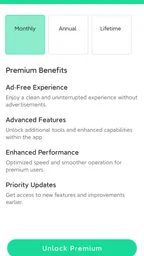
The app is free to install and is marked for everyone, but it also offers in-app purchases ranging from $1.99 to $79.99 per item. That difference matters when deciding whether to try it. I’d first explore the free experience, look for the exact item and terms before confirming a purchase, and avoid assuming that a paid add-on is necessary for basic organization. A broad price range is a reason to check each option, not a reason to guess what it unlocks.
What I would verify before trusting it with a routine
For any subscription organizer, the most important distinction is between recording a payment and controlling it. An app may help you keep a list or plan a cancellation, but the actual recurring charge is usually governed by the service or store where you subscribed. I would check whether MochiCloner’s screens make that distinction clear before treating a reminder or status as confirmation that a subscription has been stopped.
I also would not infer privacy practices from the app’s category or its purpose. Before entering account names, renewal details, or other sensitive notes, I’d review the permissions Android presents, the app’s privacy information, and any account or data controls visible inside the app. If a permission request seems unrelated to the task I am trying to do, I would pause rather than approve it automatically. That is a practical check, not a claim about which permissions the app requests.
Useful workflows without confusing records for cancellations
A realistic use is a monthly review of services that renew at different times. I’d open the app, compare the subscriptions I have recorded with the current billing pages in the relevant services, and mark anything that needs attention. The useful outcome is a clear list of decisions: keep, investigate, or cancel through the provider. This cross-check is especially valuable after changing cards or moving between app-store and direct billing, because a personal tracker can become outdated even when it once looked complete.
A less obvious but sensible workflow is to use the organizer as a decision log rather than only a list of charges. If I am considering removing an add-on, I’d note why I subscribed and what I would lose before taking action in the service itself. That makes it easier to distinguish an option I genuinely use from one I forgot about. It also limits the risk of relying on a vague label in a tracker when the provider’s own account page has the authoritative details.
For a shared household, I would use a subscription manager cautiously as a conversation aid, not as a shared source of truth unless its actual account and sharing controls clearly support that. One person could review their own renewals and bring a concise list to a household budget check. If several people enter information, they should agree who maintains it and compare it with billing records; otherwise, duplicate entries and missed updates can create false confidence.
There is also a useful boundary case: if your goal is simply to stop one charge, going straight to the service’s billing page or the app store where you subscribed may be faster. A manager can help you spot what to investigate, but it should not add an extra step between you and the cancellation control. I would use MochiCloner to organize the review only when that organization solves a real problem for me.
How it compares with familiar alternatives
Compared with a general budgeting app, a subscription-focused tool can make recurring services easier to scan without mixing them into groceries, transport, or one-off purchases. The trade-off is that a narrow organizer may not answer broader questions such as how subscriptions fit into monthly spending. If you already review every transaction in a budgeting app and can identify renewals there, adding another tool may create duplicate upkeep rather than new insight.
Compared with a spreadsheet or calendar reminder, an app can feel more convenient for keeping subscription notes together, while a manual system gives you direct control over what you store and how it is arranged. A spreadsheet is also easier to tailor if you want fields for billing source, cancellation steps, or household responsibility. I’d choose the app only if its installed interface makes routine review easier than maintaining those details myself; the label “manager” alone is not a reason to migrate personal records.
The most important comparison is with each provider’s own account page. That page is where I would verify the current plan, renewal status, and cancellation options. A third-party organizer is better viewed as a reminder and overview layer. If its records disagree with a provider, I would trust the provider’s current billing controls and correct my notes afterward.
Who should try it, and who may be better served elsewhere
I can see this being worth a cautious try for someone who has several recurring services, tends to forget where an add-on was purchased, and wants a single place to plan a review. It may also suit a person who likes to make deliberate keep-or-cancel decisions instead of waiting for a payment notification. Its focused purpose is most useful when the problem is disorganization, not when the user expects automatic financial oversight.
I would skip it if you want a guaranteed way to cancel services, automatic visibility into every payment, or a complete budget without checking what the app actually supports. I would also choose a simpler option if you only have one or two subscriptions and already remember their renewal dates. In those cases, a calendar reminder or the provider’s own billing page can be more direct and involves fewer places to keep information current.
The app requires Android 8.0 or later, and version 1.0.2 is the current release. It has passed 100,000 installs, which indicates that it has reached a sizeable audience, but reach alone does not settle questions about reliability or privacy. I’d check that the version available on my device is current and then test the workflow with low-sensitivity information before making it part of a regular financial routine.
Keep control of the sensitive moments
The moments that deserve the most care are adding account details, considering a paid item, and acting on a subscription that is about to renew. Before typing anything, I’d ask whether the information is necessary for the task. Before a purchase, I’d read the item’s description and price in the confirmation screen. Before a cancellation, I’d open the billing provider and verify the result there. These habits keep the user, rather than a tracker, in control of important decisions.
I would also make a quick maintenance habit part of using any subscription organizer: after a cancellation or plan change, revisit the record and update it. A stale entry can be worse than no entry because it may suggest that a service is still active or already handled when neither is true. Keeping the app’s notes aligned with the actual billing account is a small effort that protects the value of the overview.
My cautious verdict
MochiCloner is a potentially useful option if you want a dedicated place to think through subscriptions and add-ons, and you are comfortable verifying important actions with the companies that bill you. Its free install lowers the barrier to exploring it, but the in-app purchase range and limited written feedback make a measured approach sensible. I would start with a simple review routine, avoid storing details I do not need, and confirm every billing change at its source.
My recommendation is conditional rather than automatic: try it if recurring services are genuinely hard to track, but do not hand it responsibility for cancellations or assume anything about its data practices without checking the controls and privacy information yourself. If your current calendar, spreadsheet, or budget app already gives you an accurate view, that familiar setup may be the better choice. For me, the app earns a place only if it makes those decisions clearer without adding more upkeep than it saves.
What we like
- Lets you run separate copies of supported apps on one device.
- Useful for keeping work and personal accounts apart.
- Premium access may remove limits found in the basic version.
- Add-ons can extend features to suit different needs.
- Cloned apps can be managed without switching devices.
What could be better
- Some apps may block cloning or fail to work correctly.
- Clones can use extra storage and battery power.
- Notifications from cloned apps may be delayed.
- Premium and add-on costs can add up.
- App compatibility may vary by device and Android version.





