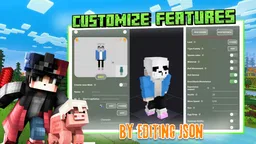
Mobs Maker for Minecraft PE review
 Analysis by Appsdrops
When I want to add a custom creature to a Minecraft PE project, the hard part is rarely coming up with an idea. It is turning that idea into a usable model without losing track of the tools and handoffs involved. Mobs Maker for Minecraft PE is aimed at that narrow, creative job: it gives MCPE creators a route toward making a mob with Blockbench, rather than being a general-purpose Minecraft companion. I see its value as a starting point for a model-making workflow, not as a one-tap creature generator or a replacement for learning the tools behind a finished mob.
From creature idea to a workable starting point
The app is a free Libraries & Demo app from PAMG Studio, with optional in-app purchases listed at $3.49 per item. It is rated Teen, and its focus is easy to understand: help people creating for Minecraft PE make their own mobs using Blockbench. That framing matters. If you are looking for a collection of ready-made maps or a guide to ordinary Minecraft survival, this is not the right kind of app. Its audience is someone who wants to make a creature and is willing to work through a creation process.
I would begin with a small, specific concept rather than a sprawling design. For example, decide on a creature’s silhouette, its main body parts, and what should make it recognizable at a glance. That preparation is useful because a mobile-oriented maker workflow can feel less forgiving than sketching freely on paper or sculpting in a full desktop tool. A clear plan helps you judge whether your model is taking shape instead of spending time adding details that do not improve the result.
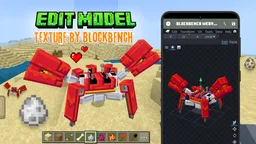
The app’s connection to Blockbench is its most important practical clue. It points toward a workflow in which the mob model is the creative focus and Blockbench is part of the wider making process. I would not treat the app as proof that every stage—from modeling through testing in a Minecraft world—happens in one place. Instead, think of it as a route into mob creation that may involve moving between tools and checking how the work behaves in its intended destination.
That distinction is useful before installing anything. A beginner can use the project as a reason to learn how a Minecraft-style model is assembled, while an experienced creator may value it as a focused entry point for a new idea. But someone expecting the app to produce a polished, fully tested mob automatically is likely to be disappointed. The creative work still depends on decisions, iteration, and a sensible handoff to the tools used to finish or check the result.
Make the first pass small enough to finish
For a first project, I would avoid designing a creature with many tiny parts or complicated attachments. Start with a distinctive outline and a limited set of forms, then decide what needs refinement after seeing the basic model. This is not just a beginner-friendly approach: it also makes troubleshooting easier. If something looks wrong, there are fewer moving parts to inspect, and you can tell whether the issue comes from the shape itself or from a later step in the workflow.
A practical example would be a creature for a small private build: perhaps a woodland guide or a harmless cave animal that gives the world a personal touch. I would write down its essential visual traits, make a simple model, and keep a separate note of what still needs attention. That short checklist becomes especially helpful when work shifts from the app to Blockbench or another part of the creation process. Without it, it is easy to forget whether a detail was unfinished or simply looked different on another screen.
Moving through the creation process
Once the idea is clear, the useful rhythm is to work in passes. First establish the overall body and proportions. Next, check whether the defining feature—such as a long neck, broad shell, or unusual ears—reads clearly from a distance. Only then spend time on smaller visual touches. This order keeps effort focused on what makes the mob recognizable and reduces the chance of polishing details on a shape that still needs a major change.
I would also save or preserve intermediate work whenever the available workflow allows it, rather than treating each session as one continuous attempt. That is a general creation habit, not a claim about a particular save function in this app. The reason is simple: model-making involves revisions, and a useful earlier version can be a better fallback than trying to reconstruct a design from memory. If you are experimenting on a phone or tablet, brief sessions are easier to manage when you know what the next task is.
Before moving on, inspect the model from more than one angle. A creature that looks convincing straight on can have awkward proportions from the side, and a feature that seems prominent while editing may disappear when viewed at a smaller scale. This is one of the most valuable checks to build into the workflow because a mob ultimately needs to read as a coherent shape, not merely look interesting in the editor’s current view.
Another worthwhile habit is to separate design questions from implementation questions. “Does this creature look like my idea?” is different from “Can this work in the target Minecraft PE setup?” If both questions are tackled at once, it can be hard to identify the source of a problem. I would settle the visual direction first, then use the next stage to check compatibility and practical use.
The handoff to Blockbench and the target project
The central handoff is between the mob-making experience and Blockbench, which is named as part of the intended creator workflow. That handoff is where expectations should stay realistic. The model is not automatically the same thing as a finished, in-game creature: a creator may still need to check the project in the appropriate tool or environment and make adjustments before relying on it. For a newcomer, this is a good reason to learn one step at a time instead of assuming a completed-looking model is ready for every use.
I would keep the handoff tidy by giving the project a clear name and noting what it is meant to do. If I were making a creature for a shared world, I would also tell whoever is helping with the next step which parts are essential and which are still provisional. That avoids a common collaboration snag: another person sees a model but does not know whether a strange proportion is intentional or unfinished.
There is also a difference between making a creature for personal experimentation and preparing one for other people to use. For a private test, a rough draft can be enough to learn from. For a shared project, I would be more careful about checking the model in its intended context and confirming that the handoff is understandable. Mobs Maker is best viewed as one part of that chain, rather than a guarantee that every downstream detail will be handled for you.
If your usual alternative is to start directly in a desktop modeling program, that route may offer a more familiar workspace for detailed editing, especially if you already know it well. If you usually browse ready-made Minecraft content, this app serves a different purpose: it is oriented toward making a mob, not simply choosing someone else’s finished creation. The trade-off is control versus convenience. Building your own creature takes more thought, but it can better fit a world or idea that existing content does not match.
What the finished result should be judged on
I would judge a successful outcome by whether the mob communicates its idea clearly and can move into the next stage of the creator’s project—not by how many details were added. A simple creature with a memorable silhouette is often more useful than an elaborate model that is difficult to inspect or revise. That standard keeps the project grounded: the point is not to spend the longest time in a maker app, but to produce something that serves the Minecraft PE world you have in mind.
The app has reached over 500,000 installs, and its average rating is 3.2 from around 1,900 ratings, alongside 136 written reviews. I take that as a reason to approach it with measured expectations rather than assuming it will suit every creator. Those figures do not decide whether it fits your particular workflow, but they reinforce the idea that this is a focused tool to try for yourself, not an automatic recommendation for anyone who plays Minecraft.
Its current version is 1.4.0, and it requires Android 7.0 or later. That makes the device requirement straightforward to check before starting. Because the app is free to install and offers paid items at $3.49 each, I would first see whether its basic workflow matches the way I want to create before considering any optional purchase. The sensible approach is to test the fit of the process, not to assume that spending is necessary to get a useful result.
Where the workflow can become frustrating
The main limitation is the gap between the promise of making a mob and the work involved in getting a creation ready for a real project. The app’s stated purpose makes it relevant to Blockbench, but a creator should still expect to think about the next stage, learn the tools, and check the result in context. If you want a finished creature without modeling decisions or a handoff, a ready-made content library or a simpler preset-based option is likely to be a better match.
Mobile creation also calls for patience. Fine adjustments can be less comfortable on a small screen than on a computer, and switching between stages can break concentration. I would keep early designs modest and use a larger screen or a familiar desktop workflow when detailed refinement becomes the priority. That is not a reason to avoid the app; it is a practical way to keep its role clear and prevent frustration from turning into an unrealistic expectation.
There is a learning curve for anyone unfamiliar with Blockbench or custom Minecraft content. A player who has never considered model structure may need to learn the vocabulary and process as they go. I think that can be rewarding if the goal is to understand how a custom mob comes together, but it is less appealing if all you want is a quick cosmetic change. In that case, choosing existing content, if it suits your project, will usually involve less effort.
I would also avoid treating one successful-looking model as proof that the whole job is finished. The practical test is whether the creation survives the handoff into the intended project and still looks right there. Keeping the first attempt small, checking it from different angles, and writing down unresolved issues are simple ways to make that transition less painful.
Who I would recommend it to
I would recommend Mobs Maker for Minecraft PE to curious MCPE creators who want to try designing a creature and are comfortable learning through a multi-step process. It makes the most sense for someone with a clear idea, a willingness to use Blockbench as part of the journey, and enough patience to revise a model rather than expecting an instant finished asset. The Teen content rating is also worth noting for families deciding whether the app is appropriate for a younger user.
I would skip it if I only wanted to browse finished Minecraft additions, if I needed a professional modeling workflow immediately, or if I had no interest in checking a creation beyond the initial design stage. In those situations, an established desktop modeling tool or a collection of ready-to-use content is likely to be more direct. The app’s strongest appeal is the chance to take ownership of a mob idea, not the promise of removing the work involved.
Overall, I see this as a useful, specialized starting point for people who want to make their own Minecraft PE creature and are prepared for the handoffs that come with that goal. Keep the first design simple, use a clear checklist, and judge the result in the context where you intend to use it. With those expectations, the app can be a worthwhile way to explore custom mob creation; without them, the distance between an idea and a finished in-game result may feel like more effort than you wanted.
What we like
- Create custom mobs without needing advanced modding skills.
- Adjust mob appearance and behavior to suit your ideas.
- Designed for use with Minecraft Pocket Edition.
- A focused tool for players who enjoy custom content.
- Offers a creative way to personalize gameplay.
What could be better
- Requires Minecraft Pocket Edition to use created content.
- Some features may depend on the app version.
- Custom mobs may not work with every Minecraft update.
- Creating detailed mobs can take time to learn.
- Compatibility may vary across devices and game editions.





