MN DNR Licensing review
 Analysis by Appsdrops
I’d treat MN DNR Licensing as a focused tool for Minnesota outdoor recreation rather than a general sports app. Its job is to support licensing through the Minnesota Department of Natural Resources, so its value is practical: it may help make a licensing task easier to manage without turning that task into a trip through unrelated services. I like that narrow purpose, but it also sets a clear expectation. This is most useful when you need Minnesota DNR licensing; it is not a substitute for broader hunting, fishing, or trip-planning tools.
MN DNR Licensing is a free app in the sports category, developed by Sovereign Sportsman, now PayIt LLC. It is rated for Everyone, and its current version is 1.2026.1029.1. The app has a 3.0 average from 67 ratings, with 40 written reviews, and has passed 50,000 installs. Those figures suggest it has reached a meaningful group of users, while the middling average is a good reason to approach it as a useful official channel rather than assume every interaction will be effortless.
Where licensing tasks can become frustrating
Licensing is a task where small points of friction matter. If I am preparing for a fishing day or a hunting trip, I want to deal with paperwork before I am packing gear or heading out the door. An official state licensing app can make that process more direct, but it still depends on the user having the right details ready and understanding which license or transaction they need.
The most helpful way to approach the app is to decide what you are trying to do before opening it. If you are renewing, buying, or checking on a licensing matter, keep relevant personal information and any existing licensing details close at hand. That simple preparation can reduce interruptions and make it easier to notice whether a problem comes from a mistyped entry, an account issue, or the app itself.
I would not assume that installing the app automatically resolves every question about eligibility or regulations. Licensing is tied to rules and circumstances, so a user may need to distinguish between completing a transaction and confirming that the selected option fits their plans. Read the prompts carefully instead of tapping through by habit, especially when making a choice you have not made before.
One practical trade-off is that a dedicated licensing app is more focused than a broad outdoor recreation app, but that focus can leave users wanting help with adjacent tasks. If you are trying to plan a route, compare equipment, or research conditions, those are separate jobs. I would use this app for the licensing part and keep other planning resources available rather than expect one tool to cover the whole outing.
Before you begin: make the basics easy to check
For a smoother first session, I would start by confirming that the device is running a compatible system. The minimum operating system is 7.0, so checking the device settings before troubleshooting the app is a sensible first step. If you are helping a family member, this is especially useful: an older phone may be the reason the experience differs from what you expect, not a mistake in the licensing process.
Next, make sure you are using the intended app and that it has finished installing. The name is specific to Minnesota DNR licensing, and the app store identifies it as an official licensing app. That distinction matters if you have searched for state information and encountered several unrelated outdoor or government tools. Choosing the correct app at the outset avoids entering personal information into something intended for a different purpose.
Then take a moment to gather the information you expect to need. I would avoid starting a purchase while rushing between errands, with low battery, or while switching repeatedly between screens to look up details. A calm, uninterrupted session is better for catching a selection that does not match your plans. This is not a special app trick; it is a useful safeguard for any transaction involving licensing.
If a screen behaves unexpectedly, close and reopen the app before repeating the same action. Check that the device has a working connection, and give a page time to load rather than tapping repeatedly. Repeated submissions can make it harder to tell what has completed, so pause and inspect the current screen before trying again. These are modest steps, but they help separate a temporary loading problem from a genuine account or transaction question.
A workflow that is easier to recover
I would handle licensing in a deliberate sequence: identify the task, review the choices, complete the requested information, and then check the final status before leaving the app. The last step is easy to skip when a screen seems to have finished. Taking a moment to confirm what the app displays gives you a clearer record of where you are in the process and helps avoid starting over unnecessarily.
If the process is interrupted, do not assume that nothing happened, and do not immediately repeat a purchase or submission. Reopen the app and inspect the available status or confirmation information first. If you cannot determine whether the task completed, contact the appropriate official support channel before trying again. That cautious approach is particularly worthwhile when an interruption happens after you have submitted information.
For a family outing, I would complete each person’s licensing task separately and review the result before moving to the next. That reduces the chance of mixing up details when several people are preparing together. It also gives you a natural checkpoint: you can verify whose task is complete rather than relying on memory later, when everyone is packing or already on the road.
Another useful habit is to leave yourself time for the task. If you are heading out early, do not make the first attempt from the car or at the last minute. A licensing app is most convenient when it replaces a rushed errand, not when it becomes another source of pressure just before departure. I would finish the transaction in advance and keep any confirmation information accessible in the way the app provides.
When the app may not be the problem
Not every obstacle points to a software fault. A device that cannot run the required operating system, a weak connection, an incorrect entry, or uncertainty about which licensing option applies can all interrupt progress. Before reinstalling or repeatedly trying the same action, I would check those basics and read the message on screen carefully. A clear error message may indicate what needs attention more effectively than a full reset.
It is also worth separating a licensing question from a technical one. If you are unsure whether a particular license suits your circumstances, the app may not be the best place to resolve the underlying rule question. Consult Minnesota DNR guidance or the relevant official support route, then return to the app once you know what you need. That is safer than selecting an option simply because it looks familiar.
Likewise, if a transaction’s outcome is unclear, avoid assuming that deleting and reinstalling the app will settle it. Reinstallation may help with some local app problems, but it does not answer whether an earlier transaction went through. Check the app’s status information and seek official assistance if the result remains uncertain. The distinction protects you from creating a second problem while attempting to fix the first.
The app’s average rating of 3.0 reflects a mixed public impression, not a guarantee that any particular user will have trouble. I would read that as a reason to be patient and prepared, especially if you rely on it close to an outing. For a routine task, the focused official purpose is a real advantage; for an urgent or unusual licensing question, having a backup way to consult the Minnesota DNR is sensible.
Who will find it useful, and who may prefer another route
This app makes the most sense for Minnesota residents or visitors who need to handle a state DNR licensing task and want a mobile option. It is particularly convenient for someone who already knows what they need and would rather complete the administrative step at home than leave it until the day of an outing. Its free price removes a purchase decision, though users should still take care to review their selections before completing any transaction.
It is less compelling for someone who only wants general fishing or hunting information, or who needs a broad collection of outdoor tools. A general recreation resource may be a better starting point for discovering places, learning about activities, or planning a trip. For licensing questions outside Minnesota, another state’s official service is the appropriate choice; this app’s purpose is specific to Minnesota DNR licensing.
If you are uncomfortable handling a transaction on a phone, or you are unsure what type of license applies, it may be better to resolve the question through an official information channel first. The app can support the licensing workflow, but it cannot replace careful reading or make a complicated choice on your behalf. I see that as a useful boundary rather than a flaw: it keeps the user responsible for checking what they are selecting.
My practical verdict
MN DNR Licensing is best judged as a specialized administrative tool, not a complete outdoor companion. I would recommend it to someone who needs Minnesota DNR licensing and is comfortable completing that task on a mobile device. The official focus and free access make it worth considering, while the mixed rating is a reminder to prepare details, move carefully, and verify the final status instead of assuming every step has succeeded.
My advice is straightforward: install it ahead of time, check device compatibility, gather the information you need, and complete licensing before the day becomes busy. If something stalls, check the connection and the on-screen status before repeating a submission; if the question is about rules or eligibility, use Minnesota DNR guidance rather than guessing. With those habits, the app can be a convenient part of preparing for an outing. If you need broader planning features or help choosing a license, use a more suitable resource alongside it.
What we like
- Buy Minnesota hunting and fishing licenses from your phone
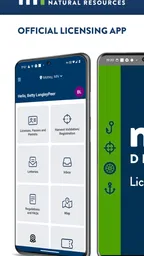
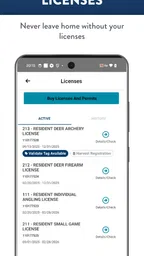
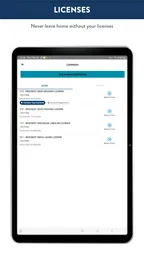
- Carry digital licenses without keeping a paper copy on hand
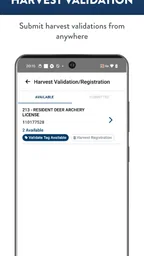
- Review license details when you need to confirm your purchase
- Access licensing services without visiting a sales agent
- A convenient option for Minnesota residents who already use mobile services
What could be better
- Some licenses or transactions may still require other documents
- You need a working device to show a digital license
- An internet connection may be needed for parts of the app
- The app is mainly useful for people who need Minnesota licenses
- A dead battery can make digital license access inconvenient





