Michigan DNR Hunt Fish review
 Analysis by Appsdrops
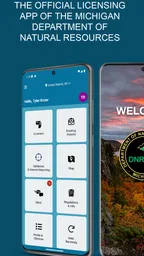
I think Michigan DNR Hunt Fish makes the most sense when you treat it as a practical companion for time spent outdoors in Michigan, rather than as a general-purpose fishing or hunting app. It is the official licensing app from the Michigan Department of Natural Resources, so its purpose is tied to the state’s outdoor licensing needs. That focus can be valuable for a household where several people plan trips together, but it also means the app is less useful to someone looking for a broad fishing guide, a social community, or a full trip-planning toolkit.
One phone, several people heading outdoors
A realistic use for this app is a family or group getting ready for a day outdoors: one person handles the shared plan, while each adult checks their own licensing needs before leaving. In that situation, having a state-specific app on hand can reduce the last-minute scramble between several sources. I would still make sure every person understands which account or personal information they are using, rather than assuming that one phone automatically covers everyone in the group.
That distinction matters with any app connected to official licensing. A shared device is not the same thing as a shared identity, and it is sensible to pause before entering personal details or completing an action for someone else. I would use the app as a convenient place to manage the relevant state service, while keeping each person’s own credentials and decisions separate. If a trip involves people with different licensing situations, check each person individually instead of relying on the household organizer’s view.
The app is free, which makes it easy for a household to try without weighing a purchase against occasional use. Its sports focus is specifically connected to Michigan’s hunting and fishing context, not sports scores or team coverage. If your plans cross state lines, I would not assume this app is a substitute for checking the rules and licensing arrangements that apply elsewhere.
Keep the device and account roles clear
For shared use, I would decide in advance who is responsible for keeping the phone available and who is responsible for their own account. That simple boundary helps avoid a common travel-day mix-up: the person holding the device may be coordinating the outing, but that does not necessarily make them the right person to make every licensing choice for the group.
I would also avoid treating a saved screen or an app left open on a shared phone as proof that every group member is covered. Before heading out, each person should confirm their own situation through the appropriate official process. This is a useful habit even when the app is already installed, because the convenience of a phone can tempt a group to rush through checks that deserve individual attention.
Michigan DNR Hunt Fish is a better fit for adults who regularly take part in outdoor activities in Michigan, or for the person in a household who often helps organize those outings. It may be less compelling for someone who only wants species information, maps, catch logs, or recommendations for destinations. Those needs are closer to what general outdoor reference apps or local guides are designed to address, while this app’s identity is anchored in the Michigan DNR.
Coordination before the trip, not a substitute for planning
The most useful household workflow is to handle the administrative check before the car is packed. The trip organizer can remind everyone to review their own licensing needs, then use the app as part of that preparation. Doing this at home is less stressful than trying to sort out account details when a group is already on the road or eager to start an activity.
For example, if two adults are arranging a weekend outing and a younger relative is joining them, the adults can coordinate the plan while keeping the young person’s situation distinct. Rather than assuming one adult’s preparation settles the whole group’s requirements, they can identify who needs to check what and leave time to resolve questions. The app can support that state-specific routine, but good coordination still comes from clear communication between the people going.
I would not choose it as the only tool for coordinating a group’s entire day. It is not presented as a shared calendar, a route planner, or a group messaging service, so those jobs are better handled with tools built for them. The practical trade-off is clear: use this app for its Michigan DNR role, and use ordinary planning tools for meeting times, transport, weather checks, and who is bringing equipment.
That separation also helps when one person in the household is less comfortable with apps. The organizer can explain the task without taking over another person’s account or assuming they have completed a check. If someone prefers to handle official matters independently, that is a reasonable boundary; the group can still coordinate the outing around it.
Age, trust, and responsible use
The app carries an Everyone age rating, so its store age classification is broad. That does not mean every licensing decision is appropriate for a child to make alone. For a household with younger users, I would keep an adult involved in any official account or licensing task and explain that the app is a tool for managing state-related needs, not a game or a general outdoor authority.
There is a trust advantage in using an official app for a state service: the developer is the State of Michigan, which makes the app’s public-agency role easy to understand. I still recommend reading what is on screen before confirming anything, especially when personal details or a transaction are involved. Official status is a reason to take the app seriously, not a reason to skip careful review.
People who share a phone should be especially deliberate about signing in and out where appropriate, and about not leaving another person’s account open for convenience. That is not a special feature claim; it is basic good practice for any app used around official records or licensing. If a family member is not ready to manage the process independently, an adult can guide them without blurring whose information is being handled.
What the app’s reputation and platform details suggest
Michigan DNR Hunt Fish has an average rating of 3.6 from 223 ratings, with 129 written reviews, and it has passed 100,000 installs. I read that as evidence of a useful but not universally smooth experience: enough people find a reason to install a state-specific app, while the middling average suggests that ease and expectations may vary. Ratings alone cannot tell me whether a particular household’s workflow will suit it, so I would judge it by whether it helps with your actual Michigan DNR tasks.
It was released on July 15, 2022, and the current version is 1.2026.0729.1. The minimum operating-system requirement is version 7.0. If an older phone is part of a shared household setup, checking that it meets this requirement before relying on it for a trip is a sensible step. I would also keep the device charged and make any important checks before departure, rather than assuming a phone will be convenient at the moment it is needed.
Compared with a general fishing or hunting app, the key difference is jurisdiction and purpose. Broad outdoor apps can be preferable when your main priorities are discovering places, keeping a catch journal, or collecting advice across regions. Michigan DNR Hunt Fish is the more natural choice when the task is connected to Michigan’s own DNR services. That narrow scope is a strength for the right user, but it is a limitation if you expect one app to cover every part of an outdoor outing.
Who should install it—and who can skip it
I would recommend it to Michigan residents or visitors who hunt or fish and want the state’s official licensing app available on their phone. It is also worth considering for the household member who usually organizes outdoor trips, as long as they remember that coordinating a group is not the same as managing everyone’s personal account. The free price removes a financial barrier to trying it, and its state-specific purpose is easy to understand.
I would skip it if you do not take part in Michigan hunting or fishing, or if you are searching mainly for detailed outdoor education, destination discovery, or a social space to share catches. I would also avoid relying on it as a complete group-management solution. A separate planning app, direct communication, and individual checks remain useful alongside it.
My household verdict is that Michigan DNR Hunt Fish is a focused tool that can make the official side of Michigan outdoor plans more convenient, especially when one person helps organize trips. Its best use is deliberate and specific: identify the relevant task, have each person keep their own account boundaries clear, and sort out details before leaving. For Michigan hunting and fishing households, that focused role is the reason to install it—and also the reason not to expect it to do everything.
What we like
- Provides Michigan hunting and fishing rules in one convenient app
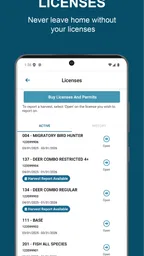
- Includes digital licenses and permits for quick access
- Offers offline access to saved licenses in the field
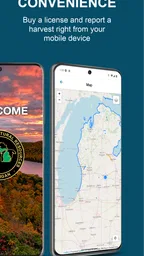
- Shows nearby public hunting and fishing locations
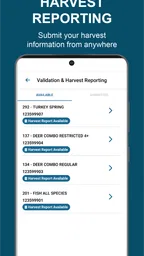
- Supports reporting harvests directly through the app
What could be better
- Some features require a reliable internet connection
- Location results may be less useful in remote areas
- New users may need time to find specific tools
- App information can change as regulations are updated
- Phone battery use may increase when location services are active





