


Meal Planner & Recipe Keeper review
 Analysis by Appsdrops
I find meal-planning apps most useful when they help with the awkward gap between saving a recipe and actually making dinner. Meal Planner & Recipe Keeper is aimed at that everyday problem: it brings recipe keeping, weekly planning, and shopping into one food-focused routine. In my view, its strongest household use is as a shared reference point for deciding what to cook and what to buy—not as a substitute for talking through everyone’s preferences or managing a family’s schedules.
One kitchen, several people, and a plan that stays visible
Picture a familiar Sunday evening: one person has found a few recipes during the week, another is checking what is already in the kitchen, and someone else wants to know what dinner is tomorrow. With a meal planner and recipe keeper in the same app, the useful idea is to move from “that recipe looked good” toward a practical plan and a shopping list. That can cut down on the last-minute scramble, especially when the household tends to repeat the same meals or forget ingredients.
I would treat Stashcook as a place to organize decisions, rather than assume that every household member needs to use it in exactly the same way. One person could take responsibility for choosing meals and gathering recipes, while another checks the plan before shopping or cooking. Even without relying on any particular sharing or family-control feature, simply agreeing on a routine—such as reviewing the week’s meals together—can make a recipe collection more useful than a folder of saved links.
The key distinction is that saving a recipe is not the same as committing to cook it. A useful personal workflow is to keep interesting ideas separate in your mind from meals that are genuinely planned. Before building a shopping trip around a saved dish, check whether it fits the week: consider prep time, whether the ingredients are already on hand, and whether the household will want leftovers. That small pause helps prevent a recipe collection from turning into an ambitious list nobody follows.
Decide who maintains the plan before everyone adds to it
For a couple or household sharing a device, I would first agree on who is responsible for keeping the plan current. If two people independently add meals, make substitutions, or shop from different versions of a list, the app cannot solve the underlying coordination problem by itself. A simple division of labor works better: one person chooses the meals, while the other checks what is needed or flags a conflict before shopping.
Shared-device use also deserves a little care. If a phone or tablet is passed around, the person who saves a recipe may not be the person who later cooks it. I would write down any important household adjustment in a way the cook can understand—such as a preferred substitution or a reminder to serve a side—rather than assume that an app’s saved recipe automatically captures everyone’s needs. The recipe is a starting point; the household still supplies context.
This arrangement is most comfortable when the people using the device trust one another and are happy to work from a common collection. It is less suitable when each person wants a completely separate recipe library, personal meal schedule, or private shopping workflow. In that case, keeping individual collections or using separate accounts may be clearer than trying to make one shared setup serve incompatible routines. I would check the app’s current account and sharing options before building a household process around them.
Recipe collection first, weekly decisions second
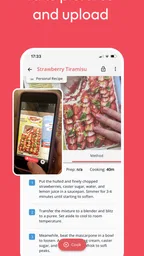
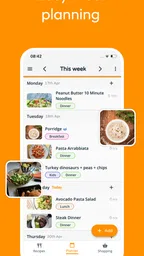
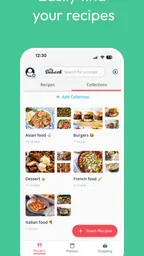
One practical way to get value from Stashcook is to avoid trying to plan an entire month at once. Start by collecting a few dependable meals that suit the household, then choose only the dishes that fit the coming week. This makes the planner feel like a working kitchen tool instead of a catalogue of good intentions. It also gives a new user a chance to see whether the app’s organization matches how they actually cook.
When a recipe is saved, I would make the next decision immediately: is it a weekday fallback, a weekend project, or just an idea to revisit? That mental label matters because the same dish can be appealing in the abstract and impractical after a long day. A recipe that needs unfamiliar ingredients or more preparation is better placed on a day when there is time to handle it. The benefit is not merely having recipes in one place; it is choosing them with the week’s constraints in view.
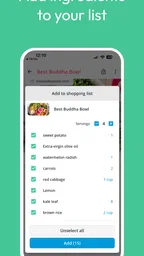
Another useful habit is to plan around ingredients that can serve more than one meal. If two selected dishes use some of the same produce or pantry staples, buying for both may make the shop more coherent and reduce the chance of a half-used ingredient being forgotten. I would still verify quantities and what is already in the kitchen before shopping. A planner can support a list-making routine, but it cannot know what has been used since the last grocery trip unless someone checks.
Shopping coordination needs a human check
The shopping side is most helpful when the person who plans meals and the person who visits the store are not always the same. Before handing over a list, I would review it for duplicates, household staples, and ingredients that might already be available. This is especially worthwhile when more than one person has been making changes. A quick check avoids the common problem of treating a generated or collected list as unquestionably complete.
For a realistic weekday example, imagine that one person plans two dinners while another is responsible for the next grocery run. The planner can give both people a shared point of reference: the shopper knows which dishes the ingredients are for, and the cook can see what the household intended to make. If plans change, the important step is to tell the other person rather than silently swapping meals. That small bit of coordination is what makes any digital plan reliable in practice.
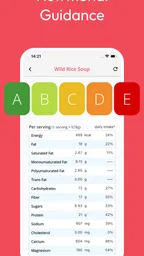
I would not use a meal planner as the only record for time-sensitive household details. If a family has a strict schedule, a meal plan can show what is intended without necessarily handling everyone’s calendar or reminders in the way a dedicated calendar app does. Likewise, the app should not be treated as a definitive source for allergies or dietary restrictions unless the household has checked how its current tools handle those needs. Put critical information where the person preparing food will see it, and confirm ingredients directly.
Account boundaries matter on a shared phone
Before several people use a single device, decide whether they are comfortable seeing and changing the same collection. A shared kitchen tablet can be convenient, but it also makes it easier for one person to alter a plan another person expected to follow. For a household that values a single common set of meals, that may be fine. For roommates with separate groceries or a parent and older child who want distinct lists, separate personal workflows may be less confusing.
I would also avoid assuming that a shared device means shared access is automatically configured. Check how the app handles accounts and any available sharing tools before relying on them; the right arrangement can depend on whether people use one device, their own phones, or a mix. If the app does not fit the household’s preferred boundaries, a shared calendar, a family notes app, or a simple paper list may be the more dependable coordination layer, with Stashcook kept as one person’s recipe library.
This is a meaningful trade-off against a basic notes app. Notes are flexible and easy to share, but recipes, weekly choices, and shopping needs can become scattered across separate pages. Stashcook’s appeal is its food-specific focus. On the other hand, a notes app or shared calendar can be better when the main challenge is assigning tasks, tracking who is home, or keeping personal information separate. I would choose based on the household’s real bottleneck, not just on which tool has the longer feature list.
Age, trust, and cooking responsibility
The app has an Everyone content rating, and it is a food-and-drink app rather than a game. That makes the general subject matter broadly approachable, but an age label is not the same thing as a household safety plan. If a younger family member uses it to choose a recipe, an adult should still decide whether the cooking steps and kitchen equipment are appropriate for that person. Recipe organization can help a child participate in meal choices without making the app responsible for supervision.
For a household with children, a useful approach is to let them suggest meals while an adult confirms ingredients, timing, and any dietary constraints. That gives them a role in the routine without assuming that a saved recipe has been vetted for every family member. The same caution applies to allergies: check the actual ingredients and preparation details, especially when a recipe is new or has been adapted. I would not rely on a general recipe collection alone for allergy management.
Trust also matters when adults share a device. Anyone using the common plan should know whether they are browsing, editing, or deciding what gets cooked. If people have different tastes, let them propose options before the weekly plan is finalized rather than expecting the app to negotiate preferences. The practical value comes from making choices visible; agreement still comes from the people eating together.
Who will get the most from it—and who may prefer something else
I think Stashcook is a good fit for someone who regularly discovers recipes and wants a path from inspiration to meals and shopping. It is also promising for a household where one person naturally takes the lead on food planning and the rest can follow a shared routine. The developer is Stashcook, and the app has an average rating of 4.5 from around 16,000 ratings, with more than 1,000,000 installs. That level of adoption suggests it has reached a broad audience, though the best test is whether its approach suits your own cooking habits.
It is free to download, with in-app purchases ranging from $3.99 to $139.99 per item. I would begin with the free experience and decide whether the planning flow earns a regular place in the household before paying for anything. The current version is 1.5.32, and it requires Android 8.0 or later. Its age rating is Everyone. Those details make it easier to judge compatibility and suitability, but they do not determine whether a particular household will enjoy using it.
The app may be the wrong choice if you rarely cook from recipes, prefer to improvise, or mainly need shared task assignments and calendar coordination. A bare grocery-list app can be quicker for someone who already knows what to buy, while a general notes tool may suit people who need maximum flexibility more than recipe-specific organization. If your household’s main challenge is keeping separate budgets, dietary rules, or personal accounts distinct, verify that the current setup supports your needs before making it central to the routine.
A useful household tool when the routine is clear
My overall view is that Meal Planner & Recipe Keeper makes most sense as a practical bridge between recipes and the decisions that lead to dinner. Its household value depends less on everyone using it constantly than on people agreeing how the plan will be maintained, checked, and changed. Keep the collection manageable, review the shopping list before a trip, and make important dietary or timing details explicit for whoever is cooking.
For a household with one willing planner and a few people who want to know what is on the menu, I would give it a try. For a group that needs strict separation, detailed scheduling, or a shared system of responsibilities, I would compare it with a calendar or notes tool before settling on a workflow. Stashcook can make meal planning feel less scattered, but it works best when the people around the kitchen bring clear expectations and a quick human check to the process.
What we like
- Keeps favorite recipes organized in one convenient place.
- Helps plan meals ahead to make weekly routines easier.
- Recipe details are easy to revisit while cooking.
- Useful for building a personal collection of meal ideas.
- Can reduce the effort of deciding what to cook.
What could be better
- Adding recipes can take time if details need to be entered manually.
- Planning features may require consistent updates to stay useful.
- Some recipes may not match every dietary preference.
- A large recipe collection can take effort to organize.
- Features and availability may vary by device or app version.





