mcpro24fps demo - video camera review
 Analysis by Appsdrops
I’m drawn to camera apps that offer more control than a phone’s default camera, but I’m wary of tools that feel exciting for a day and then slow down every ordinary recording. mcpro24fps demo is best approached as a hands-on trial of a manual video camera, not as a promise that every phone will suddenly shoot like dedicated equipment. Its real appeal is whether taking charge of video capture makes you more deliberate—and whether that control is worth keeping in your routine.
What the demo is really for
Made by Chantal Pro SIA, this free app sits in the libraries-and-demos corner of the app world: it lets you try a camera experience before deciding whether to buy the full version. The distinction matters. I would install it to assess the shooting approach and handling on my own device, rather than assume the demo is a complete, permanent replacement for the phone’s built-in camera.
The app has an average rating of 4.3 from around 3,300 ratings, and it has passed one million installs. Those figures suggest it has found an audience, but they don’t tell me whether it suits a particular phone or filming style. The useful test is personal: can I reach the controls I care about, understand the image I’m getting, and repeat a setup without turning a quick clip into a technical chore?
The demo is free, carries an Everyone age rating, and is listed as released on December 1, 2023. Its current version is 044di-demo, and it requires Android 7.0 or later. That makes trying it a fairly low-commitment decision for compatible Android users, but the demo framing should stay in view: it is a way to evaluate the manual-camera experience, with the full version positioned as a separate purchase.
The first week: curiosity meets real shooting
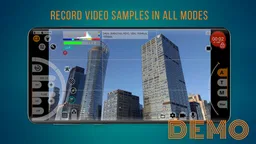
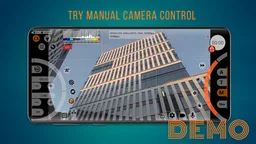
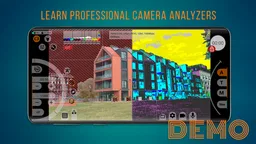
For the first few outings, a manual video camera can make familiar scenes feel different. Instead of tapping record and accepting the phone’s choices, I can pay attention to how a shot is being captured and decide whether I want to intervene. That change of mindset is the strongest first-week benefit. It encourages a test clip, a comparison, and a second take made with a clearer intention.
I would start with a low-pressure subject rather than a once-only moment: a cup of coffee near a window, a short walk, or a friend speaking in a quiet room. Make one clip with the phone’s normal camera and another with the demo, then compare them on the same screen. That simple routine helps separate a genuinely useful difference from the excitement of having a new set of controls.
A practical tip is to test one variable at a time. If I change several capture choices between takes, I may like the result without knowing why, which makes it harder to repeat later. Keeping the scene, framing, and movement similar gives me a more useful comparison. This is especially helpful when deciding whether the manual approach improves a specific kind of video I actually make.
Another good first-week test is to film movement rather than a static subject. Walk a short route, pan across a room, or record someone crossing the frame. A setting or workflow that feels comfortable while the phone is still can become awkward when I need to watch the scene and operate the camera together. The best camera app is not merely the one that offers control; it is the one I can manage without missing the shot.
Month-to-month value: does control become a habit?
Manual control earns lasting space only when it solves a recurring problem. If I regularly record performances, interviews, product details, or small creative projects, a camera app that invites careful setup may fit naturally into my process. If I mostly capture spontaneous family moments or quick messages, the built-in camera’s speed and familiar automation may be more valuable than extra decisions.
I would judge the demo over several different sessions, not one polished experiment. Try it indoors, outside, and in a situation where there is little time to prepare. The point isn’t to chase a perfect image every time. It’s to learn whether the app’s way of working gives me dependable results in the situations that come up repeatedly—and whether I can return to a useful setup without starting from scratch mentally.
For a small creator, one useful workflow is to make a short checklist before recording: decide what matters in the shot, check the live image, then record a brief test before committing to a longer take. This reduces the risk of discovering a problem only after filming a full scene. It also reveals whether manual operation is a real advantage for that project or simply extra ceremony.
Compared with the usual alternatives, the trade-off is straightforward. A phone’s default camera tends to favor speed and automatic decisions; a manual-oriented camera app is more appealing when I want to steer the capture. A dedicated video editor works later, after recording, while this kind of app is about the act of filming. Neither approach replaces the others. I might use the default camera for an unplanned moment, the demo to evaluate a more considered shoot, and an editor if the footage needs finishing afterward.
That comparison also sets a sensible limit on expectations. Trying a manual camera app cannot by itself guarantee a better-looking video: the scene, light, phone hardware, steadiness, and the person operating the camera still matter. I’d treat control as a way to make more intentional choices, not as a shortcut around filming basics.
Maintenance: keeping a useful setup without creating homework
The maintenance burden is less about physical upkeep than about remembering how I like to shoot. Any app that encourages manual decisions can add a small mental checklist before recording. If I have to pause to re-evaluate everything for every clip, I may abandon it for casual use. If I can settle on a dependable approach for recurring projects, those decisions can become part of a routine instead of a tax on attention.
My practical advice is to keep a short note outside the camera app describing the choices that worked for a particular kind of shoot. That could be as simple as “indoor talking clip” or “bright outdoor walk,” with a reminder of what I changed and what the result looked like. I would not assume the app saves or recalls any particular setup; the note is a low-tech way to make experiments useful and repeatable.
It is also worth checking the result on the device and in the place where I expect to use it. A clip that looks pleasing in a preview may feel different when watched later, so I’d review a short sample before relying on the app for an important recording. That habit is useful with any camera, but it matters more when I am deliberately taking responsibility for capture decisions rather than letting automation make them.
Compatibility is another part of the routine. The minimum requirement is Android 7.0, but a system requirement alone doesn’t tell me how the app will feel on every model. I’d test the exact phone I plan to film with, including whether the controls are comfortable to operate and whether the results suit my needs. If I switch devices, I would repeat that check rather than assume the same experience carries over.
Where fatigue sets in
The biggest source of fatigue is decision overload. Manual control is satisfying when a decision improves a shot; it is frustrating when I am adjusting things without a clear reason. For a quick clip of a passing moment, stopping to inspect a setup can cost the moment itself. I would not make this demo my default camera until I knew that its extra involvement paid off for the kinds of videos I actually record.
There is also a learning curve in judging outcomes. If I’m new to manual video capture, I may not immediately know which choice caused a result I like or dislike. That can make early comparisons confusing. A disciplined test—same subject, same position, one change at a time—helps, but it takes patience. Someone who wants the phone to make most decisions automatically may find that patience unnecessary.
The demo boundary is a separate consideration. It is designed to let people try the manual-camera experience and consider the full version, so I would not plan a long-term workflow around assumptions about what the demo includes. Before committing to a project or making a purchase decision, I’d use the trial for the specific kinds of recording I care about and check whether the full version is the right next step. This is a better approach than treating a demo as though it must meet every need indefinitely.
It is not the right choice for someone looking primarily for video editing, a library of ready-made effects, or the simplest possible point-and-shoot experience. The app’s role is camera capture, and its manual emphasis is a reason to try it only if greater involvement sounds useful. If I just want to take a quick clip and move on, the built-in camera may remain the more comfortable option.
Who should keep it—and who should move on?
I’d recommend giving mcpro24fps demo a fair trial if you shoot video often enough to notice the limits of automatic capture, enjoy learning through comparison, or want to see whether a more hands-on camera workflow suits you. It is especially sensible for someone who can test it on a real, repeatable project before deciding whether the full version deserves a place in their toolkit.
I’d skip it if the phone camera already does everything you need, if you mostly record unpredictable moments, or if adjusting capture choices sounds like a burden rather than an opportunity. That is not a judgment on the app’s quality; it is a question of fit. A manual camera is most valuable to someone who wants to make decisions while filming, not merely to someone who wants more settings to explore.
After the novelty fades, the deciding question is whether I reach for it without having to persuade myself. If it becomes my considered option for a recurring kind of video, the trial has answered its purpose and the full version may be worth considering. If I keep returning to the default camera because speed matters more, that is a useful result too. As a free demo from Chantal Pro SIA, rated for everyone, it offers a practical way to make that choice through actual use rather than guesswork.
What we like
- Offers manual control over exposure and focus.
- Supports high-bitrate video recording.
- Provides tools for monitoring audio levels.
- Includes customizable controls for camera settings.
- Can help test compatibility before buying the full app.
What could be better
- The demo may limit recording duration or features.
- Manual controls can be difficult for beginners.
- Video quality depends heavily on device hardware.
- Some phones may not support every recording option.
- The interface may feel dense on smaller screens.





