



MaxPreps: High School Sports review
 Analysis by Appsdrops
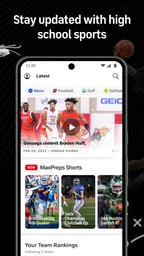
I can see why MaxPreps: High School Sports would earn a spot on a sports fan’s phone quickly: it focuses on school athletics rather than asking me to sift through professional leagues to find a local score. The app is built around the practical rhythm of a season—checking a matchup, following a schedule, and keeping an eye on athletes and teams. That makes its appeal less about a one-time burst of novelty and more about whether it remains useful when games become a weekly routine.
My overall impression is that it is best for people who already have a reason to follow high school sports: a student, a parent, a coach, an alumnus, or a fan keeping up with a nearby program. If that describes you, MaxPreps can make local coverage easier to revisit. If you mostly follow professional teams or want a broad national sports feed, its school-centered focus may feel narrow rather than refreshing.
What makes the first week appealing
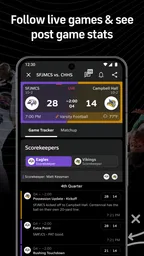
The immediate value is straightforward. Instead of treating high school games as an afterthought, the app puts school sports at the center. I can use it to check the upcoming slate before a busy week, then return to see how a team is doing as games are played. That change in focus is the point: the useful information is tied to schools, athletes, and schedules, not just headline-making leagues.
In its Sports category, the app is developed by MaxPreps Inc. It is free to download, has an Everyone age rating, and has been available since December 4, 2015. Those basics make it easy to try with a student or family member, though the real decision is whether the teams you care about are represented well enough to make checking it worthwhile.
A realistic use is a parent planning a week around a child’s team. Before making plans, they can look at the schedule; after a game, they can return to check the result and follow the team’s season. A student might use it to keep tabs on another school’s program, while a local supporter could check a rival’s results before a weekend matchup. These are modest tasks, but they happen repeatedly—and a sports app earns its place by making that repeat check less inconvenient.
The app has an average rating of 4.1 from around 9,800 ratings, with roughly 2,400 written reviews. That suggests a substantial audience has tried it, but ratings alone do not tell me whether it fits a particular school or sport. I would treat the school and team coverage that matters to you as the deciding test, rather than assuming that a well-rated app will be equally useful everywhere.
Make the first check count
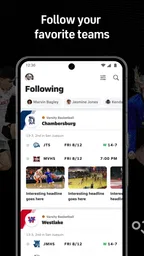
My practical advice is to begin with one specific team or athlete you genuinely follow, not to browse broadly and expect the app to become a habit by itself. Check whether the schedule and results answer the questions you actually have: when the next game is, whether the latest result is available, and whether the information is easy to find again. That quick trial reveals more than a long tour of menus.
There is also a useful distinction between following a team and merely looking up a score. A score check is a one-off errand; a schedule gives you a reason to return before the next game. If the app helps you move from “What happened?” to “When should I check again?”, it has a better chance of becoming part of your routine.
Why it can keep earning space month after month
High school sports are seasonal, but the need to follow them is recurring. The value here comes from returning to the same school or athlete as a season unfolds, rather than opening the app once for a major event and forgetting it. Scores tell me what just happened; schedules help me decide what is worth following next. Keeping both kinds of information in one sports-focused place is more useful than relying on a search each time.
That convenience becomes especially relevant when a family follows more than one team or when a fan wants to compare how local programs are progressing. One helpful workflow is to check the calendar at the start of the week, note the games that matter, and revisit after those matchups. It turns the app from a stream to browse into a reference for a specific set of commitments.
For that routine, consistency matters more than novelty. A polished first session cannot compensate if I have to repeatedly hunt for the same school or if the information I need is hard to interpret. Conversely, a plain, repeatable path to a team’s schedule and results can be enough to justify keeping the app installed. I would judge it by how quickly it answers familiar questions on the second or third visit, not by how much I explore on day one.
The app has more than one million installs, which indicates that it serves a sizeable community around school sports. I would not take that as proof that every school is equally covered, though. A sensible approach is to confirm that your local program and the sports you follow appear as expected before making it your only source for a season. For a particular team, a school’s own communications may still be the more dependable companion when you need announcements beyond scores and schedules.
Where it sits beside other sports options
Compared with a general sports app, MaxPreps has a narrower purpose. Broad sports apps are usually the easier choice if I want professional standings, national headlines, or a single place for several major leagues. MaxPreps makes more sense when the subject is a high school team or athlete and general coverage leaves me doing extra searches.
Compared with a school’s social posts or a team’s direct updates, the app offers a dedicated sports destination rather than making me follow scattered accounts. The trade-off is that a direct school channel may be better for practical announcements, while MaxPreps is more naturally suited to following the sporting record. I would use them as complementary tools if the school shares important changes elsewhere.
It is also different from simply searching the web for every result. Searching can be faster for one isolated question, but it creates repeated work if I check the same school throughout a season. The app’s lasting advantage is therefore not that it replaces every source; it is that it can reduce friction for recurring score-and-schedule checks tied to the teams I care about.
Maintenance, friction, and reasons the habit may fade
Maintenance should be light if I keep my use focused. I do not need to treat a school sports app like a daily news feed; checking around games and schedule changes is a more natural cadence. I would avoid turning it into another notification-heavy obligation unless alerts are genuinely useful to me. A sports app is easier to keep when it serves a clear purpose instead of demanding attention just because it is installed.
One limitation is the dependence on relevance. If I have no connection to a school, athlete, or local season, the app’s central focus gives me little reason to return. It is not the right choice for someone who wants continuous coverage of all sports or who mainly follows professional competitions. In those cases, a broad sports service will likely provide more value from the first screen onward.
Another source of friction is the possibility that expectations outrun the app’s role. A user may come looking for every kind of school communication, but a schedule and score tool is not automatically a substitute for messages from a coach, school, or athletic department. I would keep those channels for last-minute changes and use MaxPreps as the sports reference. That division of labor avoids frustration and makes each source easier to trust for the job it handles.
There is also a natural seasonal fatigue. If the team I follow is between seasons, or if I only care about one tournament, my visits may drop sharply. That does not necessarily mean the app has failed; it may simply be a tool whose value rises and falls with the sports calendar. I would keep it installed if I expect to follow the next season, but remove it without guilt if my interest was limited to a single event.
The current version is 5.7.0-Prod-261112, and the minimum operating system requirement is version 8.0. For someone choosing whether to install it on a family device, those details are worth checking against the device before relying on it. The app is free, but the more important cost is attention: if I find myself repeatedly opening it without learning anything relevant, it is not earning that space no matter how easy it was to download.
How to avoid turning it into another chore
I would build a small, deliberate routine around it. Check the schedule when planning the week, then return after the games that matter. If I follow several programs, I would start with the ones I can name and have a real reason to track rather than trying to monitor everything. This keeps the app useful as a reference instead of a feed I feel obliged to scroll.
For families, it can help to decide who needs which information. A parent arranging transport may care most about upcoming games; an athlete may want to keep up with another team; a fan may mainly revisit results. Being clear about that purpose makes it easier to decide whether the app is actually helping, and whether a school’s own communication channel needs to remain the source for logistics.
One practical trade-off is breadth versus focus. A general sports app can save space if I need only one place for major leagues, but it may not serve school athletics as directly. MaxPreps is the more sensible choice when high school sports are a regular part of my life; otherwise, installing it for occasional curiosity may create more clutter than value.
My long-term verdict
MaxPreps: High School Sports earns lasting space when I have teams or athletes I expect to follow across a season. Its combination of schedules, results, and an emphasis on school sports gives it a repeatable job, and that is a stronger reason to keep an app than novelty. The most useful test is simple: after checking a team once, do I have a reason to return before or after its next game?
I would recommend it to parents, students, coaches, alumni, and local fans who want a more direct way to keep track of high school athletics. I would not recommend it as a replacement for a broad sports app, nor as the only channel for urgent team or school updates. Those are different jobs, and choosing the right tool for each avoids expecting this app to do everything.
Its lasting value depends on how well it matches a real habit. If following a school’s season is already part of my week, the app can make that routine easier to manage. If I rarely care about high school sports, the initial curiosity is likely to fade. For the right user, though, its focused purpose is precisely why it can remain useful after the first-week appeal has passed.
What we like
- Follow teams and athletes to see updates tailored to your interests.
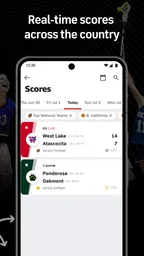
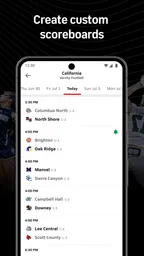
- Browse schedules and results for high school teams across many sports.
- Team pages make it easy to track records and season progress.
- Access rankings and standings for a quick view of team performance.
- Notifications can help you keep up with important team updates.
What could be better
- Coverage may be limited for smaller schools or less popular sports.
- Some team pages may have missing or outdated information.
- The app experience depends on schools and users submitting data.
- Frequent notifications may feel distracting if many teams are followed.
- Some features or content may require an account or subscription.





