


MacroPoint for Truckers review
 Analysis by Appsdrops
Keeping a delivery moving is about more than following a route. Drivers and transport partners also need to stay in sync about where a load is and when it reaches key points. MacroPoint is built around that coordination: it automatically communicates arrival, departure, and location information to partners. For truckers, the appeal is straightforward—less reliance on manually relaying routine status updates, and a clearer shared picture of a shipment’s progress.
From a shipment in motion to a shared status
In everyday trucking, a journey creates a steady stream of questions. Has the truck left? Is it still on the way? Has it reached the expected stop? When information arrives late, dispatchers and other partners may have to chase updates, while drivers can be interrupted to provide details that are already part of the trip.
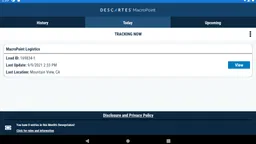
MacroPoint approaches that situation as a load tracking and transportation communication app. Its central promise is to automatically communicate a truck’s location, arrivals, and departures to partners. That makes it less like a general-purpose map app focused only on getting from one place to another and more like a coordination tool intended to keep the people involved informed as a shipment progresses.
The workflow starts with a load and the people who need visibility into it. The driver’s journey then supplies the important milestones: movement, arrival, and departure. Rather than treating each milestone as a separate phone call or message, the app is designed to pass those updates along automatically. The intended result is a more continuous flow of information between the truck and its partners.
That distinction matters. A navigation tool can help a driver think about the road ahead, but a logistics operation also needs to communicate what is happening to everyone coordinating the shipment. MacroPoint’s stated role is on that second side of the job. I’d view it as a visibility and status-sharing companion within a trucking workflow, not as a substitute for safe driving judgment or every other tool a driver may use.
Following the trip, step by step
At the beginning of a tracked movement, the useful question is whether the right people can follow the load’s progress. MacroPoint is meant to connect location information with the partners who need it. Once the trip is underway, that shared visibility can help replace some of the uncertainty that comes from waiting for a manual update.
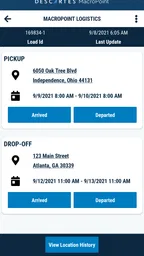
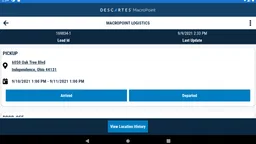
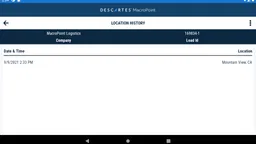
As the truck moves, location is the ongoing thread. The app’s summary also calls out arrivals and departures, giving partners meaningful changes in the journey rather than only a general sense that the truck is somewhere on the road. For a driver, that is the practical shape of the workflow: travel continues, milestones occur, and relevant status information is communicated to the people following the load.
Arrival and departure updates are especially useful because they mark transitions. Reaching a location tells partners that one part of the trip has progressed; leaving tells them that movement has resumed. In a busy operation, those simple signals can help others plan their next steps without requiring the driver to stop and narrate every change personally.
The best version of this workflow is quiet and predictable. The driver concentrates on the road and the job at hand, while partners receive the information they need through the app’s automatic communication. That does not mean every transport problem disappears. It does mean the product’s value is easy to understand: reduce the gap between what is happening on the journey and what the people coordinating it know.
Where the handoffs matter
A trucking journey is rarely a one-person process. The driver is physically moving the load, while partners may be coordinating schedules, receiving the shipment, or tracking its progress. MacroPoint’s job sits at the handoff between those sides: location and milestone information from the trip is communicated outward so that other participants can stay informed.
That handoff is most helpful when everyone involved understands how the tracking arrangement is being used. A driver needs to know that the trip is being followed, and partners need to know where they can rely on the resulting status information. Clear expectations make automatic updates useful rather than surprising. In that sense, the app’s practical success depends not only on the phone but also on the working relationship around the load.
For drivers, the appeal is reducing repeated status conversations. For partners, it is having a better sense of progress without waiting for a check-in. Those benefits meet in the middle: the driver can spend less attention on routine reporting, and the people coordinating the shipment can make decisions with fresher context.
I also think this is where the app’s narrow focus is a strength. It is not trying to sell a complicated story about trucking. Its stated purpose is direct: communicate location, arrival, and departure to partners. That clarity helps set expectations. Someone looking for a tool centered on shipment visibility may find the concept immediately relevant, while someone expecting a complete suite for every part of a trucking business should consider how it fits alongside their other systems.
The outcome: less chasing, more visibility
When the flow works as intended, the result is a shared view of progress. A load’s movement is easier for partners to follow, and the driver does not have to be the sole source of every routine update. That can make coordination feel smoother, especially when multiple people need to understand whether a trip is moving, has reached a point, or has departed again.
MacroPoint is free, and it has a 4.5 average from around 74,000 ratings. It has also passed one million installs, suggesting that it has found a substantial audience among people who need its kind of transportation visibility. Those figures provide context, but the core question for an individual trucker is still whether their partners use the app and whether its role fits the way their loads are managed.
The app has been available since April 16, 2013, and its current version is 26.06.24. It is rated for everyone and supports Android 6.0 and newer. Those details make it accessible to a broad range of Android users, though as with any work app, the value depends on the device and setup a driver actually uses on the road.
For searchers looking for a MacroPoint for truckers review, my takeaway is that the app is best understood through the workflow it supports. It links a truck’s progress with the partners who need to see it, focusing on location and the arrival and departure moments that shape a delivery. That is a practical, specific purpose rather than a promise to solve every challenge in logistics.
Where the flow can become frustrating
Automatic communication is helpful only when the people involved are aligned on the tracking process. If a driver and the partners are not on the same page about which load is being followed or who should receive updates, the intended handoff can feel confusing. That is not unique to MacroPoint; it is a reminder that tracking tools depend on clear coordination between the people using them.
There is also a difference between visibility and control. Knowing where a truck is, or that it has arrived or departed, does not by itself resolve a delay, change a plan, or answer every operational question. Partners still need to interpret updates and communicate when a situation calls for action. I would therefore see MacroPoint as a way to improve awareness, not as an automatic replacement for judgment and conversation.
Drivers should also keep the app’s role in perspective during a demanding workday. Any status-sharing tool should fit around safe driving and established work procedures. The point is to make routine information easier to share, not to create a reason to interact with a phone while driving. A useful workflow is one that keeps attention where it belongs and lets the communication happen without unnecessary interruption.
Finally, the benefits are strongest when the people who need shipment visibility actually participate in the same process. A tracking app cannot create a useful handoff if the relevant partners are not using the information. Before relying on it for a particular operation, it makes sense for drivers to understand how their transport partners expect the app to be used and what updates they expect to receive.
My take for drivers
MacroPoint makes the most sense for truckers who want a straightforward way to share trip progress with partners. Its focus on automatic location, arrival, and departure communication gives it a clear place in the delivery workflow: the truck moves, meaningful milestones happen, and the people coordinating the load can stay informed.
I like that the purpose is easy to grasp. The app is not framed as a replacement for every map, dispatch, or communication tool; its strength is keeping shipment status visible across a handoff. That can reduce routine chasing and give partners a more current picture of a trip, provided everyone understands the process and uses it consistently.
If you are a driver whose work involves partners who rely on load visibility, MacroPoint is worth considering as a focused logistics companion. If your main need is turn-by-turn navigation or a broad all-in-one trucking platform, the app’s stated role is different. Overall, it offers a practical answer to a common coordination problem: helping the people around a load stay updated as it moves from one milestone to the next.
What we like
- Quickly reports location to participating brokers and carriers.
- Designed to share trip progress without constant phone calls.
- Simple interface focused on shipment tracking tasks.
- Can help reduce manual check-in updates.
- Useful for drivers whose companies already use MacroPoint.
What could be better
- Requires a compatible tracking request from a broker or carrier.
- Location sharing may raise privacy concerns for some drivers.
- Background location access can affect battery life.
- Tracking reliability depends on network coverage.
- Offers limited value when dispatch partners do not use MacroPoint.





