




LUDEX Sports Card Scanner +TCG review
 Analysis by Appsdrops
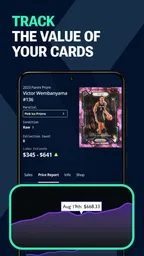
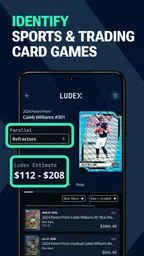
When I’m sorting a stack of trading cards, the slow part is often not deciding what I want to keep; it’s identifying each card and figuring out whether it deserves a closer look. LUDEX Sports Card Scanner +TCG is built for that job: it uses card scanning to help identify sports and trading cards, check their value, and organize a collection. I see the appeal most clearly for collectors who want a practical first pass, rather than a substitute for careful research or a specialist’s condition assessment.
What scanning can—and can’t—speed up
The basic promise is straightforward: point the app at a card instead of searching manually through names, sets, and listings. That can make a mixed pile less intimidating, especially when you recognize a player or character but not the exact release. LUDEX is a sports app from Ludex AI, and its focus on trading cards gives the scanning workflow a more specific purpose than a general camera or a broad collection spreadsheet.
I’d think of speed here as a way to shorten the identification step, not a guarantee that every card is instantly settled. A scan is most useful when the card is cleanly visible and you can present it clearly. Foil glare, soft focus, worn edges, unusual variants, or a camera struggling to distinguish similar designs can all make identification less straightforward. The sensible approach is to treat a result as a lead: check the card details before using a value as the basis for a trade or sale.
That distinction matters because “what card is this?” and “what is my copy worth?” are different questions. Identifying a release narrows the search, but condition, edition, and current buyer interest can change what a particular copy is worth. I wouldn’t let a quick scan replace inspecting the physical card or comparing relevant market information when the decision involves meaningful money.
A useful first pass for a real collection
Imagine sorting cards after a weekend trade. You have a few familiar names, some cards you haven’t seen before, and a small stack you might want to sell. Scanning can help turn that pile into a list of things to investigate, rather than forcing you to look up every card from scratch. I’d scan the uncertain cards first, then spend extra time checking the ones that appear valuable or that have details easy to confuse.
A practical habit is to keep the card centered and well lit, then rescan when the result doesn’t match what you can read on the card. If the scan identifies a player but you’re unsure about the set or variation, compare the visible printed details instead of assuming the first match is exact. This small verification step is especially worthwhile with cards that look nearly identical across releases.
For a casual collector, that workflow can save effort without turning a quick estimate into a promise. For someone pricing a card to sell, the app is better viewed as a starting point: identify it, confirm the version, assess condition yourself, and then check whether the value makes sense for the intended transaction.
When a session gets bigger
Light use and a long sorting session are different tests. A handful of scans is a quick convenience; working through a box means repeating the same camera and identification process many times, keeping track of which cards need a second look, and avoiding mistakes as the stack gets repetitive. That is where a focused scanner can be useful, but also where patience and a consistent routine matter more than simply tapping quickly.
I’d divide a large batch into manageable groups and separate uncertain results instead of trying to resolve every ambiguity on the spot. That prevents a questionable identification from getting mixed into a collection record as if it were confirmed. It also makes it easier to return to cards that need better lighting or a closer look, rather than slowing the whole session down.
There’s a trade-off in using a phone camera for repeated scans: the app may streamline lookup, but your hands still have to present each card clearly. If you’re processing a large collection, arrange the cards before starting and keep the surface and lighting consistent. That won’t guarantee recognition, but it reduces avoidable friction caused by glare, shadows, or changing angles.
For a particularly valuable card, I’d stop treating the scan as the final step. Confirm the exact version and inspect condition separately. A scanner can help you find the right subject to research; it cannot make a worn corner, surface mark, or other physical detail irrelevant to a buyer.
Reliability means checking the result
My standard for a reliable card tool is not that it never needs a second attempt. It’s that the user can notice uncertainty and verify the important details before acting. LUDEX is most useful when its output helps narrow the search, while the collector remains responsible for confirming that the match describes the card in hand.
If a scan looks wrong, I’d first check the simple causes: whether the card is fully in view, whether the text and artwork are readable, and whether reflections are obscuring a detail. A second attempt under steadier lighting is a reasonable recovery step. If the result still seems off, manual comparison is safer than repeatedly accepting a match that doesn’t fit.
This is a meaningful limitation for collectors whose cards include unusual parallels, variations, or condition-sensitive details. Two cards can look similar in a quick camera view while differing in a way that matters to a collector. The more specialized the card, the more I’d use the app as an index and rely on close inspection to confirm the identification.
LUDEX has an average rating of 4.5 from around 16,000 ratings, with about 1,900 written reviews, and more than a million installs. Those figures suggest it has found a substantial audience, but they don’t tell me whether a particular scan will recognize a particular card. I’d judge its usefulness by how well it fits your collection and how carefully you verify results.
Phone and cost considerations
The app is free to download, with in-app purchases ranging from $3.99 to $239.99 per item. I’d start by deciding what you actually need from a card-scanning workflow before paying for anything: occasional identification is a different use case from managing a collection frequently. Since the available purchase range is broad, check the current in-app options and terms before committing, rather than assuming every useful task requires an upgrade or that a particular purchase is necessary.
Device expectations are worth keeping modest. The listed minimum operating-system requirement is version 7.0, but a compatible system version alone does not guarantee the same camera experience on every phone. Clear focus, steady handling, and even light are practical factors for any image-based scan. If your camera struggles to focus up close, scanning may feel less convenient regardless of the app’s intended workflow.
For resource demands, I wouldn’t assume that a scanning app is effortless on every device during a long session. Repeated camera use can make extended sorting feel more demanding than a short lookup, particularly if the phone is already busy or low on battery. I’d try a small batch first on an older device and see whether the camera view and results remain comfortable to use before planning a full afternoon around it.
The app is rated for Everyone, and its current version is 2.0.5. It was released on June 7, 2022. These details help set expectations about what you’re installing, but the more important decision is whether you want a card-focused scanner at all. If your collection is small and you already know each card, manual notes may be simpler. If you regularly encounter unfamiliar cards, a scan-first tool can make the initial sorting less tedious.
How it compares with manual lookup
The usual alternative is searching by hand, using the card’s printed details and a general browser or collection spreadsheet. That approach gives you more control over what you compare, but it can be slow when you have many unfamiliar cards or don’t know which details identify a particular release. LUDEX’s advantage is the scanning-led starting point; its limitation is that a camera match still needs human judgment.
A spreadsheet can be better for someone who wants a fully custom record of purchases, trades, condition notes, and personal organization. A manual search can also be preferable when a card is rare or when tiny distinctions matter more than speed. I’d use LUDEX to reduce the initial lookup burden, then move to more deliberate research for high-stakes decisions instead of expecting one tool to handle every stage equally well.
The app is a weaker fit if you want guaranteed pricing, grading, or a complete appraisal from a scan. Those are not interchangeable with identifying a card and finding a value reference. Collectors who mainly need exact condition judgments or detailed records may prefer a more hands-on process, even if it takes longer.
Who I’d recommend it to
I’d recommend giving LUDEX a try if you collect sports or trading cards and often find yourself stopping to identify unfamiliar items. It makes the most sense for casual sorting, checking which cards deserve further research, and getting a collection started without manually looking up every card from zero. The strongest use case is not blind trust in a number; it’s a quicker route from an unknown card to an informed next step.
I’d skip it if you rarely need to identify cards, prefer maintaining a custom catalog by hand, or need a definitive valuation without checking the physical copy and market context. I’d also be cautious about relying on it alone for cards where small differences or condition could change the decision. In those situations, a slower manual comparison is the safer choice.
Overall, LUDEX is appealing because it tackles a specific collector chore rather than trying to be a general-purpose organizer. Its scanning approach can make card identification less cumbersome, especially when you sort in small batches and verify uncertain matches. I’d treat it as a helpful assistant, not an authority: for everyday discovery it can save effort, while valuable or hard-to-distinguish cards still deserve a careful second look.
What we like
- Quickly identifies sports cards using a phone camera.
- Organizes scanned cards into a searchable digital collection.
- Supports price tracking to help monitor collection value.
- Useful for checking cards while browsing shops or trade events.
- Includes tools for managing sports card inventory.
What could be better
- Recognition results may need manual correction.
- Card values can differ from real sale prices.
- Pricing data may not reflect every recent market change.
- Some features may require a paid subscription.
- Scan quality can suffer with glare or damaged cards.





