
Little Caesars review
 Analysis by Appsdrops
Choosing a restaurant app is less about finding the one with the most buttons and more about finding the one that suits the way you actually order. If Little Caesars is already on your pizza shortlist, the Little Caesars app offers a direct place to explore the brand and handle pizza-related tasks. Its store tagline, “EASIEST WAY TO PIZZA®,” sets a clear expectation: a focused experience for people who want Little Caesars, rather than a broad guide to every restaurant in town.
What to consider before choosing a pizza app
I’d start with a simple question: do you want to order from one familiar pizza chain, or compare a range of restaurants and cuisines? That distinction matters more than flashy extras. A brand-specific app can make sense when you already know where you want to eat; a general food-ordering app may be a better match when you’re still deciding what sounds good.
The Little Caesars app is a free Food & Drink app from Little Caesar Enterprises, Inc. It is rated for Everyone, so its intended audience is broad. The app has a 4.7 average rating from around 647,000 ratings, and it has been installed over 10 million times. Those figures suggest that plenty of people have chosen to try it, though they don’t guarantee that every person will have the same experience.
A focused route to one brand
With a chain’s own app, the main appeal is straightforward: you’re dealing with that restaurant rather than browsing a collection of unrelated options. That focus can be useful if Little Caesars is already the decision. You can begin with the brand you have in mind instead of sorting through a wide catalogue just to find it.
That doesn’t mean a dedicated app is automatically the right choice for every meal. Its value depends on whether you want Little Caesars specifically. If you’re in the mood for pizza from this brand, a direct route feels sensible. If you want to compare several local restaurants or explore different types of food, a single-brand experience is naturally a narrower starting point.
Why the app stands out for Little Caesars fans
The strongest reason to consider it is its clear purpose. The app is built around Little Caesars, so it speaks to customers who want a direct connection with the chain. I like that kind of focus when I already know what I’m looking for: less wandering around, more attention on the restaurant I chose.
Its scale is another useful signal. The app has 74,000 reviews, alongside its large rating and install totals. Reviews can reflect very different situations, devices, and expectations, so I wouldn’t treat popularity as proof that everything will work perfectly for everyone. Still, a substantial audience makes it easier to see the app as an established option rather than an obscure download.
It’s also free to download, which makes trying it a low-commitment decision. That does not mean every possible purchase or order is free; the free price refers to the app itself. If you’re curious about ordering directly through a restaurant’s own app, you can give this one a look without paying an app-download fee.
When another kind of app may suit you better
Different apps serve different appetites, and there’s no need to force them into a single ranking. A restaurant’s own app is a natural fit when you have a specific chain in mind. A multi-restaurant ordering service can be more convenient when you want to compare places, cuisines, or menus in one spot. A restaurant’s website or an in-person visit may suit someone who prefers not to add another app to their phone.
Those alternatives aren’t automatically better; they simply answer a different question. If your priority is exploring broadly, a broader service may match your habits more closely. If your priority is Little Caesars, opening a dedicated app can be a more direct choice. I’d choose based on the meal I want and how I prefer to place an order, not on the assumption that one type of service must win in every situation.
It’s also worth thinking about how often you expect to use a dedicated restaurant app. For an occasional order, a browser or another ordering route may feel sufficient. For someone who regularly returns to the same brand, keeping its app handy may be more appealing. That’s a personal convenience trade-off, not a claim that one approach will save time or work the same way for every customer.
The practical cost of switching
Trying a new ordering app usually involves a small amount of setup and getting used to a different layout. With this one, the main adjustment is choosing a brand-specific tool instead of a general food app or another way of ordering. Whether that feels worthwhile depends on your routine: if you already reach for Little Caesars, the change may feel natural; if you mostly browse across restaurants, it may be one more place to check.
There’s no need to make the switch permanent. You can keep the options that already work for you and consider the Little Caesars app when you want that particular restaurant. That flexible approach is especially sensible if you’re unsure whether a dedicated app belongs in your regular rotation. The decision can be as simple as trying it for the occasions when the brand is already your choice.
The app’s history may also matter to readers who prefer established products. It was released on September 16, 2016, and its current version is 26.21.0. It requires Android 9 or later. Those details help Android users judge basic compatibility, while the release history gives a sense that this isn’t a newly launched experiment. The app is available in the app-store context for its supported platform, with the download itself listed as free.
What I’d keep in mind while using it
I’d approach the app with a clear expectation: it’s for engaging with Little Caesars, not a universal food-discovery tool. That framing keeps the decision grounded. If the chain is what you want, the brand-focused approach is the point. If you’re hoping to compare a broad range of restaurants, you may be more comfortable starting with a service designed for that wider search.
It’s also helpful not to read too much into any single rating. A strong average is encouraging, but people’s needs vary: some care most about a simple route to a familiar restaurant, while others want a particular feature or a broader selection. I’d use the rating as one consideration among several, alongside whether you want this brand and whether your device meets the Android requirement.
As with any restaurant app, the best experience is the one that fits your own ordering habits. Think about what you expect to do, how often you choose Little Caesars, and whether you prefer one dedicated app or a broader place to compare options. Keeping those questions in mind makes it easier to judge the app on its actual role instead of expecting it to solve every food-ordering need.
My recommendation
I’d recommend the Little Caesars app to people who already enjoy the brand or want a direct, brand-specific way to engage with it. Its focused purpose, free download, large audience, and strong average rating make it a reasonable option to consider. For existing Little Caesars customers, it’s especially easy to understand why a dedicated app might be preferable to searching through a wider collection of restaurants.
If you’re still deciding where to eat, though, a multi-restaurant service may be a better first stop. And if you rarely order from Little Caesars, there may be little reason to add another app to your phone. Neither choice is a knock against the product; it’s simply a matter of matching the tool to the way you make meal decisions.
Overall, I see this as a focused choice rather than an all-purpose food app. Go for it if Little Caesars is already part of your plans and you like having a restaurant’s own app available. If your priority is broad comparison, keep using an option that brings more restaurants together. That’s the clearest way to decide whether this app deserves a place on your device.
What we like
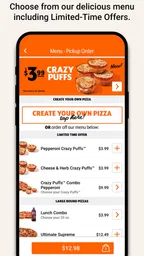
- Order pizza and sides for pickup through the app.
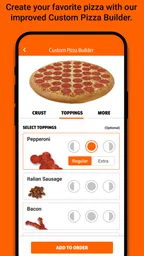
- Browse the menu and customize eligible items before ordering.
- Save favorite orders for quicker repeat purchases.
- Find nearby Little Caesars locations using the store locator.
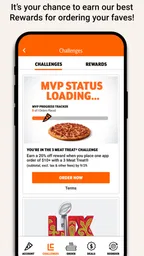
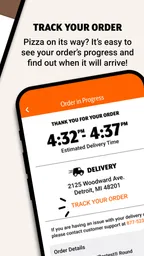
- Track order progress for updates on eligible orders.
What could be better
- Menu availability can vary by location.
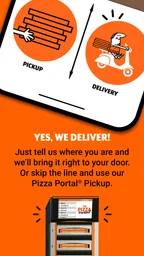
- Delivery may be handled by third-party services.
- Promotions and prices can differ between stores.
- Some orders may require a minimum purchase for delivery.
- App features may not be available at every location.





