Kwik Rewards review
 Analysis by Appsdrops
I think the best way to judge a loyalty app is to ask whether it helps at the exact moment you need it: while deciding where to stop, standing at the counter, or trying to make sense of a purchase afterward. Kwik Rewards is Kwik Trip Inc’s free Food & Drink app, built around the company’s rewards program. Its appeal is straightforward: if Kwik Trip is already part of your routine, keeping the loyalty experience on your phone can make visits easier to manage. If you rarely shop there, the value is naturally much smaller.
When the connection matters
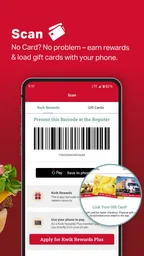
A rewards app is most useful when it is ready before you reach the register. With Kwik Rewards, I’d treat a working internet connection as part of the checkout plan rather than assume the app will behave the same way in every network situation. Open it while you still have a moment, check that the screen you need is available, and avoid waiting until a queue is moving to sign in or troubleshoot.
That small habit matters because a loyalty app is not just something to browse at home. Its practical test is whether you can use it during an ordinary stop, when you may be carrying a drink, juggling a phone, or trying to pay promptly. If your connection is weak inside a building or you have limited mobile data, loading the app at the counter could add friction. I would not plan a purchase around an assumption that every part of the experience will be available without a connection.
For regular customers, the app makes the most sense as a routine tool: check it before leaving, then have it ready when you arrive. That approach also helps you notice whether your account is signed in and whether the information you expect is visible. It is a more dependable workflow than discovering a login issue with people behind you.
Make the stop easier, not slower
Here is a realistic example: I’m on my way to work and stopping at Kwik Trip for something quick. Rather than opening the app only after I have paid, I would bring it up while waiting for my turn. If the connection is behaving, I can deal with the loyalty step without turning checkout into a phone-and-wallet juggling act. If it is not, I can make a quick decision about whether to continue without holding up the line.
The useful insight is that preparation is part of the app’s value. A rewards balance or offer is only helpful if you can access the relevant screen when you need it. Even a brief pre-check can prevent the common mistake of assuming that an app which worked at home will load instantly in a busy store.
Useful in a familiar routine
The app is aimed at people who already choose Kwik Trip for convenience-store visits, food, drinks, or other everyday stops. The strongest fit is someone who goes often enough to care about collecting and using loyalty rewards. For that person, a dedicated app can be more convenient than remembering a physical card or trying to keep track of program details separately.
It is less compelling if you visit only occasionally or choose whichever nearby shop is easiest. A loyalty program tends to reward consistency, so the app is not a reason by itself to make an out-of-the-way trip. I would compare the actual convenience of stopping at Kwik Trip with your usual alternatives, rather than treating the existence of an app as proof that every visit is a better deal.
Compared with a paper card or a generic wallet full of loyalty passes, a store-specific app can keep the experience focused on one retailer. The trade-off is that it asks you to use another app and rely on your phone. If you prefer not to install dedicated apps for individual stores, a simpler payment routine or another nearby retailer may suit you better.
For a household where several people make separate stops, it is worth deciding whose account will be used and how each person will access it before relying on the program. That is not a special feature claim; it is a practical bit of planning that prevents confusion at checkout. Keeping the routine consistent makes it easier to tell whether a visit was recorded as expected.
What to do when the app stalls
Any app used in a checkout line has to contend with real-world interruptions: a weak signal, a slow loading screen, or a session that needs attention. I’d first check whether the phone has a usable connection, then give the app a moment to finish loading rather than repeatedly tapping controls. If the screen still does not appear, stepping aside and trying again is more considerate than blocking the line while troubleshooting.
For a purchase where the reward matters, it is sensible to confirm the relevant app screen before completing the transaction. Afterward, check the account when you have a stable connection if something seems missing. That gives you a clearer view of whether the issue was a delayed update or whether you need to look into the transaction more carefully. I would keep a receipt when available until I’m satisfied that the visit appears as expected.
This is the kind of small recovery habit that makes a rewards app less stressful. Don’t assume that a slow screen means the transaction has failed, and don’t keep repeating an action if you cannot tell whether it went through. Pause, check the connection, and retry only when the app’s state is clear.
Using it without wasting mobile data
If you keep an eye on mobile data, the easiest approach is to use the app deliberately rather than leave it open as a background habit. Load what you need before you reach the counter when you have a reliable connection, and close it when you are finished. I would also avoid repeatedly refreshing a screen just because it takes a few seconds; that can use time and data without making the experience clearer.
People who rely on public Wi-Fi may prefer to open the app before the busiest part of a visit, when they have time to confirm whether it is working. For anyone concerned about account access on a shared device, using a personal phone and keeping its normal lock enabled is a sensible precaution. These are general ways to handle a loyalty account responsibly, not a substitute for reading the app’s own account and privacy information.
Because connectivity can vary from one stop to the next, I would not make the app the only place I keep track of something important. If you are planning a purchase around a reward, check the app beforehand and retain ordinary purchase details until the account reflects what you expect. That approach is especially useful for people who make several stops in a day and may not have time to investigate each one immediately.
A focused choice for Kwik Trip regulars
Kwik Rewards has a clear purpose, and I find that focus more useful than an app that tries to serve every retailer at once. Kwik Trip Inc’s loyalty app has a 4.7 average from around 43,000 ratings, and it has been installed over a million times. Those figures suggest that it has found an audience, but they do not guarantee that it will fit every shopper’s habits or work perfectly on every connection.
The app is free, rated for Everyone, and its current version is 3.57.1. It first appeared on January 11, 2018, and requires Android 10 or later. For someone with a compatible phone who already visits Kwik Trip regularly, the cost barrier is low. The more important question is whether you are comfortable using a phone-based loyalty routine and whether the stores you visit are convenient enough to make that routine worthwhile.
I would recommend trying it if you often stop at Kwik Trip and want your rewards experience in one place. Give yourself a calm first run: sign in before a busy visit, learn where the useful account information appears, and test your normal checkout workflow without rushing. The app is a weaker choice for people who seldom visit, avoid installing retailer-specific software, or need a loyalty tool that does not depend on connectivity at the moment of use.
My verdict is practical rather than universal: Kwik Rewards is worth keeping ready if Kwik Trip is already one of your regular stops. Its best quality is how naturally it can fit into a repeated shopping habit; its main limitation is that a phone-based rewards step can become inconvenient when the connection or login is uncooperative. Prepare before checkout, keep a simple backup mindset, and it should feel like a useful companion rather than another task to manage.
What we like
- Earn rewards on eligible purchases at participating Kwik Trip locations.
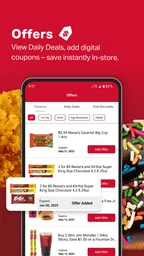
- Use the app to activate digital coupons before shopping.
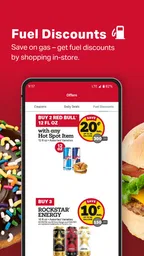
- Browse weekly deals and current promotions in one place.
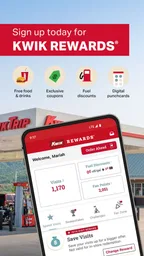
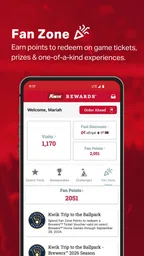
- Check your rewards balance and available offers from your phone.
- The free app provides a convenient alternative to paper coupons.
What could be better
- Rewards and offers may vary by location.
- Some deals require activation before checkout.
- You may need to share personal information to create an account.
- The app offers limited value outside participating Kwik Trip stores.
- A phone with internet access is needed to browse current offers.





