

KFC US - Ordering App review
 Analysis by Appsdrops
I like the KFC US app best when I already know I want KFC and need a simple way to plan the order, check for a deal, or make a repeat visit less of a hassle. It is a free Food & Drink app from KFC US, built around ordering and rewards rather than browsing restaurants in general. That focus is useful, but it also sets a clear limit: if I’m comparing several nearby restaurants or deciding what to eat from scratch, a broader delivery or dining app may suit me better.
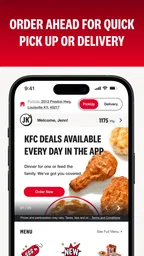
Ordering around a KFC meal
In everyday use, the main appeal is having KFC’s menu and ordering experience gathered in one place. I can use it when I want to think through a meal before arriving, or when a quick stop is more convenient than deciding at the counter. The app is most worthwhile for someone who visits KFC often enough to care about rewards and offers; occasional customers may find that opening it for a single order does not change much.
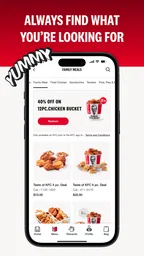
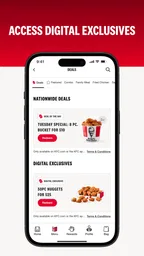
The store presents the app with the promise of fried chicken, rewards, and deals. I’d treat those as reasons to check the app, not as a guarantee that every order will be cheaper. The practical habit is to look at the current offer before settling on a meal, then compare its terms with what I was already planning to buy. A deal only helps if it fits the order I actually want.
A realistic use case is a busy evening when I’m picking up dinner on the way home. I can decide what the group wants, check the app for an available offer, and place the order before reaching the restaurant. That can make the stop feel more organized than making every choice at the counter. I would still review the final order carefully: when several people are sharing food, it is easy to overlook a side, a drink, or a change to one person’s choice while moving quickly.
The strongest reason to keep it installed is convenience tied to repeat KFC visits. For a person who goes regularly, the app’s rewards-and-deals angle may make it worth checking even when ordering in person would be easy. For someone who rarely eats there, its value depends on whether the current offer or ordering flow saves enough effort to justify another app on the phone.
Where it fits among food apps
Compared with a general delivery app, KFC US is a more focused option. A broad service is usually the better starting point when I want to compare different restaurants, see a wider range of cuisines, or place several kinds of orders in one session. KFC’s own app makes more sense when the decision is already made and I want to deal directly with the restaurant’s own ordering and rewards experience.
That difference matters most when convenience has competing meanings. A third-party service may be easier if I’m coordinating food from multiple places; a restaurant-specific app may be preferable if I’m returning to the same chain and want to check its own offers. I wouldn’t assume one route is always cheaper or faster. I’d compare the final basket and the available pickup or delivery choices for that particular order instead of relying on a general rule.
The app has an average rating of 3.2 from around 27,000 ratings, alongside roughly 9,000 written reviews. I read that as a reason to approach it with sensible expectations rather than as a verdict on every user’s experience. Ordering apps can be especially sensitive to location, timing, and the details of a particular order, so I’d judge it on whether it works smoothly for the KFC location and routine I actually use.
What the version history can—and cannot—tell you
The current version is 2026.11.0, while the app’s original release was on February 12, 2021. That gives the product a history of several years and shows that the version identifier has continued to advance. It is fair to say the app is maintained as a current product; it would not be fair to infer a particular redesign, newly added feature, or performance improvement from the version number alone.
For existing users, a newer version is most useful when it keeps the ordering experience compatible with the phone and improves day-to-day reliability. But version progression by itself does not answer the questions that matter before dinner: whether a chosen location is available, whether a particular offer applies, or whether an order is ready when expected. I’d check those details in the actual flow rather than treating a recent version as proof that every part of ordering will be seamless.
If I already use the app, I would keep my habits practical: update it through the app store, check the location and order details before submitting, and avoid leaving the final confirmation until I’m in a hurry. If I’m a new user, I’d start by browsing the available options and offers before building a full order. That makes it easier to see whether the app suits my usual KFC visit without committing to a basket I didn’t intend to place.
Small decisions that make ordering smoother
One useful workflow is to decide whether I’m ordering for myself or for a group before opening the menu. With a group, I’d settle the main choices first and then verify the complete basket once, rather than adding items while people are still changing their minds. This is not a special app feature; it is a simple way to reduce mistakes in any restaurant ordering flow, and it is particularly helpful when a meal includes several chicken choices and sides.
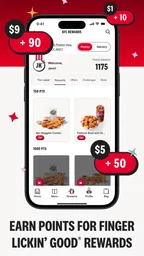
I’d also treat rewards and deals as a final check, not the first step. Start with the meal that meets the need, then see whether an offer fits it. That prevents a common trap: choosing extra food simply because a promotion looks attractive. If the offer changes the order in a way that leaves unwanted items or a larger bill, it is not a useful saving for me.
For a pickup stop, I’d place the order only after I have a realistic idea of when I can reach the restaurant. Ordering too early can be inconvenient if my plans change; waiting until I’m already at the counter defeats much of the point. The right timing depends on the trip, so I’d use the app as a planning aid, not as a promise about how quickly the restaurant will prepare food.
Before finalizing, I’d pause on the order summary and check the location, quantities, and any choices that matter to the people eating. That brief review is especially worthwhile when a deal is involved, since the offer and the basket need to match. It is a modest habit, but it can prevent the sort of correction that turns a convenient order into an awkward conversation at pickup.
Limits to keep in mind
The app is not a substitute for knowing what the local restaurant can fulfill at that moment. Restaurant-specific ordering is tied to a particular location and its service conditions, so I would confirm that I have selected the place I actually intend to use before proceeding. This matters if I’m travelling, ordering near work instead of home, or making a pickup for someone else.
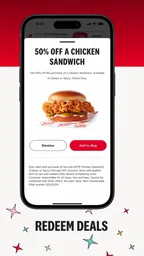
Offers can also be a source of friction if I expect every promotion to apply to every meal. I’d read the displayed terms and check the basket rather than assume a deal works with any combination. If I am comparing the total cost of dinner, I would look at the final amount and the items included; the word “deal” alone does not tell me whether it is the best choice for my appetite or budget.
It is also not the right tool for every food decision. If I want to discover independent restaurants, compare several cuisines, or arrange food from multiple businesses, a broader service will be more useful. If I need a specific answer about a restaurant’s immediate availability, I would rely on what the app shows for that location and consider contacting the restaurant when the decision is important. The app’s main strength is a focused KFC experience, not universal restaurant discovery.
Who should try it, and what to watch
KFC US has more than five million installs, is free, and is rated for Everyone. It runs on Android 8.0 or later, which makes it an option for many older Android devices as well as newer ones. The developer is KFC US. Those details make it easy to assess whether the app is suitable for a phone, but they do not determine whether it will be useful: that comes down to how often someone chooses KFC and whether they value checking restaurant-specific rewards and offers.
I’d recommend it to regular KFC customers who like arranging a meal ahead of time and are willing to review offers before ordering. It can also help a household coordinate a familiar meal without making every choice at the counter. I’d skip it if I rarely visit KFC, prefer to compare many restaurants in one place, or do not want another account-based food app in my routine unless it provides a clear benefit.
What I’d watch going forward is whether future updates make the core tasks—finding the right location, checking an offer, and confirming an order—more dependable and easier to understand. The current version number shows an ongoing product, but it does not establish what will change next. For now, my advice is simple: use the app when KFC is already the plan, check the offer against the meal you genuinely want, and verify the basket before submitting it.
KFC US is a practical companion for repeat visits, not a must-have food app for everyone. I’d keep it if its direct ordering and rewards fit my routine; otherwise, the ordinary restaurant counter or a broader food app may be the more sensible choice. Its best value comes from making a familiar KFC order easier to plan, while its limitations are easiest to manage when I treat deals and timing as details to check rather than promises.
What we like
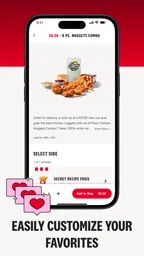
- Customize menu items before adding them to your order
- Save favorite orders for quicker repeat purchases
- Order ahead for pickup at participating locations
- Track order progress in the app
- Browse meals and prices before checkout
What could be better
- Some locations may not offer every ordering option
- Menu availability can vary by restaurant
- Promotional deals may have limited terms
- Pickup wait times can change during busy periods
- A KFC account may be needed for some features





