
Jimmy John's Sandwiches review
 Analysis by Appsdrops
I use the Jimmy John's Sandwiches app when I want to place a sandwich order without turning lunch into a phone call or a stop at the counter. Its best fit is fairly clear: someone who already likes Jimmy John's and wants a convenient way to arrange pickup or delivery, with rewards available in the same app. It is less compelling if you are still deciding among several nearby restaurants, since its choices are centered on one sandwich chain rather than the wider range a general delivery app offers.
Where a connection matters most
The app is a Food & Drink app from Jimmy John's Sandwiches, and its core task depends on being able to reach the service while you browse and submit an order. That matters most at the practical points: choosing what you want, setting up pickup or delivery, and checking the progress of an order. I would treat a stable connection as part of the ordering process, especially if I am placing lunch for other people and need to be confident the request went through.
On a strong connection, the main advantage is having ordering and rewards together rather than juggling a restaurant call, a separate loyalty tool, and a delivery service. The app is free, and it has a 4.8 average from around 293,000 ratings. Those figures suggest many people find it useful, but they do not guarantee that every order will suit every location or situation; the useful test is whether the restaurant options and ordering flow work for the place you need.
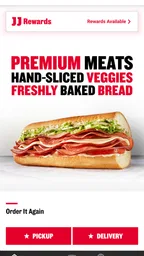
A small but helpful habit is to settle on pickup or delivery before building the order. Those choices affect the practical details of getting lunch, so changing your plan late can add avoidable steps. If you are ordering for a group, I would also confirm the destination or pickup plan before customizing several sandwiches. That reduces the chance of spending time on an order only to discover you were setting it up for the wrong kind of handoff.
Ordering on the move
The app makes the most sense in everyday mobile moments: walking to a lunch break, arranging food before leaving work, or ordering for a meeting while someone else handles the table and drinks. For a predictable routine, I can see the value of opening it before the rush, taking a moment to make choices, then collecting the order or waiting for delivery rather than deciding at the counter. It is a focused use case, not a replacement for browsing every restaurant in town.
For example, if I have a short break and know my usual sandwich, I would place the order while I still have a reliable connection, then use the confirmation and any available order-tracking information to guide what I do next. The useful part is not simply ordering from a screen; it is being able to organize the meal before the break begins. If the break is very short, though, I would avoid assuming that an app order guarantees an exact ready time. I would leave enough room for the restaurant’s preparation and the trip to pick it up.
Ordering for colleagues is another sensible use. Rather than passing a phone around, one person can coordinate the order and keep the details in one place. The trade-off is that the coordinator becomes responsible for checking everyone’s choices, pickup or delivery arrangements, and any customizations. I would ask people for their selections first, then enter them carefully; a mobile screen is convenient, but it can make a long group order harder to review at a glance than a short, familiar individual order.
Jimmy John's has over five million installs, and the app is rated for Everyone. It is available for devices running version 9 or later of its supported mobile operating system, while the current release is 7.9.1. If an older device is involved, checking compatibility before planning around the app is a sensible first step. The app’s reach is useful context, but the actual experience still depends on the restaurant serving the area and the connection available when ordering.
When an order stalls or needs attention
Connectivity is most important at the moment an order is submitted. If the screen appears to pause, I would not immediately tap the final action again: first I would look for an order confirmation or status. Repeating a submission without checking could create uncertainty about whether the first request succeeded. If there is no clear confirmation, I would use the app’s available order information and contact the restaurant through an appropriate channel before trying again.
That is a useful distinction between browsing and committing. A slow connection while looking through choices is irritating; a slow connection at checkout can leave you unsure whether food is being prepared. For an important group lunch, I would place the order while I have dependable service rather than waiting until I am in a basement, elevator, or crowded spot with patchy reception. This is a practical precaution, not a promise that every connection problem can be resolved inside the app.
Delivery and pickup also create different recovery needs. With pickup, I can head to the restaurant once I have enough confidence that the order was accepted, and ask staff if the status is unclear. With delivery, I need to pay closer attention to the destination and order progress because I cannot simply check the counter. If a plan changes after submitting, I would act promptly and use the order details to figure out the next step rather than assume edits will always be possible.
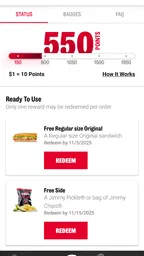
Rewards add another reason to check the account and order details before finishing. Since tracking rewards is part of the app’s purpose, keeping the order and reward activity together can be more convenient than relying on memory. Still, I would not make a lunch plan depend on a reward being reflected at a particular instant. The app is most useful when rewards are a welcome extra, not the only reason the order is worthwhile.
Using it without wasting mobile data
If I am watching data use, I would do the decision-making over Wi-Fi when convenient and submit the order when I have a dependable connection. The app is centered on restaurant ordering, so the key data-conscious choice is to avoid repeatedly reopening or refreshing an uncertain order while traveling. I would check the status when I need it, then put the phone away rather than keep the screen active just to watch for changes.
Battery and attention matter too. An order-tracking screen can be useful when delivery timing affects what I am doing, but it does not need to occupy my whole break. I would place the order, note the relevant status, and return to it when there is a reason. If I am walking or driving, I would finish the ordering steps before setting off; the small convenience of ordering on the move is not worth making a mobile task compete with attention to the road or surroundings.
For a regular customer, a practical routine is to use the app for familiar orders and take extra time when trying something new or organizing a group. That keeps the quick path quick while leaving room to check details when mistakes would be more inconvenient. The app’s focused design is a strength for repeat use, but it does not remove the need to review what is in the order before submitting it.
Who will get the most from it
I would recommend Jimmy John's Sandwiches to people who already choose Jimmy John's often, value arranging pickup or delivery ahead of time, and want rewards tracking close to the ordering process. The app has 63,000 reviews as well as its large rating count, which points to an established audience. For someone who orders there occasionally, it may still be handy, but a dedicated app is less essential if a nearby counter visit is already simple.
I would skip it if my main goal were to compare menus, delivery fees, and availability across many restaurants in one place. A general food-delivery service is better for that kind of decision. Likewise, if I prefer speaking to staff about a complicated request or need to resolve a time-sensitive change, ordering directly with the restaurant may feel more reassuring. The dedicated app is strongest when the order is straightforward and I want the restaurant’s own mobile route.
Compared with calling, the app gives me a more structured way to enter an order and keep track of its progress and rewards. Compared with a broad delivery marketplace, it narrows the choice to Jimmy John's rather than presenting competing restaurants. That is not automatically better or worse: it depends on whether I have already chosen the chain. If I have, the narrower focus can make the app a useful shortcut; if I have not, a broader option is the better starting point.
A practical connectivity verdict
My overall view is that the app is a useful ordering companion, not something I would rely on to solve every lunch problem. A dependable connection makes the important steps smoother, and a little planning helps avoid uncertainty when submitting an order or coordinating food for others. I would place orders before entering a low-signal setting, check for confirmation before repeating a request, and use the tracking and rewards features as practical aids rather than guarantees of a particular outcome.
The best reason to install it is simple: you already want Jimmy John's and would rather arrange the meal on your phone than start from scratch at the restaurant. It is free, and its Everyone rating makes it broadly suitable for the intended audience. If your habits match that focused use, I think it is worth trying. If you need broad restaurant comparison, prefer to talk through every detail, or cannot count on a usable connection when you order, another approach will likely fit better.
For me, that makes Jimmy John's Sandwiches a practical choice for repeat customers who value a more organized pickup or delivery routine. I would use it when I know what I want, have time to check the order, and can get online long enough to submit it confidently. In those circumstances, it earns its place on the phone; outside them, the familiar alternatives of calling, ordering at the counter, or choosing a multi-restaurant service may be more convenient.
What we like
- Order ahead to reduce time spent waiting in line.
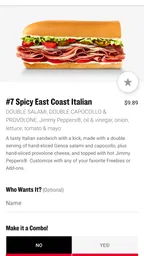
- Customize sandwiches with a range of available toppings.
- Save favorite orders for quicker repeat purchases.
- Find nearby locations using the app's store locator.
- Access delivery where participating locations offer it.
What could be better
- Delivery availability varies by location.
- Some menu items may be unavailable at certain stores.
- The app may require location access to find nearby shops.
- Ordering options can differ between pickup and delivery.
- Promotions may be limited by location or eligibility.





