


Jersey Mike's review
 Analysis by Appsdrops
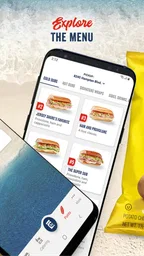
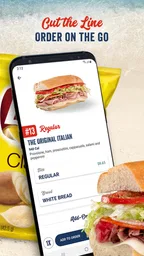
The most useful thing about Jersey Mike’s is easy to understand: I can place a sub order before I reach the restaurant instead of making the counter part of my schedule. That makes this Food & Drink app practical when I already know what I want and would rather spend a lunch break eating than waiting to order. It is a focused tool for one chain, not a general restaurant-discovery app, and that narrow purpose is also its main limitation.
Ordering ahead is the point
Jersey Mike’s is a free app from Jersey Mike’s Subs, built around ordering food ahead for a visit to a favorite location. In my view, that single job is a better fit for the app than trying to make it an all-purpose food platform. If I’m craving a sub and have a particular shop in mind, it gives me a direct route from decision to order.
The distinction matters most when time is tight. Ordering in person means arriving, deciding, placing the order, and then waiting for it to be prepared. Ordering ahead shifts the decision-making to a quieter moment, such as before leaving home or during a gap between meetings. It doesn’t make the food appear instantly, but it can make the visit feel more planned and less dependent on the counter queue.
The app’s scale suggests that many people use it for this straightforward purpose: it has over five million installs, and its average rating is 4.8 from around 148,000 ratings. Those figures are encouraging context, not a guarantee that every order or restaurant visit will go smoothly. My own recommendation rests more on whether you regularly choose Jersey Mike’s than on popularity alone.
What changes when I order before arriving
The biggest practical benefit is that I can separate choosing from collecting. At a busy moment, deciding on a sandwich while people are behind me can feel rushed. Ordering earlier gives me room to think through what I want and reduces the amount of time I need to spend interacting at the restaurant. For someone with a predictable lunch routine, that small change can make the whole stop easier to fit into the day.
It is also useful for a planned pickup with another person. Rather than arriving together and working out each order at the counter, I can handle the app order in advance and coordinate what everyone wants beforehand. That is not a special group-order feature claim; it is simply a way to use advance ordering sensibly. It works best when the group has settled on its choices and the pickup plan is clear.
There is a tradeoff: ordering ahead asks me to make decisions earlier. If I am still choosing between lunch options, or if my plans may change, the app’s main advantage is less valuable. A walk-in order keeps the choice open until I am there. I would use the app when I know the destination and want a smoother stop, not just because placing an order on a phone is automatically better.
A realistic lunch-break use
Imagine I have a short break and know I want Jersey Mike’s, but I still need to finish a task before heading out. I can use that earlier window to place the order, then make the restaurant stop part of the trip rather than the start of a longer wait. The useful insight is to order once the destination and meal are reasonably settled, not at the last possible second while already walking in. Advance ordering helps most when it moves a decision out of the crowded part of the day.
For a less predictable schedule, I would be cautious about ordering too early. A meeting can run late, a commute can change, or lunch plans can fall through. Since the core value is timing the order around collection, the user needs to think about when they can actually get to the restaurant. If I cannot make that estimate with confidence, ordering at the counter may be the simpler choice.
Another useful habit is to check the order carefully before submitting it. When I make choices in a hurry, it is easy to overlook a detail or select the wrong item. The phone may make the process feel calmer, but it does not remove the need to review what I have chosen. A few seconds spent checking the basket is more helpful than assuming that advance ordering alone prevents mistakes.
Where it fits among food apps
Compared with a general restaurant or delivery app, Jersey Mike’s is more focused. A broader service is the better option when I want to compare several restaurants, browse different cuisines, or arrange delivery from wherever I happen to be. This app makes more sense when I have already chosen Jersey Mike’s and want a direct way to order ahead. It is less a discovery tool than a shortcut for a decision I have already made.
It also differs from simply walking in and ordering. The counter gives me flexibility to change my mind at the last moment and ask questions face to face. The app’s advantage is convenience before arrival; the counter’s advantage is keeping the decision spontaneous. Neither approach is universally better. I would choose based on whether reducing time at the restaurant matters more than deciding on the spot.
Because the app is tied to a single restaurant brand, it is not a strong choice for someone who eats Jersey Mike’s only occasionally and already finds in-person ordering easy. Downloading another app may not simplify anything if there is no recurring order-ahead need. But for a regular customer, having the restaurant’s ordering option ready on the phone can make a familiar lunch routine easier to repeat.
Useful limits to keep in mind
The key limitation is dependence on the restaurant you want to visit. An order-ahead app can only help when Jersey Mike’s is the right choice for the meal and the location works for your plans. If you want to eat somewhere else, compare menus across several places, or need a broader range of choices, another food app—or a direct walk-in decision—will suit you better.
I would also avoid treating advance ordering as a promise that every visit will be frictionless. The app helps with placing an order before arrival; the actual usefulness still depends on having a clear pickup plan and checking the order details. For a first visit, a counter conversation may be preferable if I want to ask about choices before deciding. For a familiar order, the app’s convenience is easier to appreciate.
This is a sensible example of a branded ordering app staying close to one everyday job. It does not need to replace every way of choosing lunch. Its best use is narrower: make a known Jersey Mike’s stop more deliberate, especially when a busy schedule makes time at the counter inconvenient.
Who will get the most from it
I would recommend it most to people who already choose Jersey Mike’s often, know what they like, and can plan when they will collect their food. It may also suit anyone who wants to organize a straightforward lunch pickup before leaving work or home. If you prefer to decide face to face, rarely eat at the chain, or want one app to compare many restaurants, the benefit is modest.
The app is rated for Everyone, and it is free to download. It was released on April 6, 2016, and the current version is 2.56.0, with Android 8.0 as the minimum operating-system requirement. Those details make it easier to judge whether it is relevant for your device, but the more important question is still how often you visit Jersey Mike’s.
My overall take is positive but specific: ordering ahead is worthwhile when it removes a real pause from a meal you were already planning. I would keep the app if Jersey Mike’s is part of my regular routine and use it to make pickup more convenient. If my meals are spontaneous or I want to explore restaurants beyond this one chain, I would stick with a broader option or order in person. Jersey Mike’s is at its best when you know what you want and simply want to make the visit fit your day.
What we like
- Order sandwiches for pickup or delivery through the app.
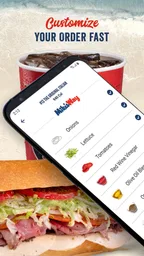
- Customize ingredients to match your preferences.
- Save favorite orders for quicker repeat purchases.
- Find nearby locations with the store locator.
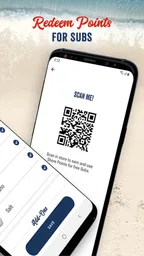
- Earn points through the rewards program.
What could be better
- Menu availability can vary by location.
- Delivery may be limited in some areas.
- Prices and fees can differ by store.
- Rewards may require an account to access.
- Order changes may be difficult after checkout.





