
inKind review
 Analysis by Appsdrops
I think of inKind as a restaurant-payment app with a clear purpose: help you get more value when you dine at participating places. That makes it different from a restaurant guide, a delivery service, or a general-purpose rewards wallet. The key question is not whether you eat out, but whether the restaurants you already enjoy—or would genuinely like to try—are available through it.
That distinction matters. A promise of getting money back can sound compelling, yet it only helps if the participating choices suit your plans and the payment process works for the way you dine. I’d treat inKind as a useful extra option to check before a meal, rather than as a reason on its own to choose a restaurant.
What to weigh before making it your payment habit
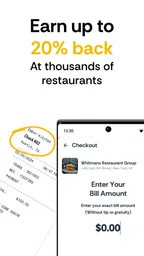
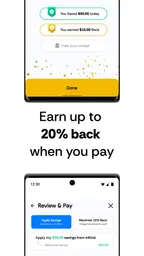
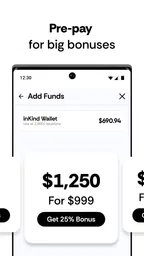
inKind is a free Food & Drink app from developer inKind, and its central appeal is a return of up to 20% at participating restaurants when you pay with the app. The “up to” is important: I wouldn’t assume every meal earns the same amount. The practical value depends on the restaurant, the offer available there, and whether the places you want to visit are part of the network.
The app has an average rating of 4.8 from around 15,000 ratings, with roughly 1,500 written reviews, and more than 500,000 installs. Those figures suggest that many diners have found a reason to keep it around, but they can’t tell you whether its restaurant selection matches your neighborhood or tastes. I’d make that local fit the first thing to investigate.
It is free to install and rated for Everyone. The app’s release date is August 13, 2018, and its current version is 6.77.0; it requires Android 7.0 or later. These details make it accessible to a broad range of Android users, though the age rating is not a promise that every offer or restaurant will suit every family’s needs.
Start with the restaurants, not the reward
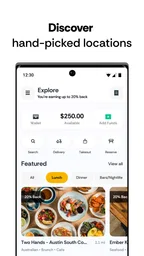
Before changing how you pay, look for places you would choose even without an incentive. This is a small but useful test: if the list contains restaurants you already visit, or options you would happily try, the app has a chance to save you money without changing your routine. If the choices are inconvenient, the headline return is less meaningful.
I’d also think about the sort of meal you usually buy. Someone who regularly plans dinners out can have more chances to use a restaurant-focused payment app than someone who mainly cooks at home or orders from places that do not participate. That doesn’t make the latter person a poor fit forever; it simply means the benefit may be occasional rather than a dependable part of the budget.
There is a useful distinction between “a restaurant I might enjoy” and “a restaurant I would choose anyway.” The first can encourage a worthwhile discovery, but it can also nudge you into spending more than planned. I’d set the meal budget first, then see whether inKind improves the value. The app should support your decision, not make the decision for you.
Where inKind has a real advantage
Its strongest case is straightforward: it connects restaurant spending with a potential return, so the benefit is tied to an activity you may already do. Compared with a conventional restaurant directory, it gives you a financial reason to check participating options. Compared with a general payment method, its appeal is more focused on dining rather than everyday purchases.
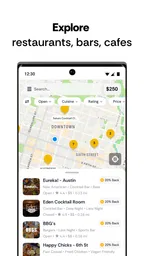
A practical way to use it is to check before choosing a place for a planned dinner. If a suitable participating restaurant is nearby, you can compare it with your usual choice and decide whether the meal, location, and offer all make sense. That is a better workflow than opening the app only after you have already arrived somewhere and expecting it to change the bill.
It may also help when a group is choosing where to meet. I would use it as one factor alongside menu preferences, travel time, and the group’s budget. If the app points you toward a restaurant everyone likes, the potential return is a welcome extra. If it means asking friends to travel farther or accept a place they do not want, the reward may not justify the compromise.
Another non-obvious benefit is that it can make a planned restaurant visit easier to evaluate in advance: you can decide whether a participating option is worth considering before you commit to the outing. That can reduce last-minute searching, especially when you have a short list of places in mind. It still requires a little planning, so I would not describe it as a set-and-forget source of savings.
When another kind of app or payment choice is better
If your main need is discovering restaurants by cuisine, reading broad local recommendations, or arranging delivery, a restaurant-discovery or ordering service may be the better first stop. Those tools solve a different problem: helping you find or obtain food. inKind is most relevant once you are considering a participating restaurant and want to see whether paying through it is worthwhile.
A bank card or a general rewards program may be more convenient if you want one payment method to cover many kinds of spending. Its return may be less directly tied to dining, but simplicity has value: you do not have to check a restaurant network before every meal. I’d compare the actual benefits available to you rather than assume that a restaurant-specific offer is always better.
There are also diners for whom the app is simply not the right fit. If you rarely eat at restaurants, prefer places chosen for dietary, accessibility, or family needs that are not represented in the participating options, or want to keep payment routines as simple as possible, another approach may serve you better. No reward makes an unsuitable meal or an inconvenient trip a smart purchase.
The small switching costs to consider
Using a new payment app adds a step to a routine that may already feel settled. You need to remember to check it, confirm that the restaurant is participating, and use the intended payment method when the bill comes. The first time you use it, I’d avoid assuming the payment flow will feel as familiar as tapping a card; take a moment to understand what the app asks you to do before you order.
That habit is the main cost of switching—not necessarily money, but attention. If you forget to check inKind until after the meal, you may miss the chance to use it. If you open it every time you eat out, even when you already know the restaurant is not a match, it can become needless friction. A sensible middle ground is to check it when planning a meal or when deciding among a few nearby options.
I’d also keep your own spending rules intact. A return is not the same as avoiding a purchase, and a meal that costs more than you intended can outweigh the appeal of getting something back. Decide what you want to spend before comparing offers, and treat the potential return as a bonus only when the restaurant and bill already make sense.
Who I’d recommend it to
I’d recommend giving inKind a try if you eat out often enough to make restaurant-specific savings relevant and you are willing to check whether its participating choices suit your plans. It is especially promising for people who like to plan a dinner ahead, have a few restaurants they revisit, or enjoy trying a new place when it fits their budget and schedule.
I would be more cautious if you expect it to work everywhere, want a universal rewards solution, or tend to choose restaurants solely by convenience. Its value is conditional on participation and on your willingness to use a separate payment workflow. If those conditions sound irritating, a familiar card or a broader rewards option may be the better everyday choice.
My bottom line is that inKind is worth considering as a dining-specific tool, not as a replacement for every restaurant app or payment method. Its potential return gives you a concrete reason to check participating restaurants, while its usefulness depends on local fit and a little planning. Use it when it supports a meal you already want to have; skip the extra step when it would steer you away from a better restaurant or complicate a routine you value.
What we like
- Members can find participating restaurants through the app.
- Dining credits make eligible purchases more rewarding.
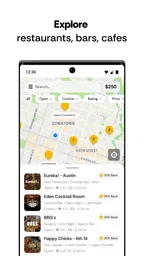
- The app offers a practical way to explore local dining options.
- Restaurant details help users compare places before visiting.
- Digital membership keeps dining benefits accessible on the go.
What could be better
- Benefits are limited to participating restaurants.
- Dining credits may come with eligibility rules.
- Offers can vary by restaurant and location.
- The app is less useful in areas with few partner restaurants.
- Users may need to review terms before each purchase.





