
HuntWise: A Better Hunting App review
 Analysis by Appsdrops
I like hunting tools best when they help me make a better decision before I leave home, not just give me another screen to check in the field. HuntWise is built around that kind of preparation: it brings scouting, wind and weather information, and animal-movement planning into a sports app aimed at hunters. Its usefulness depends partly on whether the information you need is available when you need it, so I would treat connectivity as part of the plan rather than assume the app will work the same way everywhere.
Planning works best before you lose signal
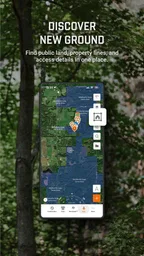
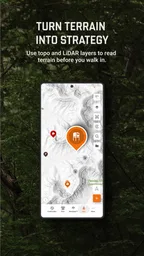
HuntWise is a free app from Sportsman Tracker, Inc., in the sports category. Its central appeal is combining several planning concerns that hunters often handle separately: land scouting, local conditions, and likely animal movement. That can make preparation feel more coherent than switching among a mapping tool, a weather app, and notes. The trade-off is that a combined tool is only as useful as the information you can access at the right moment.
I would start by checking the area and conditions while I still have a dependable connection. That is when it is easiest to compare a proposed access point with the wind, look at the forecast, and think through how changing conditions might affect where I want to sit. The app is most valuable as a planning aid, not as a guarantee that animals will move in a particular way. I’d use its guidance to form a sensible plan, then adjust based on what I see and what local conditions are doing.
Connectivity matters most when you first open or refresh information, change the area you are considering, or want to revisit a plan from a different location. Before heading out, I’d make a deliberate check of the details I expect to need rather than wait until I’m standing at a trailhead. I would not assume that every map, forecast, or planning element remains available without a connection; the practical approach is to confirm what is visible on your device before relying on it in a low-signal spot.
Build a plan around conditions, not just a pin
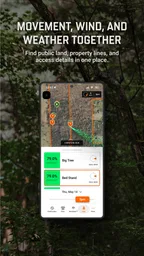
A useful way to work with the app is to treat wind as a planning constraint. Instead of choosing a promising-looking location first and checking the wind as an afterthought, I’d compare a few possible approaches and ask which one makes sense for the expected direction. That small change in workflow can prevent a common mistake: committing to a spot that looks convenient on a map but may put your scent where you do not want it.
Weather and movement information also make more sense together than in isolation. If conditions shift, I would revisit the plan rather than interpret a single indication of animal activity as a firm prediction. In my view, the best use is to narrow the options and prompt better questions: Which access route fits today’s wind? Is there a reason to choose a different location? What would make me change the plan once I arrive? The app can support that reasoning, but field judgment still has the final say.
For a realistic weekend example, imagine choosing between two areas the evening before a hunt. I’d check the forecast and wind, use the scouting tools to compare the locations, and settle on a primary option plus a backup. Before leaving, I’d review the information again while online. If reception is weak at the property, I’d avoid making a plan that depends on repeatedly loading fresh details there. This is a simple habit, but it makes the app’s connected features more dependable in practice.
Useful in the truck, less convenient on the move
The app fits naturally into a few different mobile situations. At home, I’d use it for careful preparation on a larger screen if available, though its main role is clearly on a phone. In the truck or at a staging area, it can help me make a final check and compare a backup plan. Once I am moving through remote country, however, the value of any connected planning tool becomes less predictable because reception can vary from one stretch to another.
That makes timing important. I would do the exploratory work before setting off, then use quick checks in the field only where a connection is reliable. If you hunt in places with patchy service, it is worth finding out in advance how the information you need behaves on your device and in your usual areas. A good test is to open the relevant screens before leaving coverage and see what remains accessible later; do not infer offline availability from a screen that happened to load once.
On a small phone screen, the temptation is to keep checking conditions instead of paying attention to the surroundings. I’d use HuntWise for deliberate planning moments, not as something to consult continuously while walking or handling equipment. That is partly a practical safety consideration and partly a way to avoid turning a useful tool into a distraction. A short pre-hunt review and a purposeful check when circumstances change are more valuable than constant refreshing.
When information stalls, keep a backup plan
Any app that supports planning around maps or changing conditions can become frustrating when information does not load promptly. If a screen is slow or unavailable, I would first avoid making repeated refreshes in the same dead spot. Move to a place with better reception if that is practical, give the app a moment to update, and then confirm that the information on screen matches the area and conditions you intend to use. I would not treat an old view as current just because it is still displayed.
The more important recovery step happens before the problem: keep your hunting plan understandable without depending on a live connection. Remember your chosen access point and backup, and carry whatever navigation or safety arrangements you ordinarily rely on. HuntWise can inform a decision, but it should not be the only way you know where you are going or how you will respond if your phone cannot retrieve something. For remote outings, a separate dependable navigation method may be the better choice.
There is also a useful distinction between a temporary connection failure and a planning error. If fresh weather or wind information is unavailable, I would not try to compensate by guessing from an earlier reading. Instead, pause, reassess what you know, and choose the option that remains sensible under uncertainty. This cautious approach is especially worthwhile when a small change in wind could alter whether a location is appropriate.
Keep mobile data use intentional
For data-conscious use, I’d focus on when I request updates rather than repeatedly checking every screen. Review the area and conditions in advance, make a short final check before entering a low-signal region, and avoid refreshing simply out of habit. This keeps the workflow purposeful and reduces the chance that a weak connection becomes the main event of the trip. It also makes it easier to notice when information genuinely needs another look.
Battery and mobile data are practical concerns for any phone used outdoors, especially when reception is poor and the device is working harder to stay connected. I would begin the outing with a charged phone, limit unnecessary screen time, and keep a backup power option if the trip warrants one. These are general field habits rather than special requirements of this app, but they matter because a planning tool is only useful while the device remains usable.
The app is free to install, with in-app purchases ranging from $0.99 to $119.99 per item. I’d explore the free experience and decide whether its planning workflow suits my needs before considering a purchase. Since optional purchases can represent very different levels of commitment, check the current in-app details carefully before paying. The app is rated for Everyone, and its current version is 9.2.0; it requires Android 9 or later. It has an average rating of 4.2 from around 8,600 ratings, with more than 3,000 written reviews and over 1 million installs.
Who benefits, and when another tool is better
I think HuntWise is a strong fit for hunters who like to prepare thoughtfully and want scouting, wind, weather, and animal-movement planning in one place. It can be especially helpful if your current routine involves bouncing between several apps and you want a more joined-up way to compare a location with conditions. Sportsman Tracker, Inc. has positioned it for practical hunting preparation, and the app’s focus feels clearest when you use it to evaluate options before setting out.
It is less suitable for someone who expects a connected app to replace fieldcraft, a dedicated navigation setup, or a reliable plan for areas without reception. If your priority is simply viewing a forecast, a general weather app may be quicker. If you need navigation that you already know works in your specific remote locations, a dedicated mapping solution may deserve the leading role. HuntWise makes most sense as a planning companion, not necessarily the single tool every hunter should depend on.
Hunters who rarely want to research conditions in advance may also find its broader planning approach more than they need. Conversely, people who enjoy comparing locations and adapting a plan to wind and weather are more likely to get ongoing value from it. The key question is not whether an app can predict a hunt perfectly; it cannot. It is whether having these planning considerations together helps you make more informed choices without creating extra friction.
My connectivity verdict
After looking at how its tools fit into a hunting routine, I would recommend HuntWise to someone who plans ahead and is willing to treat network access honestly. The app’s best moments are before the hunt, when I can weigh a location against conditions and prepare an alternative. Its weakest moments are the ones any connection-dependent workflow can create in the field: waiting for a refresh, wondering whether information is current, or discovering that a remote area is not a good place to depend on live updates.
My practical advice is to prepare while connected, verify what you will need before heading out, and keep a backup navigation and decision-making plan for places where service is uncertain. Used that way, HuntWise can make scouting and condition-based planning more organized without pretending that a phone can remove the unpredictability of hunting. If that balance suits your habits, it is worth trying; if you need a tool that remains dependable regardless of connectivity, choose a solution you have already tested in your own terrain.
What we like
- Hunt area maps help you plan trips before heading outdoors.
- Weather forecasts support better timing for hunts.
- Wind and pressure data add useful context to conditions.
- Saved locations make it easy to revisit promising spots.
- The app offers tools for organizing hunting plans.
What could be better
- Some features may require a paid subscription.
- Map and forecast access can be limited without internet.
- Accurate location tracking depends on device settings.
- Detailed maps may take time to learn.
- Battery use may rise when GPS runs in the background.





