



Hardee’s® review
 Analysis by Appsdrops
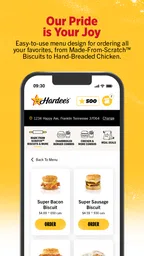
I think of Hardee’s® as a practical shortcut for one particular job: placing a Hardee’s order without starting from scratch at the counter. The app is free, and its focus is mobile ordering for the chain’s familiar range of meals, from burgers and chicken to breakfast and desserts. That narrow purpose is also its main trade-off. If you already know you want Hardee’s, ordering ahead can be useful; if you are choosing among several restaurants or looking for a broad food-delivery service, this is not the tool I would reach for first.
Ordering around the way you actually eat
The app is a Food & Drink option developed by CKE Restaurants, and its straightforward identity matters more than a long menu of extra services. I would use it when I have a specific Hardee’s meal in mind and want to handle the ordering step on my phone. It is less compelling for browsing dinner ideas across restaurants, comparing cuisines, or arranging a meal from a place that is not part of the Hardee’s experience.
That distinction changes how I judge it. A restaurant’s own ordering app does not need to beat every delivery platform at discovery; it needs to make ordering from that restaurant feel direct and predictable. Hardee’s® is most useful when the restaurant is already the decision, not when I am still deciding where to eat. In that situation, having the order in one place can save a little time and reduce the back-and-forth of choosing at the counter.
The menu range makes it relevant at different times of day. Someone stopping for breakfast is not using the app for quite the same reason as someone picking up burgers after work, but both can start with the same restaurant-specific ordering route. Desserts and chicken also make it more than a single-product shortcut. I would still treat the menu as a way to order what is available through the app, rather than assume every in-store choice or customization will necessarily appear in the same way.
A useful fit for familiar orders
For a regular customer, the strongest use case is a repeat order: you know the kind of meal you want, and you would rather sort it out before reaching the restaurant. My practical tip is to decide on the meal and pickup plan before opening the app. That keeps the app’s purpose clear and avoids spending time browsing when you are hungry, in a rush, or trying to coordinate food for more than one person.
It can also help when the person collecting the food is not the person who chose it. One person can settle the order on a phone, then the pickup becomes a simpler handoff than relaying a list of items verbally. That is a useful everyday role for mobile ordering, but it depends on being comfortable making the choices in advance. If your group tends to debate every side or change its mind at the last moment, ordering face-to-face may be easier.
A realistic example is the drive home after work. If I have already decided that Hardee’s is the stop, I can use the app to place the order before arriving, rather than try to make choices while a line forms behind me. I would not treat that as a guarantee of a particular wait time or a promise that every order will be ready instantly. The practical benefit is moving the decision-making onto my phone, not eliminating the restaurant’s preparation and pickup steps.
Where it sits beside other food apps
Compared with a general delivery app, Hardee’s® is a more focused choice. A multi-restaurant service is better if I want to compare nearby places, look for a wider variety, or have food brought to me through that service. Hardee’s’ own app makes more sense when I have already chosen the chain and want a direct route to ordering its food. I would not install it expecting a restaurant marketplace.
Compared with walking in and ordering at the counter, the app is attractive when I want to make choices ahead of time. In-person ordering remains the better fallback if I need help understanding a menu item, want to make a decision after seeing what is available, or prefer staff assistance. The app’s value is not that it makes every order simpler for every person; it gives customers who like planning a separate way to start the process.
That also makes it less useful for occasional visitors who are unsure what they want. If I am only passing through and have not decided whether Hardee’s suits the group, a general search or another food app is more helpful at the beginning. Once the decision is made, the restaurant-specific app becomes more relevant. Keeping those two stages separate helps set realistic expectations about what this app is for.
What the current release tells me
The current version is 5.8.0, while the app’s release date is July 27, 2021. Those facts show that this is an established mobile-ordering product with a current version number, rather than a newly launched concept. They do not, by themselves, reveal what changed between releases, so I would not infer particular interface additions or ordering tools from the version number alone.
For an existing user, the sensible expectation is continuity of purpose: the app remains centered on ordering Hardee’s food. If you have used an earlier version, it is reasonable to check the current app after updating and confirm that your usual ordering routine still feels clear. I would avoid assuming that an update has introduced a specific feature unless it is visible in the app. A version label is useful context, but it is not a changelog.
The app has an average rating of 4.6 from around 26,000 ratings, with about 9,500 written reviews, and it has more than one million installs. I read those figures as signs that many people have tried it and that the overall response is favorable, not as proof that every order or location will work identically. A restaurant app is ultimately judged in a local context: the usefulness of ordering ahead depends on the customer’s plans and the restaurant they intend to visit.
It is free to download and is rated for Everyone. That makes trying it a low-commitment choice for a customer who already visits Hardee’s, though the app is still only worthwhile if its ordering route fits your habits. I would not download it simply because it is free if I rarely eat at the chain. The developer is CKE Restaurants, which makes the app’s restaurant-specific purpose clear.
Small decisions that make mobile ordering work better
My first practical suggestion is to use the app when you have enough time to review your choices calmly, rather than treating it as an emergency shortcut at the last possible moment. Ordering on a phone can move menu decisions out of a busy line, but it also asks you to be clear about what you want before you arrive. For a routine lunch, that is convenient; for a group still negotiating what to eat, it can create an extra round of messages.
Second, separate the menu decision from the pickup decision. First settle what everyone wants, then use the app to place the order. That simple workflow is especially useful when one person is collecting food for several people: it reduces the chance that the collector has to remember a list while also trying to place an order. It does not remove the need to check the order details, so I would still take a moment to review the selections before submitting.
Third, keep a counter order in mind as a fallback. If the phone experience does not suit the moment, or you would rather ask a question before choosing, ordering in person remains a reasonable alternative. I would not let the convenience of having an app make me feel obliged to use it every time. The best approach is to choose the method that makes the specific visit easier.
Where the convenience has limits
The main limitation is the app’s narrow scope. It serves Hardee’s customers, not people who want to browse a broad selection of restaurants. That is an advantage when loyalty to the chain is already settled, but a genuine drawback when price, cuisine, or nearby alternatives are part of the decision. In that case, a general food app or direct comparison is more useful before choosing a restaurant.
There is also a difference between convenience and certainty. Mobile ordering can make it easier to enter an order before reaching the restaurant, but it cannot make every visit frictionless. You still need to choose carefully, use the app at a suitable time, and follow the restaurant’s pickup process. I see it as a better way to organize a familiar order, not a guarantee that no waiting or adjustment will be needed.
Customers who prefer personal guidance may also find a phone-based order less comfortable. If you have questions about a menu choice, are unfamiliar with the restaurant, or want to decide only after arriving, the counter is likely the more natural option. Likewise, if you expect a dedicated delivery marketplace, this is the wrong kind of app to install. Knowing those boundaries is more helpful than treating mobile ordering as an automatic upgrade over every other way to order.
Who I would recommend it to
I would recommend Hardee’s® to people who visit the chain regularly, already know what they tend to order, and appreciate making food decisions before they reach the restaurant. It may be particularly handy for a planned breakfast stop or a familiar meal pickup after a busy day. For those customers, the focused approach is a strength: it keeps the task tied to the restaurant they chose instead of asking them to browse an entire marketplace.
I would suggest skipping it if you rarely eat at Hardee’s, want to compare several restaurants in one place, or prefer to speak with someone before ordering. Those customers are likely to get more value from a general food service or an in-person visit. People who are comfortable with both methods can keep the app as an option and use it only when planning ahead genuinely helps.
My overall view is that this is a useful, purpose-built ordering app rather than an all-purpose food companion. Its history and current version point to an established product, but they do not justify guessing about features that are not evident in the ordering experience. I would install it for a direct way to arrange a Hardee’s meal, use it when the order is familiar, and switch to the counter or a broader service whenever the situation calls for more choice or help. Its best feature is its focused convenience, and that same focus is the reason it will not suit everyone.
What we like
- The menu includes burgers and chicken sandwiches for varied tastes.
- Combo meals offer a convenient option for a full meal.
- Breakfast items are available at participating locations.
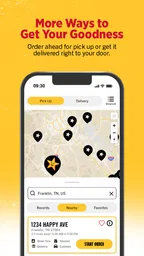
- The app can help locate nearby Hardee’s restaurants.
- Mobile ordering can reduce time spent waiting at some locations.
What could be better
- Menu options can vary by restaurant.
- Some locations may not support mobile ordering.
- Promotions and deals may have location-specific terms.
- Delivery availability depends on your area.
- The app requires an internet connection for most features.





