




GPS Voice Map & Route Finder review
 Analysis by Appsdrops
I would consider GPS Voice Map & Route Finder if I wanted a free-to-start navigation app that puts spoken guidance and route finding at the center. It is a Maps & Navigation app from Softo Apps, and its simple premise is appealing: plan a trip, get directions, and use voice prompts to follow the route. In my view, its main draw is convenience rather than a promise to replace every navigation tool on a phone.
What the free starting point means
The app is free to download, which makes it easy to try before deciding whether it belongs in your everyday travel routine. It also offers in-app purchases, with listed items ranging from $3.99 to $99.99 each. That is a wide span, so I would check the purchase screen carefully before paying and make sure the particular item addresses a need I actually have. The free price alone does not tell you which capabilities are included or what a purchase changes.
That distinction matters for a navigation app: a free install is a low-commitment way to assess whether its interface and guidance suit you, but it is not a guarantee that every option is free. I would start with the basic trip I expect to take most often, then decide whether any paid offering adds enough value for my own use. If the free experience already handles the journeys I need, there is no reason to buy something simply because it is available.
GPS Voice Map & Route Finder is rated for Everyone, and its current version is 1.80.3. It has an average rating of 4.4 from around 1.1 thousand ratings, alongside 177 written reviews. Those figures offer some context, but they cannot tell me whether the app will be a good fit for a particular commute, phone, or travel style. I would treat them as a reason to investigate, not as a substitute for trying it myself.
Where the value comes from
The practical value of voice-led directions is that they can reduce how often I need to look down at a screen. That is useful when I am walking through an unfamiliar area or riding as a passenger and trying to help with a turn. It is not a license to handle a phone while driving: I would set the destination and check the route before moving, then keep attention on the road and follow local rules.
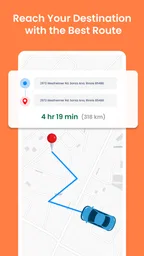
The app’s focus on routes also gives it a straightforward role when I know where I want to go but not how best to get there. A useful test is to enter a destination I already understand, compare the suggested route with the roads I know, and see whether the directions feel clear at the moments that matter: approaching a junction, choosing between nearby streets, or finding the final entrance. That tells me more than taking a familiar route and assuming the result will suit every trip.
For a daily routine, I would use it as a quick decision aid rather than blindly accepting the first route. Before leaving, I would check that the destination pin is placed on the correct building or entrance, especially for a large site where a street address may lead to the wrong side. Then I would review the route as a whole. The shortest option is not automatically the easiest one if it involves complicated turns or roads I would rather avoid.
How it fits beside familiar navigation options
Compared with the map app already installed on most phones, this one is worth considering if its voice-map approach feels more direct to you. Familiar alternatives may be more convenient when you rely on established habits, saved places, or a particular ecosystem. I would not switch solely because another app offers directions; I would compare the actual route choices and spoken prompts on a few journeys I take regularly.
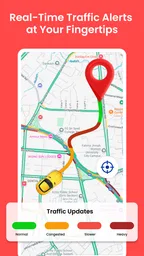
It is also sensible to keep a second navigation option available for trips where the details matter. If a journey depends on live traffic information, specialized transit directions, offline maps, or detailed local place information, I would verify that the tool I choose supports the exact need before setting off. I am not assuming those capabilities are present here. For a simple trip where I mainly need route guidance, the app’s central purpose may be enough; for a more demanding journey, the more established alternative for that specific task may be the safer choice.
A useful comparison is not just which app draws a shorter line. I would look at whether the route is understandable, whether the voice directions arrive in time for a turn, and whether the destination marker is actually useful once I arrive. If two apps disagree, I would check road signs and common-sense constraints rather than treating either screen as infallible. Navigation is assistance, not authority.
Small habits that make a route easier to follow
One non-obvious way to get a fair test is to try a route with a known landmark near the destination, rather than judging the app on a vague address alone. If the landmark is right but the entrance is not, I can distinguish a destination-placement problem from a route problem. That is particularly helpful for campuses, shopping areas, and buildings with multiple access points.
I would also avoid changing the destination while moving unless it is safe and lawful to do so. A better workflow is to pull over or ask a passenger to make the change, then confirm the new destination before continuing. Spoken guidance can make a trip less screen-dependent, but it does not remove the distraction of interacting with a phone or the possibility of a confusing instruction.
Another useful check is to compare a suggested route with the trip’s purpose. For a time-sensitive appointment, I would allow extra time and inspect the route before leaving rather than treating “shortest” as a promise of fastest arrival. For a relaxed walk, I may care more about simple turns than shaving distance. Those are personal tradeoffs, and the best route is not always the same one for every traveler.
Tradeoffs to keep in mind
The biggest limitation I would keep in view is that the app’s broad route-finding promise does not by itself answer every practical travel question. Before depending on it for an unfamiliar region, I would check whether the functions I need are available in the app and whether the phone has a reliable connection and GPS reception along the way. I would not assume that a route can be followed offline or that every map detail is current.
Voice prompts are useful, but they can be less helpful in a noisy car, a busy street, or an area where several turns happen close together. I would glance at the map only when stationary or when a passenger can help, and I would listen for landmarks and road signs too. If an instruction seems to conflict with what I see on the road, I would trust safe, legal driving over the screen.
The purchase range is another reason to approach the app deliberately. A $3.99 item and a $99.99 item represent very different commitments, and the existence of either does not establish that either is necessary for ordinary navigation. I would read the description attached to any purchase and consider whether the free version already meets my needs. If the cost or benefit is unclear, I would hold off rather than guess.
Who is likely to get the most from it
I can see this being a reasonable option for someone who wants a free app to try spoken route guidance, has straightforward destinations, and is comfortable checking a route before setting out. It may also suit a traveler who wants another navigation choice on hand instead of relying on a single app. Softo Apps released it on August 9, 2019, and it has reached over 500 thousand installs, so it is not an obscure one-off tool, though popularity alone does not guarantee a perfect fit.
I would be more cautious if I needed a navigation app for a complex commute, a remote trip, or a journey where a particular specialist feature is essential. In those cases, I would first confirm that the required feature is actually available and test it before relying on it. Someone who already has a trusted map app that consistently handles their usual routes may gain little by switching unless this app’s voice guidance or route presentation feels better in practice.
The minimum operating system is Android 7.0. That gives many older Android devices a possible path to installation, but compatibility still depends on the phone and its software setup. The age rating is Everyone, which makes the app suitable for a broad audience; it does not change the need for sensible, attentive use around traffic.
My buy-or-skip verdict
I would try GPS Voice Map & Route Finder if I wanted to evaluate a free voice-guided navigation option without committing money upfront. I would test it on a familiar journey, verify the destination placement, and pay attention to whether the spoken directions are clear at difficult turns. That short trial gives a much better basis for a decision than an average rating alone.
I would skip paid extras unless I could identify a specific benefit I wanted and confirm its price and contents in the app. The free starting point is the clearest value; the purchase range means the value of paid options depends on what each one provides and how often I would use it. If my existing map app already handles my routes reliably, staying with it is perfectly reasonable. If I want a simple additional option and its real-world guidance suits me, this app is worth a careful try.
What we like
- Voice guidance helps reduce the need to watch the screen while driving.
- Route planning can make unfamiliar trips easier to manage.
- Map navigation is useful for finding destinations on the go.
- Multiple route options can help users compare possible journeys.
- A simple navigation format is approachable for first-time users.
What could be better
- GPS accuracy can vary with signal strength and device settings.
- Voice directions may be difficult to hear in a noisy vehicle.
- Incorrect map data can lead to confusing route instructions.
- Navigation can use significant battery power on longer trips.
- Some features may require an internet connection.





