
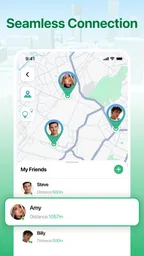
GPS Tracker & Location Tracker review
 Analysis by Appsdrops
I approach GPS Tracker & Location Tracker as a practical location-sharing tool, not a replacement for a full navigation app. Its appeal is straightforward: it is free to download and is intended to help people keep track of loved ones. Whether that is useful in daily life depends less on flashy extras than on whether the people involved are comfortable using a tracking app and can make it part of their routine.
What free access means for this tracker
GPS Tracker & Location Tracker is a free Maps & Navigation app from NAICOO PTE. LTD. That makes it easy to consider without an upfront purchase, but I would not treat “free” as a promise that every possible feature or future use is cost-free. The confirmed price is free; any other commercial details should be checked in the app store before making a decision.
The app is listed at version 1.2.4 and requires Android 7.0 or later. It is rated for Everyone, so its intended audience is broad. The listing shows a 4.3 average from around five thousand ratings, with 214 written reviews, and more than a million installs. Those figures suggest that people have tried it at scale, but they do not tell me whether it will suit a particular family’s habits or expectations.
I see the value proposition as paying nothing upfront to try a dedicated GPS tracker instead of immediately choosing a paid service. That is useful if you want to explore location sharing for a specific reason, such as coordinating a pickup or checking that someone has arrived. It is less compelling if you already have a reliable location-sharing arrangement that everyone in your circle understands.
Value depends on the routine, not just the map
A location app earns its place when it solves a recurring problem with less effort than texting or calling. For example, a parent waiting at home might want to see whether a family member is on the way rather than interrupt them with repeated messages. A group meeting across town could use a shared location check to coordinate a rendezvous. In both cases, the benefit is practical only if the people being tracked have agreed to participate and keep the app usable.
That last point is easy to overlook. A tracker is not a substitute for consent or clear expectations. Before relying on it, I would talk through who can see whose location, when checking is appropriate, and what to do if a phone is unavailable. A calm agreement prevents an everyday convenience from becoming an uncomfortable expectation of constant monitoring.
For quick route planning, traffic, transit directions, or finding a business, a conventional navigation app is usually the better tool. A GPS tracker has a different job: helping people keep tabs on location rather than guiding a driver turn by turn. I would choose based on the actual need, not assume that the shared word “GPS” means these apps are interchangeable.
Where the tradeoffs show up
Location information is inherently sensitive, so the central tradeoff is convenience versus privacy. Even when everyone agrees to use a tracker, people may want different boundaries: one person may be comfortable sharing during a trip but not throughout the day. I would establish those boundaries first and avoid treating continuous visibility as the default measure of safety or trust.
There is also a practical limitation common to location tools: a displayed position is only useful when the device and app can provide an update. A phone that is unavailable, out of power, or unable to communicate may leave someone looking at old information rather than a dependable live picture. I would still use a direct call or message when timing matters, and I would not rely on a location screen as the sole plan for an urgent situation.
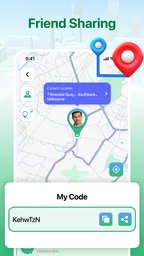
Another tradeoff is setup across a group. One person downloading a tracker does not automatically make it useful to everyone else; the people whose locations matter must be willing and able to take part. That makes it less convenient than checking a map alone. If your family already shares locations through a service built into its phones, introducing a separate app may add another account or routine without solving a new problem.
Battery and data use are sensible things to pay attention to with any app that relies on location. I would observe how the app behaves on the phones that will use it, rather than assume that the effect is negligible or severe. If someone has a tightly limited battery or data plan, they should test it during ordinary use before depending on it for a long day away from home.
Small habits that make location sharing more useful
One useful workflow is to agree on a purpose before opening the app. For a school pickup, for instance, the person sharing a location can let the other person know when they are leaving, while the viewer checks only around the expected arrival. This keeps the tracker focused on coordination rather than turning it into a background source of anxiety.
A second practical tip is to pair the map with a simple fallback. If the location appears unchanged, send a message asking for an update instead of assuming the person is still at that spot. This is especially helpful when meeting in a crowded place: a map can narrow down the area, while a brief text can identify the exact entrance or landmark.
A third consideration is to keep the sharing group small and purposeful. Adding people “just in case” can make the privacy arrangement harder to understand. I would include only those who genuinely need the information, then revisit the arrangement when a temporary need—such as coordinating a trip—has passed.
Finally, agree on what a location check does and does not mean. Seeing a person’s position can help with timing, but it cannot explain why they stopped, whether they are safe, or whether they are able to respond. That distinction matters most when a viewer is worried. A tracker should support communication, not replace it.
Who is likely to get value from it
I can see this app making sense for families or small groups that want a dedicated way to coordinate whereabouts and are comfortable agreeing on shared access. It may also suit someone who wants to try a free tracker before deciding whether a location-sharing routine is worth keeping. The broad Everyone rating and Android compatibility from version 7.0 make it accessible to a range of users, though each person should still judge the privacy implications for themselves.
It is a weaker fit for someone who only needs directions, live traffic, public transport guidance, or nearby-place search. Those tasks call for a navigation-focused app. It may also be unnecessary if everyone already uses a location-sharing feature they trust and find convenient. Installing a second tracker just because it is free can create clutter rather than value.
I would also advise skipping it if the people involved do not want to share their whereabouts, or if you need a guaranteed emergency-monitoring system. A consumer tracker should not be treated as proof that someone is safe or as a replacement for contacting emergency services when needed. In those situations, choose a tool designed for the specific requirement and make a clear backup plan.
My buy-or-skip verdict
My recommendation is to try GPS Tracker & Location Tracker only if you have a clear, consensual use for shared location. Since it is free, the barrier to trying it is low, and the app’s focus is more relevant to keeping track of loved ones than a standard directions app. Its 4.3 average and more than a million installs offer some context about adoption, but they are not a guarantee that its workflow will match yours.
Before relying on it, set expectations with the people in your group, test it during an ordinary outing, and keep messaging as a backup. If you need navigation, choose a navigation app; if you already have location sharing that works for everyone, there may be little reason to add another. For a family or small group that wants a straightforward tracking option and is willing to handle privacy thoughtfully, GPS Tracker & Location Tracker is a reasonable free starting point rather than an automatic must-install.
What we like
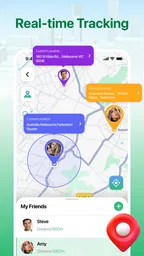
- Provides real-time location updates on a shared map
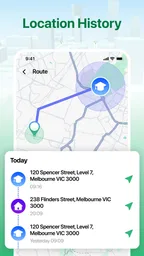
- Location history can help retrace recent trips
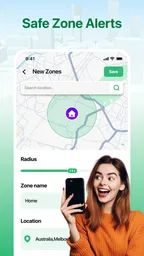
- Geofencing alerts notify users when someone enters or leaves an area
- Useful for coordinating family or group meetups
- A simple map view makes shared locations easy to check
What could be better
- Accurate tracking depends on GPS and network availability
- Frequent updates can drain the phone battery
- Location sharing requires consent and careful privacy settings
- Background tracking may be restricted by phone settings
- Some features may require a paid plan





