GPS Tracker: Find Phone review
 Analysis by Appsdrops
I would treat GPS Tracker: Find Phone as a tool for coordinating with people who have agreed to share their location, not as a way to quietly monitor someone. That distinction matters with any family location app: a map can be useful during a busy day, but it also involves sensitive information and trust between the people using it. My view is practical rather than unconditional. The app may suit a household that wants a straightforward location-checking option, while anyone who needs clear, detailed controls over privacy should take time to inspect the app’s choices before relying on it.
Trust starts with expectations
GPS Tracker: Find Phone is a free Maps & Navigation app from Mitra MT, with optional in-app purchases priced from $2.49 to $9.99 per item. It has a 4.3 average from around 13,000 ratings and has been installed over 5 million times. Those figures show that it has found a broad audience, but popularity is not a substitute for deciding whether its approach to location sharing fits your needs.
The app is listed for Everyone and is at version 1.1.7, with Android 7.0 as its minimum operating system. For a family, that broad compatibility may make it easier to consider across different phones, though each person still needs a device that can run it. The central question is less whether a location tracker sounds useful and more whether everyone involved understands when location is being shared and is comfortable with that arrangement.
In my experience, location tools work best when the purpose is specific and agreed in advance: checking that a relative has reached a destination, coordinating a pickup, or finding a phone that belongs to you. They become uncomfortable when one person assumes the app is for safety while another experiences it as constant supervision. I would talk through the intended use before asking family members to install it, especially with teenagers or adults who value independence.
The app’s GPS-tracking focus also sets expectations. It is not the same thing as a full navigation suite whose main purpose is turn-by-turn directions, route planning, or transit guidance. If your priority is getting across town, a dedicated navigation app is likely the more suitable choice. If your priority is checking a shared location, this app is aimed at a different job.
Check the controls before depending on them
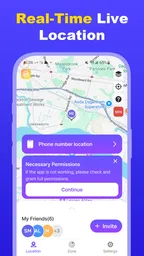
A careful first session should be about understanding the choices the app presents, not immediately treating it as a dependable safety system. Read each prompt, note what access it requests, and consider whether the explanation matches the way you intend to use the app. I would not assume that a general description of location tracking tells you precisely when location is collected, who can see it, or how sharing is managed.
Before connecting another person to a location-sharing routine, look for the visible account and sharing controls in the app itself. Check whether you can identify who has access, change or end a sharing arrangement, and remove an account or device from the setup. These are sensible checks for any tracker, but I would verify them in the actual interface rather than rely on assumptions based on the app’s name or category.
It is also worth reviewing Android’s own location permission settings. A permission choice at the operating-system level affects whether an app can access location in the first place, while an in-app sharing option may govern how people use the service. They are related but not interchangeable. If you change a device permission, check the app afterward so you know whether location sharing still works as you expect.
I would be especially cautious about granting broader access than the app needs for the task you have in mind. If a prompt offers a choice, select the least expansive option that still supports your intended use, then test the result. This is a practical way to avoid giving an app more access simply because tapping through setup is faster.
Location is most sensitive at the wrong moment
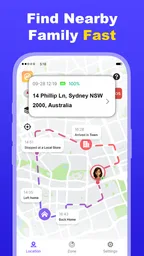
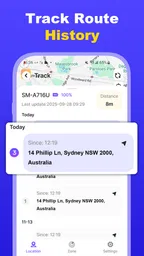
Location data can reveal routines even when nobody is actively checking a map. A repeated home-to-school or home-to-work pattern may say more than a single point on a screen. That is why I would treat this app as a deliberate sharing arrangement, not a casual utility to leave running without discussing it.
One realistic use is a family pickup: a parent and an older child agree to share location while the child travels home, so the parent can judge whether to leave for the pickup point. The useful part is reducing unnecessary calls or guesswork. The trade-off is that everyone should know when the arrangement begins and what would make it end. A clear boundary—such as using sharing for the trip rather than as an all-day expectation—helps keep the tool proportional to the need.
For a lost phone, a tracker can be appealing because the device’s location may help narrow down where to look. Still, I would not treat a location shown on a map as proof that the phone is exactly there or that it is safe to retrieve. If the device appears to be somewhere unfamiliar or potentially unsafe, contact the appropriate people rather than confronting a stranger. A location tool can help inform a decision; it cannot make that decision risk-free.
There is another useful distinction: locating a phone you own is different from tracking another person. Before using the app with family members, make sure each person understands the arrangement and has a way to ask questions or withdraw. For a child too young to manage app settings independently, a parent should explain the purpose in age-appropriate language rather than presenting tracking as invisible or automatic.
Make the setup work for real life
I would begin with a small, clearly defined group and one straightforward use case. That makes it easier to see whether the app is useful without turning the first setup into a broad, permanent family-monitoring system. Once everyone has tried it, discuss what felt helpful and what felt intrusive. If the answer is “we only need this during occasional trips,” keep the routine limited to that situation.
Another practical habit is to agree on a backup plan. A location app should not be the only way family members can reach one another. Phones can be unavailable, permissions can be changed, and a person may not want to share at a particular moment. Agree on a call or message as the fallback, particularly for a pickup or a time-sensitive meeting. That prevents a missing map update from becoming a reason to panic.
Battery and connectivity are everyday considerations for GPS-based tools, even though I would avoid assuming that any particular update interval or power-saving behavior applies here. If you plan to rely on the app during a trip, test it beforehand on the devices involved. Confirm that the people you expect to see can use the app and understand what they need to do. A quick test in a familiar place is more useful than discovering a setup problem when someone is already waiting outside.
For privacy-conscious users, make a periodic check part of the routine: review which people or devices remain connected, revisit permissions, and remove access that is no longer needed. This is especially sensible after a phone changes hands, a family arrangement changes, or a short-term trip ends. Location sharing can outlive the reason it was created unless someone deliberately revisits it.
Where it fits among the alternatives
Compared with a standard maps app, a dedicated GPS tracker is better aligned with keeping an eye on an agreed shared location than with finding the fastest route or exploring nearby places. Compared with built-in phone-finding tools, it may be more relevant to a family workflow involving multiple people, but users should compare the actual controls and setup available on their devices before deciding to switch. A tool that is already integrated with a phone may be simpler if the only goal is finding that one device.
Compared with messaging someone for an update, location sharing can reduce repeated “where are you?” messages, but it can also expose more information than a quick check-in. For a one-off arrival confirmation, a text or call may be the more respectful and simpler option. For recurring coordination where everyone wants shared visibility, a tracker may be more convenient. I would choose the least intrusive method that solves the real problem.
The optional purchases deserve a deliberate look before spending. The app is free to install, but individual in-app items range from $2.49 to $9.99. I would first establish whether the basic experience covers the intended use and only consider a purchase after checking what it adds and whether that addition matters to your household. A price alone does not explain the value of an item, so avoid buying in a hurry during setup.
A cautious recommendation
GPS Tracker: Find Phone is worth considering if you want a focused way to coordinate locations with people who knowingly participate, and you are willing to check its permissions and sharing controls yourself. Its scale of adoption and solid average rating make it a familiar option to investigate, but neither tells me whether its privacy choices will suit every family. I would make that judgment by looking at the current app interface and Android settings before building a routine around it.
I would skip it if you need turn-by-turn navigation, if the people involved do not agree to share, or if you are uncomfortable using a location service without first understanding its account and privacy controls. I would also avoid relying on it as the sole answer to an emergency or as proof of someone’s precise whereabouts. Those are situations where a different tool, a direct conversation, or appropriate local help is a better fit.
My recommendation is measured: try it only for a clearly explained purpose, keep the sharing group narrow, and test the arrangement before depending on it. The most important feature is not a map point but informed, revocable consent. If the app’s visible controls support the boundaries your family wants, it may make everyday coordination easier. If you cannot establish those boundaries comfortably, choose a simpler way to check in.
What we like
- Can help locate a misplaced phone when location services are enabled.
- A map view makes the phone's reported position easy to check.
- Useful for sharing location with trusted family members.
- Location updates can make meetups easier to coordinate.
- A phone-finding tool can offer reassurance during travel.
What could be better
- Accuracy may drop indoors or in areas with weak GPS signals.
- Location sharing requires permission from the other person.
- Background tracking can increase battery use.
- The app may need an internet connection to update locations.
- Location data raises privacy concerns if access is not carefully managed.





