



GPS Navigation & Map Direction review
 Analysis by Appsdrops
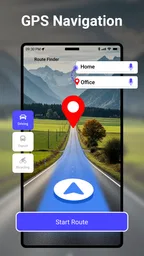
I judge a navigation app less by how many tools it advertises than by whether it helps me make a sensible choice when I’m already on the move. GPS Navigation & Map Direction is a free Android maps and navigation app from Sharp Apps Studio, built around route finding and a handful of travel utilities. That mix can be handy when I want more than directions in one place, but it also means I would treat it differently from a dedicated turn-by-turn navigator. My view: it is worth trying for casual trips and quick travel tasks, while anyone who depends on precise, predictable guidance should compare it carefully with their usual maps app.
What you get without paying
The app is free to install, and its age rating is Everyone. The listing also includes in-app purchases priced from $9.99 to $599.99 per item. That is a wide range, so I would not assume that every useful function is free or that a purchase is necessary; I’d check the purchase screen and the exact item before committing. The free entry point makes it easy to explore, but the purchase range is a reason to be deliberate rather than tap through prompts casually.
That distinction matters in a navigation app. A person may only need to find a destination once, while another may expect a dependable everyday driving companion. I would first test the basic route-finding flow on a familiar journey and see whether it gives me enough practical help. If it does, there is no reason to spend just because additional tools or purchase options exist. If a feature appears behind a payment prompt, I’d weigh its usefulness against an alternative I already have, rather than assuming it is essential.
The app has a 3.9 average from around 72,000 ratings, with about 2,200 written reviews, and it has passed 10 million installs. Those figures suggest a substantial audience, but they are not a substitute for checking whether its approach suits your routes and habits. It is currently at version 3.8.28 and requires Android 7.0 or later, which makes it relevant to a broad range of Android devices. I’d still try it on the phone I plan to carry before relying on it for an important trip.
More than a route screen, with a few practical catches
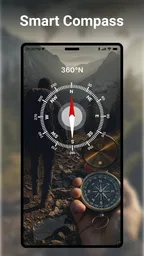
The central appeal is having route finding alongside a compass, translator and currency converter. I see those extras as travel companions, not as proof that the app can replace every specialist tool. A compass can help me orient myself when I step out of a station or parking area; a currency converter can make a quick price comparison easier; and a translator may help with a short exchange. Keeping these tasks near navigation can reduce app switching, especially during a city visit.
One useful workflow is to plan a destination before leaving, then use the compass as a quick orientation aid once I arrive. If I’m walking out of a large transit hub, for example, I can check which direction I’m facing before choosing a street, rather than immediately setting off in the wrong direction. I would still use the route itself to decide where to go: a compass shows orientation, not whether a road is open or a pedestrian entrance is available. That distinction keeps the extra tool helpful instead of misleading.
The translator and currency converter are most valuable for small, immediate questions. I might use the converter to compare a menu price while keeping a destination in mind, or use the translator to understand a brief phrase during a stop. For longer conversations, detailed budgeting, or complex language needs, I’d choose a dedicated app designed for that task. These utilities add convenience, but their presence does not tell me how complete their language or conversion options are, so I’d test the exact use case before depending on them.
For an everyday scenario, imagine I’m visiting a town for the afternoon, walking from a train station to a café and then to a nearby landmark. I can use the route finder to get oriented, check the compass outside, and reach for the translator or converter if a small question comes up. That is a coherent reason to keep the app around. It is less compelling if my day involves tight transfer times, several stops with changing conditions, or a route where one missed turn could create a serious problem. In those cases, I’d favor a navigation service whose route information and guidance I already know well.
My main tradeoff is breadth versus confidence. Combining several travel tools may save a little time, but it can also leave me wondering which part of the app deserves trust for a particular job. I would not treat a compass reading as route advice, a currency estimate as a full travel budget, or a translator as a replacement for careful communication. The practical tip is to decide in advance what role each tool will play, rather than expecting one app to be authoritative in every travel situation.
There is also a difference between finding a route and navigating it comfortably. For a familiar local trip, route finding may be all I need. For a new neighborhood, I want to know whether the app’s guidance is clear enough for me to follow without repeatedly stopping to inspect the screen. I’d test it on a short, low-stakes trip first, ideally one where I know the general direction. That makes it easier to judge whether its instructions fit my preferences before I rely on it somewhere unfamiliar.
Compared with the usual alternatives, this app’s strongest distinction is the bundle of navigation and travel helpers. A dedicated maps app is often the better choice when I want a single, familiar place for routine directions and the confidence of a workflow I already use. Separate specialist apps may make more sense for serious translation or careful currency planning. GPS Navigation & Map Direction is most attractive when convenience matters more than depth and I’m comfortable checking each tool on its own merits.
Who is likely to get the most from it
I’d recommend giving it a try if you want a free way to explore route finding and appreciate having a compass and basic travel utilities close at hand. It makes particular sense for occasional city visitors, people who take short local trips, or anyone who wants to experiment with a second navigation option without paying to install it. Sharp Apps Studio’s app has broad reach, but its popularity alone should not decide the matter; a short personal test is more useful than assuming it will match your habits.
I’d be more cautious if you drive unfamiliar routes every day, need highly predictable instructions, or rely on navigation for time-sensitive appointments. In those situations, use the route planner you trust most and test this one as a backup before changing routines. I would also skip it if I only need one of the extra utilities and already have a preferred specialist app for that job. A bundled toolbox is not automatically better when a focused alternative serves you well.
Before a longer journey, I’d enter a destination I know, compare the suggested route with my usual option, and see how easily I can follow the directions. Then I’d check whether the compass and other tools are genuinely useful to me, and inspect any purchase prompt rather than treating it as a required upgrade. That quick trial answers the most important practical questions: whether the route experience feels clear, whether the extras fit my travel style, and whether the free version is enough for my needs.
My verdict on the value
For a free download, the combination of route finding, compass, translator and currency converter gives GPS Navigation & Map Direction a clear reason to try it. Its value is strongest when I want several simple travel aids together and am willing to verify that each one works for my particular task. The broad purchase-price range makes me careful about spending, but it does not erase the value of trying the app without paying.
I would install it for casual exploration or as a secondary travel tool, then keep it only if its route experience proves comfortable on real trips. I would not make it my sole choice for demanding navigation without first testing it, and I would not pay for an item until I understood exactly what it adds. That is the fairest verdict: use the free access to judge the navigation first, and spend only when a specific paid option clearly earns its place.
What we like
- Offers turn-by-turn directions for everyday trips.
- Provides map views to help plan routes.
- Can make finding nearby destinations more convenient.
- GPS positioning helps track your location while traveling.
- Useful for checking directions before setting off.
What could be better
- GPS accuracy may vary with device and surroundings.
- Live traffic features may depend on internet access.
- Navigation can drain battery during long trips.
- Map details may be outdated in some areas.
- Using the app while driving can be distracting.





